CRADLEPOINT CBA750B | USER MANUAL Firmware version 5.0
© 2013 CRADLEPOINT, INC. PLEASE VISIT HTTP://KNOWLEDGEBASE.CRADLEPOINT.COM/ FOR MORE HELP AND RESOURCES PAGE 113
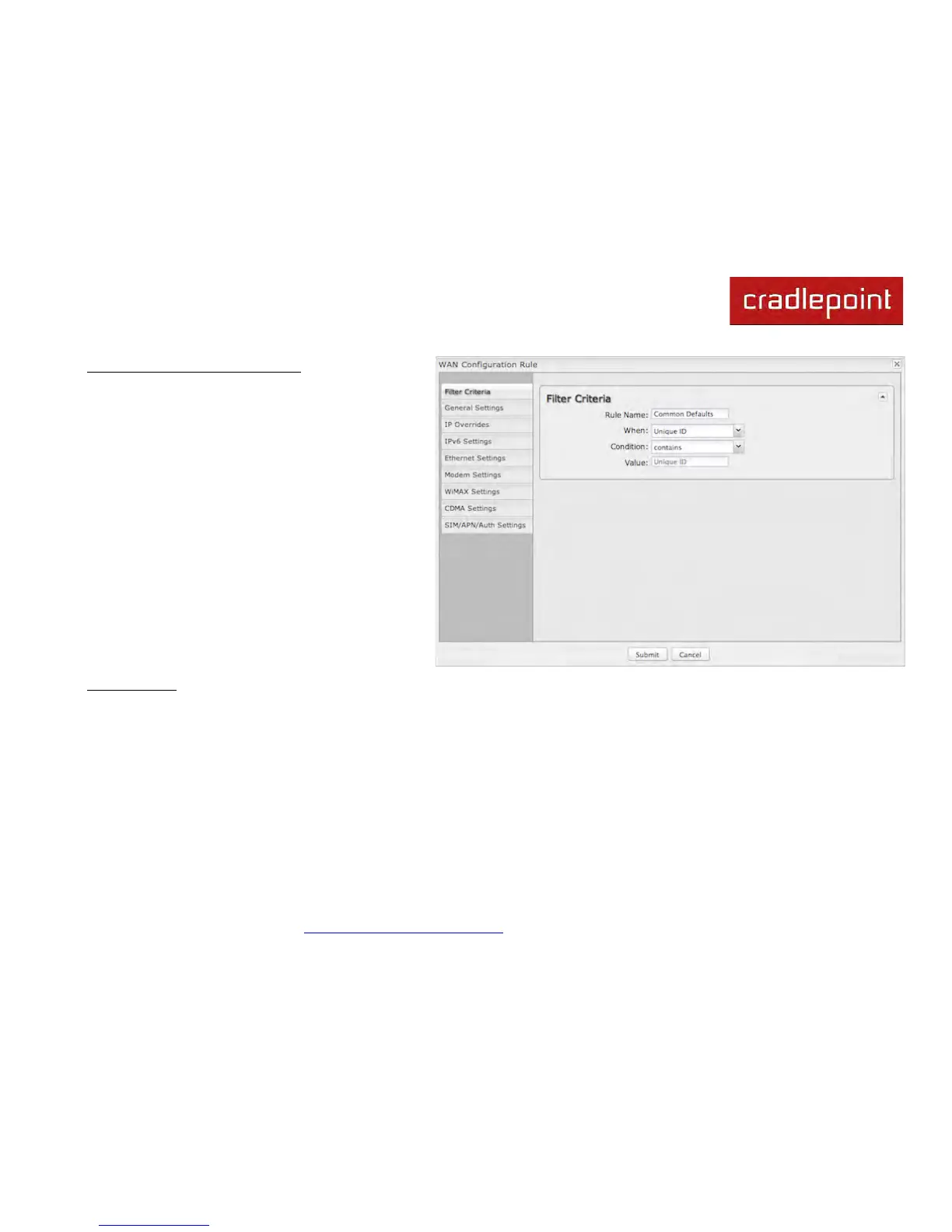
WAN Configuration Rule Editor
After clicking “Add” or “Edit,” you will see a popup
with the following tabs:
• Filter Criteria
• General Settings
• IP Overrides
• IPv6 Settings
• Ethernet Settings
• Modem Settings
• WiMAX Settings
• CDMA Settings
• SIM/APN/Auth Settings
Filter Criteria. Begin by setting the Filter Criteria if you are creating a new rule. Create a name for your rule and the
condition for which the rule applies:
Rule Name: Create a name meaningful to you. This name is optional.
Select each of the following to create a condition for your rule. When:
• Port (USB Port 1, 2; ExpressPort): Select by the port that you are plugging the modem into.
• Manufacturer: Select by the manufacturer, such as Sierra Wireless.
• Model: Set your rule according to the specific model of modem.
• Type (LTE, Modem, WiMAX, HSPA): Select by type of Internet source.
• Serial Number: Select 3G or LTE modem by Serial Number.
• MAC Address: Select WiMAX modem by MAC Address.



 To Next Page