CRADLEPOINT CBA750B | USER MANUAL Firmware version 5.0
© 2013 CRADLEPOINT, INC. PLEASE VISIT HTTP://KNOWLEDGEBASE.CRADLEPOINT.COM/ FOR MORE HELP AND RESOURCES PAGE 133
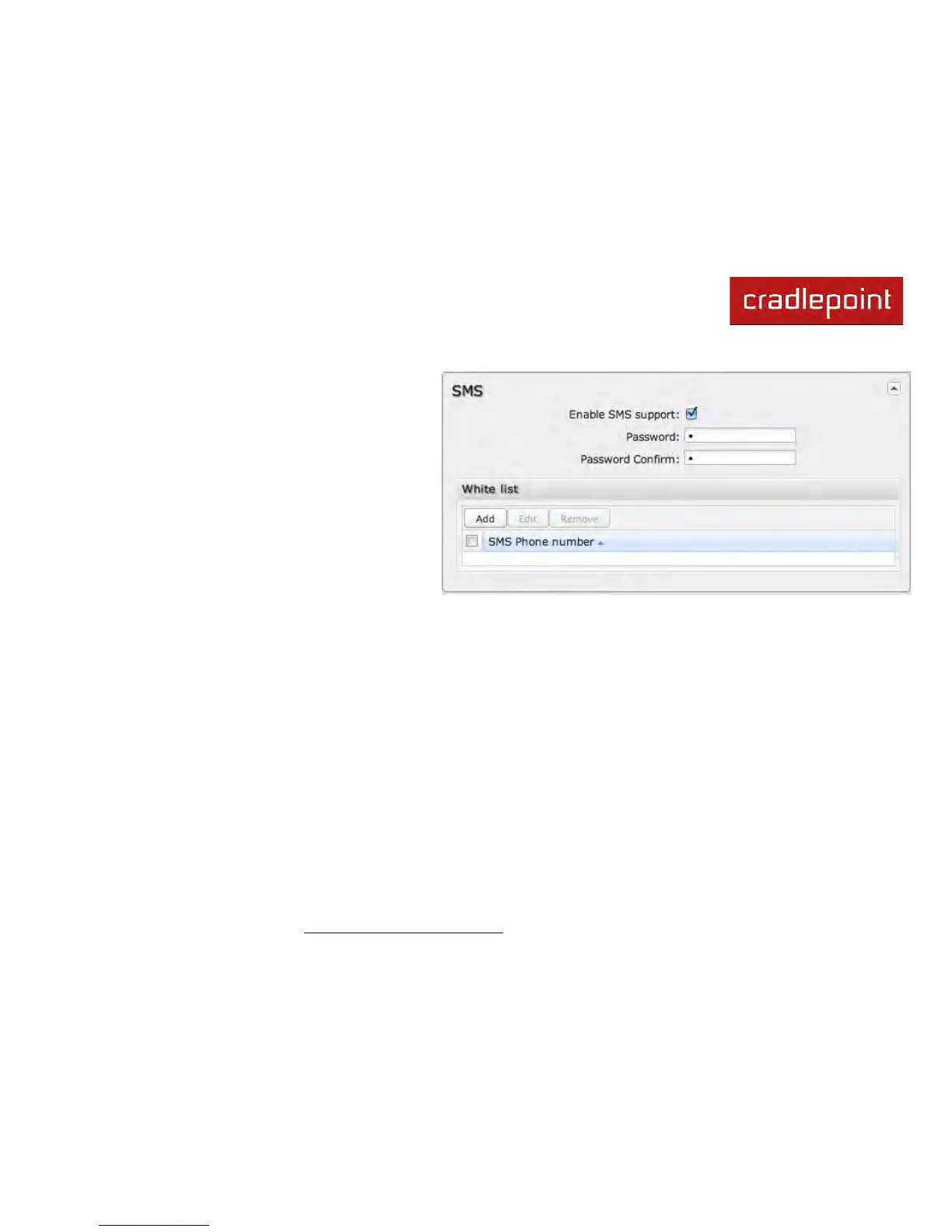
Enable SMS support
SMS support is enabled by default on the router.
Deselect this to disable.
Password
By default, the password is the last 8 characters of
the router’s MAC address (i.e., the Default Password
on the product label). You can change this password
to anything between 1 and 16 characters. It should be
long enough to be useful for security but short
enough to easily type into your phone (or other
texting client).
White List
This list is blank by default, which means that the router will accept SMS messages from any phone number. Leaving this
blank is unsecure, so CradlePoint recommends that you add phone numbers to this list. Once any numbers are listed,
only those numbers have the ability to connect to the router via SMS.
NOTE: You cannot add email addresses to the White list. When a phone number is added to the White List, email SMS messages will be rejected.



 To Next Page