CRADLEPOINT CBA750B | USER MANUAL Firmware version 5.0
© 2013 CRADLEPOINT, INC. PLEASE VISIT HTTP://KNOWLEDGEBASE.CRADLEPOINT.COM/ FOR MORE HELP AND RESOURCES PAGE 46
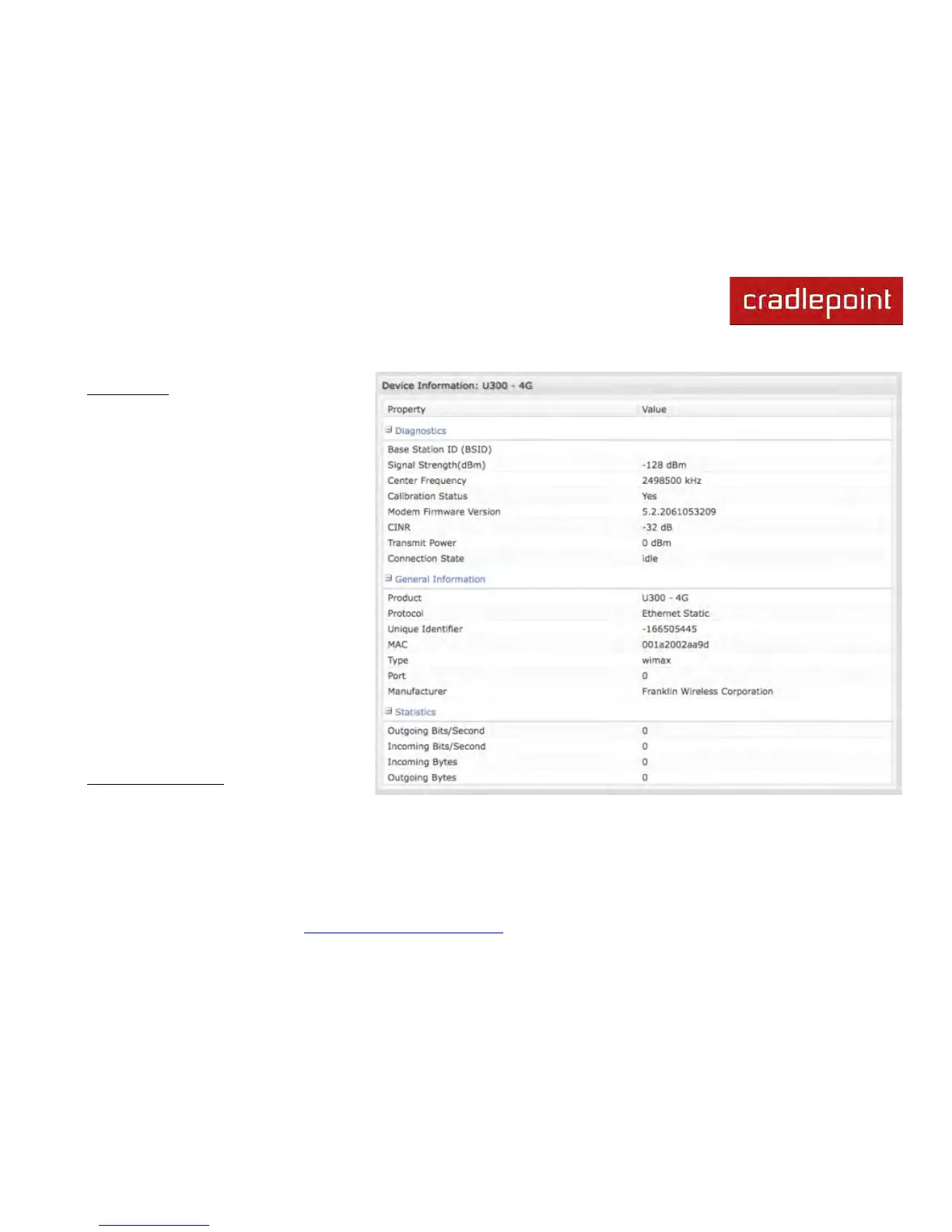
5.4.3 WiMAX Modem (U300 – 4G)
Diagnostics
For a WiMAX modem, the CINR and
Signal Strength values are important as
they show how strong the signal is and
that has significant effects on how much
data the router can download or send. You
can place the router in different locations
to see where you get better signal. You
can also see a LED display of the current
signal strength. Pressing the router's
Signal Strength button will toggle the LED
display on and off.
• Base Station ID (BSID)
• Signal Strength(dBm)
• Center Frequency
• Calibration Status—Don’t worry if
this says the modem is not
calibrated.
• Modem Firmware Version
• CINR
• Connection State (connected, idle,
etc.)
General Information
• Product U300 – 4G
• Protocol Ethernet Static
• Unique Identifier
• MAC



 To Next Page