CRADLEPOINT CBA750B | USER MANUAL Firmware version 5.0
© 2013 CRADLEPOINT, INC. PLEASE VISIT HTTP://KNOWLEDGEBASE.CRADLEPOINT.COM/ FOR MORE HELP AND RESOURCES PAGE 93
7.1.3 General Settings
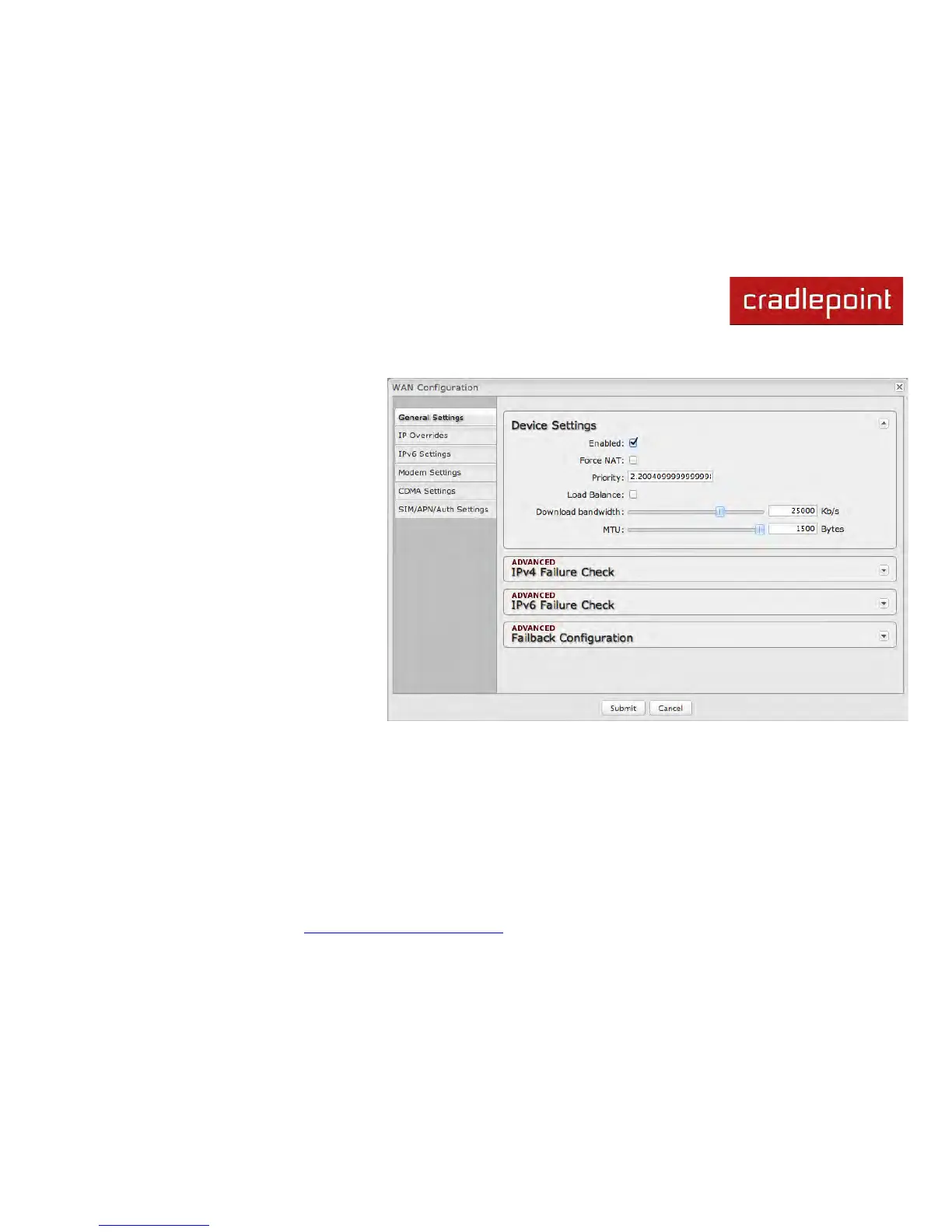
• Enabled: Select/deselect to
enable/disable.
• Force NAT: Normally the LAN Route
Mode controls the use of NAT
(network address translation). When
this option is selected the router will
always perform NAT when traffic is
sent out from this device.
• Priority: This number controls failover
and failback order. The lower the
number, the higher the priority and the
more use the device will get. This
number will change when you move
devices around with the priority arrows
in the WAN Interfaces list.
• Load Balance: Select to allow this
device to be available for the Load
Balance pool.
• Download bandwidth: Defines the
default download bandwidth for use in
Load Balance algorithms. (Range: 128
Kb/s to 76800 Kb/s.)
• MTU: Maximum transmission unit. This is the size of the largest protocol data unit that the device can pass.
(Range: 46 to 1500 Bytes.)



 To Next Page