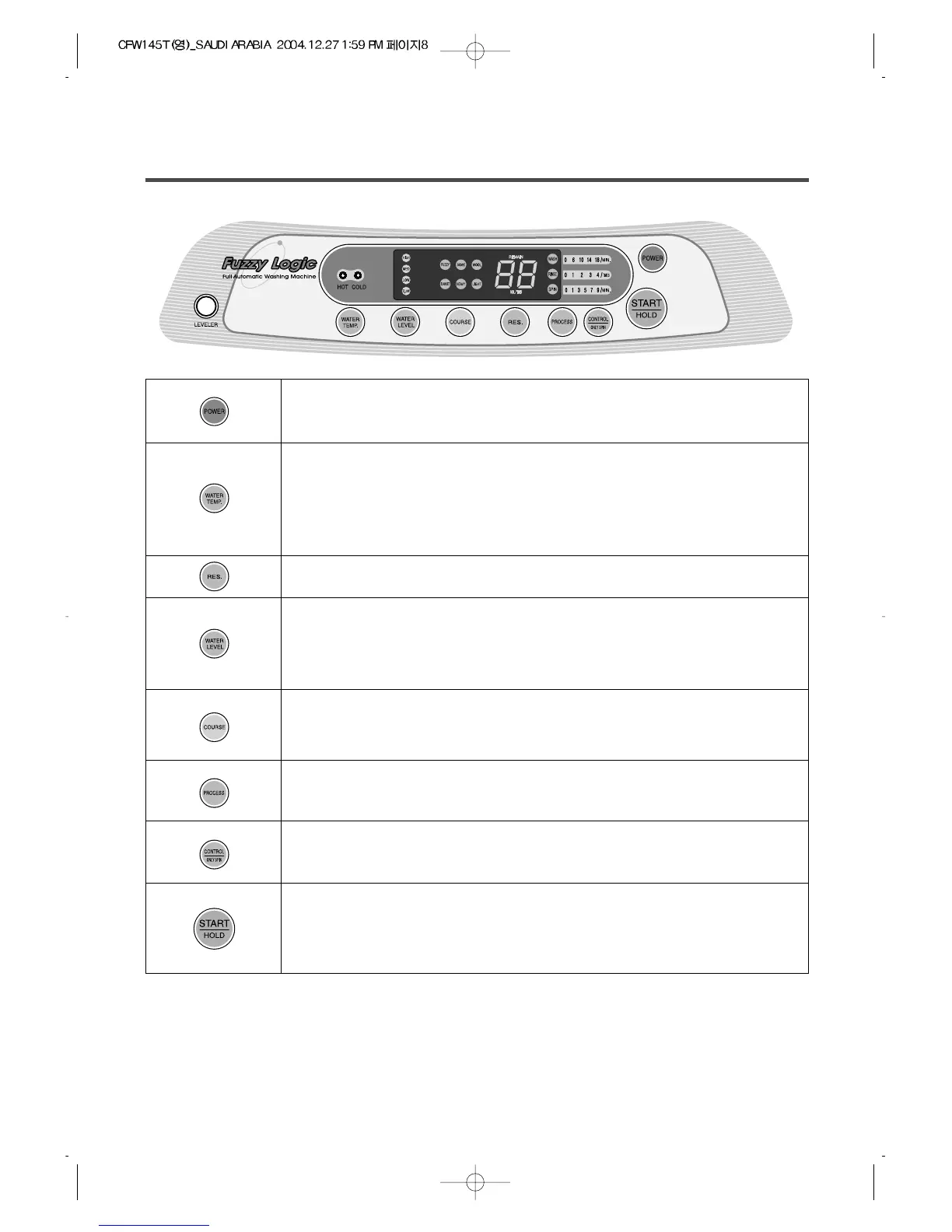
THE FUNCTIONS OF THE CONTROL PANEL
• Press this button to turn the power "ON" or "OFF".
• It can be used to pre-engage time for wash.
• It can be used to choose water temperature to be supplied.
• As the button is pressed, water temperature will be repeated.
• In case of the single valve model, there is no wash temperature
selector function.
• It can be used to adjust amount of water according to the size of the
load to be washed.
• As the button is pressed, water level is selected by
MEDIUM
process (wash, rince, spin) (See page 10)
➝ HIGH ➝
• It can be used to select the full-automatic course.
• As the button is pressed, course will be selected by following order:
ECONOMYFUZZY ➝➝ WOOL➝BLANKET ➝HEAVY➝ LIGHT
• Operation and temporary stop is repeated as it is pressed.
• When you want to change course in operating;
press the "START/HOLD" button ➝ Select the course that you want to
change ➝ press the "START/HOLD" button again.
• It is the button for the partial process or the combination of each
➝ LOWE.LOW
COLD ➝ COLD + HOT ➝ HOT
➝
• It can be used to change spin time.
• As the button is pressed, it will repeat. 7
➝
9
➝
1
➝
53
➝
OFF


 To Next Page