2
Access Reference Information
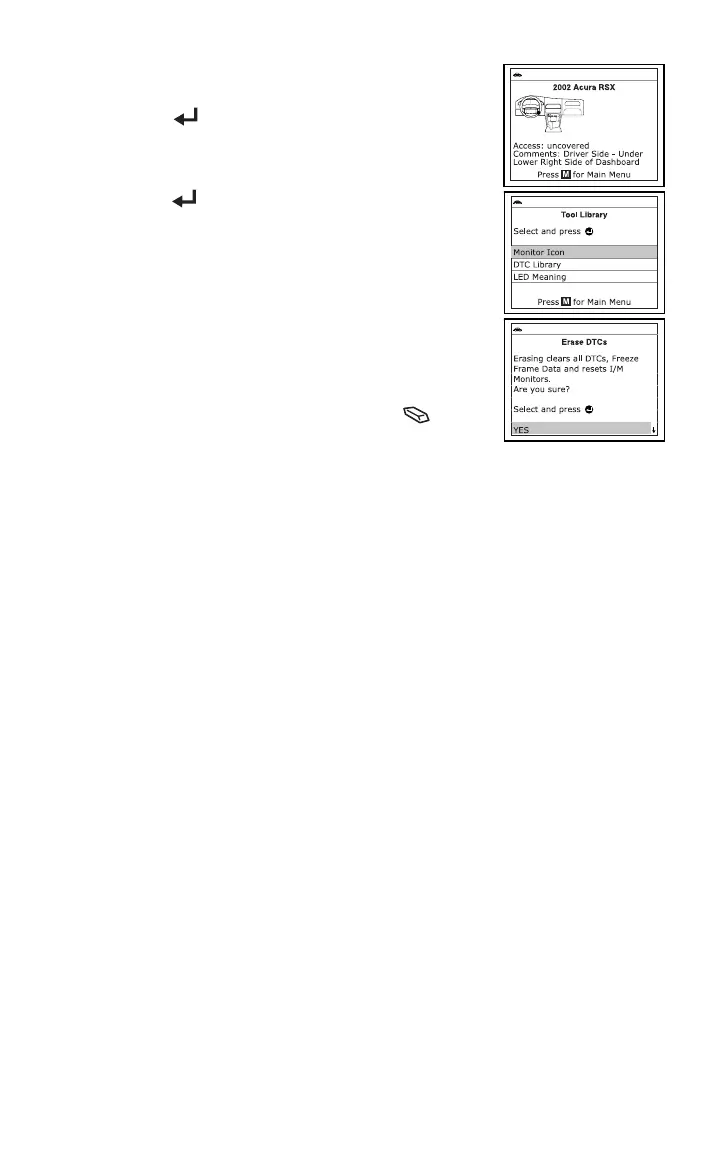
From the Main Menu, highlight DLC Locator, then press
the ENTER
button to access the DLC Locator. The
DLC Locator lets you find the location of the Data
Link
Connector (DLC
) for a specified
vehicle.
From the Main Menu, highlight Tool Library, then press
the ENTER
button to display the Tool Library Menu.
From the Tool Library Menu you
can access a library of
OBD2 DTC de
finitions, or view definitions and
descriptions o
f the I/M MONITOR STATUS icons and
SYSTEM STATUS
LEDs.
Erase DTCs
Connect the diagnostic tool to the vehicle’s test
connector. Turn the ignition key "On.” DO NOT start
the
engine. The diag
nostic tool will automatically link to the
vehicle’s comput
er.
Press and release the diagnostic tool‘s ERASE button.
ABOUT REPAIRSOLUTIONS®
RepairSolutions® is a web-based service that provides you with the tools and information
you need to quickly and accurately diagnose and repair today’s vehicles. You can view,
save, and email the diagnostic data retrieved from a vehicle’s on-board computer(s) using
a Craftsman diagnostic tool. RepairSolutions® provides an extensive knowledge database,
developed by compiling and analyzing years worth of “real world” vehicle service data,
along with verified, vehicle-specific fixes supplied by ASE technicians across the country.
The basic RepairSolutions® account is free. Certain “value added” premium information is
available on demand at nominal charge or through “premium” subscription.
The RepairSolutions® Diagnostic Report lets you take advantage of the following
information:
Verified Fixes – find the most likely repair(s) needed by your vehicle based on
the DTCs retrieved, including cost estimates and access to detailed instructions
for performing the repair(s).
Diagnostic Data – view detailed DTC descriptions as well as probable causes for
the issu
e and recommendations for verifying the pr
oblem.
Factory Technical Service Bulletins (TSBs) / Factory Recalls – ensure your
vehicle meets Federal safety standards by reviewing Factory Technical Service
Bulletins (TSBs), Factory Recalls, and Government-mandated NHTSA Safety
Recalls for your
vehicle.
Maintenance - view maintenance procedures that should be performed based on
your vehicle’s year, make, model and current mileage. T
hese include
recomm
ended service procedures based on analysis of comp
onent failures
reporte
d by the RepairSolutions® network of technicians.
Factory Warranty Information – check the current state of your vehicle’s
warran
ties (whether they are active, expired, and/or tran
sferable).
Predicted Repairs – know what may fail on your vehicle during the next 12
months b
efore it occurs (based on your vehicle’s year, make, model
and mileage).
Vehicle History Reports –access vehicle registration and title information,
odometer readings, reported service and repair information for your
vehicle.


 To Next Page
 Loading...