ADJUSTING THE HORIZONTAL
LASER BEAM SCAN
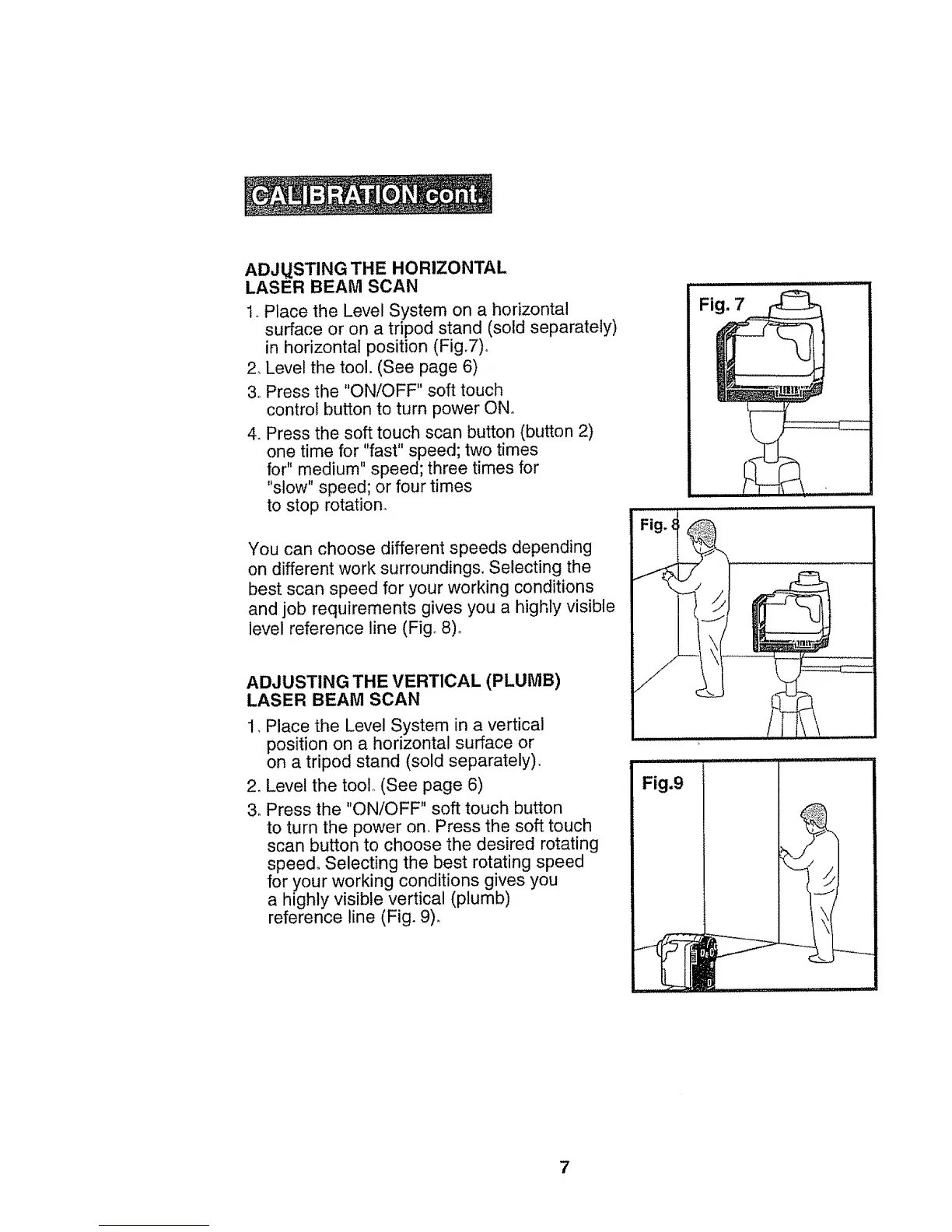
1, Place the Level System on a horizontal
surface or on a tripod stand (sold separately)
in horizontal position (Fig,7)o
2, Level the tool, (See page 6)
3.,Press the "ON/OFF" soft touch
control button to turn power ON,
4_ Press the soft touch scan button (button 2)
one time for "fast" speed; two times
for" medium" speed; three times for
"slow" speed; or four times
to stop rotation,
You can choose different speeds depending
on different work surroundings. Selecting the
best scan speed for your working conditions
and job requirements gives you a highly visible
level reference line (Fig,, 8)°
ADJUSTING THE VERTICAL (PLUMB)
LASER BEAM SCAN
1, Place the Level System in a vertical
position on a horizontal surface or
on a tripod stand (sold separately),
2_ Level the tool (See page 6)
3. Press the "ON/OFF" soft touch button
to turn the power ono Press the soft touch
scan button to choose the desired rotating
speed, Selecting the best rotating speed
for your working conditions gives you
a highly visible vertical (plumb)
reference line (Fig, 9)_
Fig.9
7


 To Next Page