EasyManua.ls Logo

Craftsman CMXCESM14144 - User Manual

Craftsman CMXCESM14144
28 pages
Print Icon
To Next Page IconTo Next Page
Loading...
0099002238-01
INSTRUCTION MANUAL | GUIDE D’UTILISATION | MANUAL DE INSTRUCCIONES
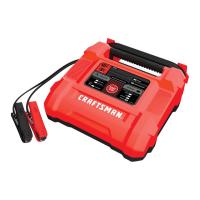
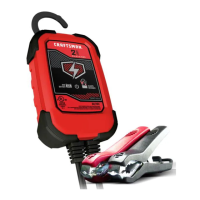
Automatic Battery Charger/Maintainer
Chargeur / Mainteneur de batterie automatique
Cargador de baterías automático / Mantenedor
CMXCESM14144
IF YOU HAVE QUESTIONS OR COMMENTS, CONTACT US.
POUR TOUTE QUESTION OU TOUT COMMENTAIRE, NOUS CONTACTER.
SI TIENE DUDAS O COMENTARIOS, CONTÁCTENOS.
1-888-331- 4569 WWW.CRAFTSMAN.COM

Table of Contents

Questions and Answers

  • B
    Barbara TaylorAug 4, 2025
    What to do if the red Bad Battery LED is lit and yellow/orange Charging LED is flashing on my Craftsman CMXCESM14144?
    • B
      Brandi JohnsonAug 5, 2025
      If the red Bad Battery LED is lit and the yellow/orange Charging LED is flashing, it could mean the battery voltage is too low after charging (below 10V for a 12V battery or 5V for a 6V battery) or, in maintain mode, the output current exceeds 1.5A for 12 hours, indicating unsuccessful desulfation. The battery may be defective. Ensure no loads are on the battery; if present, remove them. If there are no loads, have the battery checked or replaced.
  • C
    Cody RodriguezAug 26, 2025
    How to fix a Craftsman CMXCESM14144 when the green Power LED does not light?
    • M
      Micheal RodgersAug 26, 2025
      If the green Power LED doesn't light up when the charger is properly connected, it could be due to a dead AC outlet or a poor electrical connection. Check the fuse or circuit breaker supplying the AC outlet. Also, inspect the power cord and any extension cords for loose plugs.
  • B
    Benjamin NewtonNov 13, 2025
    Why is the red Bad Battery LED lit on my Craftsman CMXCESM14144?
    • J
      James RobinsonNov 13, 2025
      The red Bad Battery LED being lit indicates a few potential issues. It could mean the battery is sulfated, there's a lack of charging progress and the battery voltage is low (below 14.2V for a 12V battery or 7.1V for a 6V battery), the battery’s initial voltage is low (below 12.2V for a 12V battery or 6.1V for a 6V battery) with low total input, or the battery voltage drops too low in Maintain Mode. The charger may be in desulfation mode, so continue charging it for several hours. If that doesn't work, have the battery checked. Also check for overheating and allow to cool if needed. The battery may be too large, have a short circuit, have low capacity, be too old, or won’t hold a charge. Make sure there are no loads on the battery. If there are, remove them. If there are none, have the bat...

Summary

Important Safety Instructions

General Safety Guidelines

Covers essential safety points like reading instructions, keeping away from children, and proper cord handling.

Explosive Gas Warning

Highlights the danger of explosive gases from lead-acid batteries and stresses following instructions.

Personal Safety Precautions

Handling Lead-Acid Batteries Safely

Advises on personal safety measures, including protective gear, first aid, and avoiding sparks near batteries.

Preparing for Charging

Details steps before charging, such as removing the battery, ensuring ventilation, and cleaning terminals.

Charger Placement Guidelines

Provides instructions on where to position the charger to prevent damage from battery gases or corrosion.

DC Connection Safety

Outlines precautions for connecting and disconnecting DC output clips to prevent sparks or short circuits.

Charging Battery In Vehicle

Vehicle Battery Charging Steps

Provides step-by-step instructions for connecting and charging a battery while it's installed in a vehicle.

Charging Battery Outside Vehicle

External Battery Charging Steps

Details the procedure for charging a battery that has been removed from the vehicle.

Grounding and AC Power Cord Connections

AC Outlet and Grounding Requirements

Explains the need for a properly grounded 120V AC outlet and avoiding ungrounded systems.

Extension Cord Usage Guidelines

Provides recommendations for using extension cords, including wire size and condition.

Features and Control Panel

Charger Features Overview

Identifies key components of the charger, including hook, indicators, and clamps.

Control Panel LED Indicators

Explains the meaning of various LED lights on the control panel for charging status and errors.

Operating Instructions

Charging a Battery In the Vehicle

Step-by-step guide for charging a battery while it's connected to the vehicle.

Charging a Battery Outside the Vehicle

Instructions for charging a battery that has been removed from the vehicle.

Quick-Connect Cable Connectors

Details on using the quick-connect system for attaching cables to the charger.

Battery Charging Times Table

Provides estimated charging times for different battery sizes and applications.

Charging Modes and Maintenance

Automatic and Aborted Charging

Explains automatic charging, aborted charging, and desulfation mode.

Maintain Mode (Float-Mode Monitoring)

Describes how the charger maintains a full charge and potential issues.

Maintaining a Battery

Information on how to maintain batteries at full charge for extended periods.

Troubleshooting Common Issues

LED Indicators and Battery Issues

Guides on diagnosing problems based on LED status and battery voltage readings.

Specifications and Parts

Technical Specifications

Lists the input voltage, output voltage, and output current rating of the charger.

Replacement Parts

Identifies part numbers for replacement ring connectors and battery clamps.

Warranty and Guarantees

Two Year Limited Warranty

Details the terms and conditions of the manufacturer's two-year limited warranty.

90 Day Money Back Guarantee

Explains the satisfaction guarantee and return policy for the product.

Craftsman CMXCESM14144 Specifications

General IconGeneral
BrandCraftsman
ModelCMXCESM14144
CategoryBattery Charger
LanguageEnglish

Related product manuals