16 17
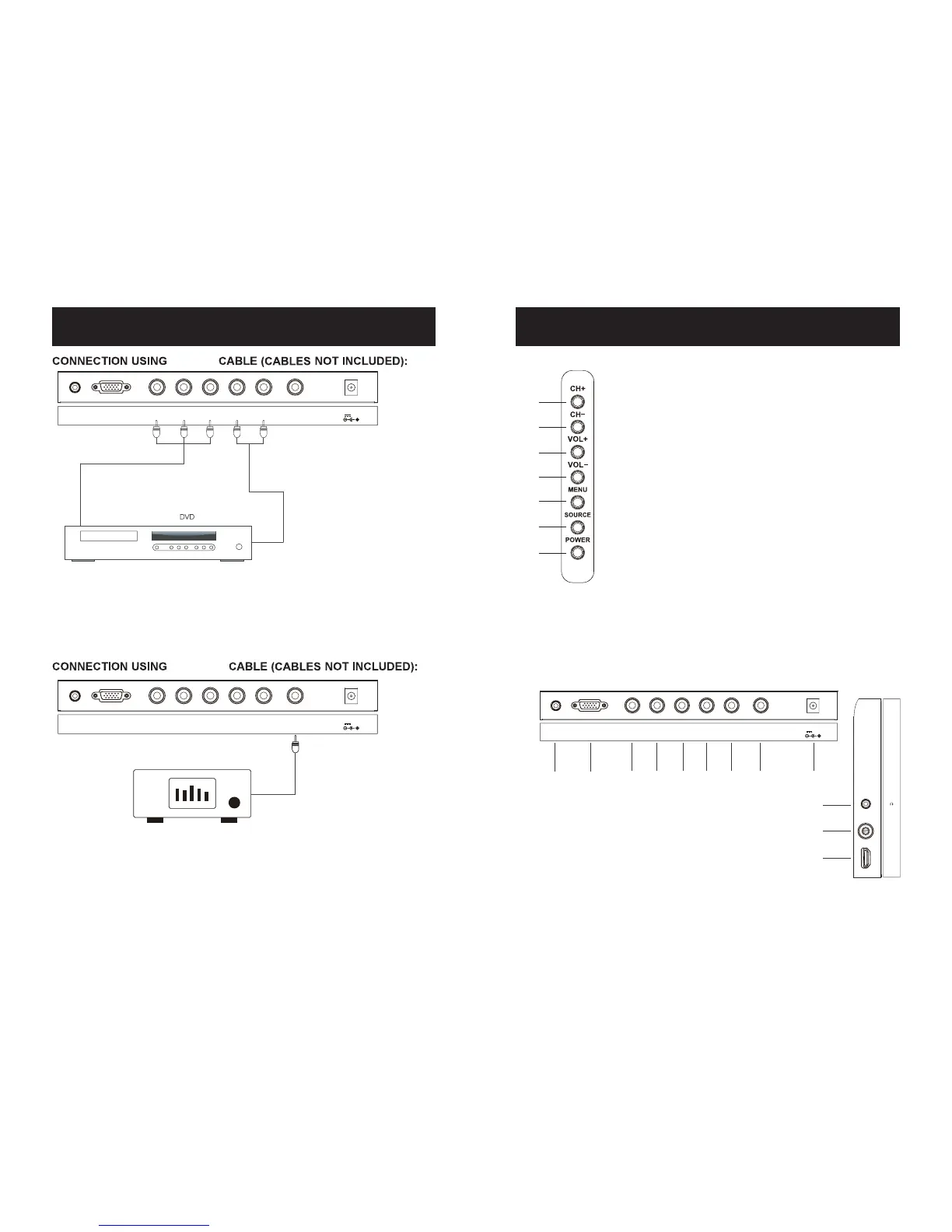
LOCATION OF CONTROLS
VOL- (Volume down) button4.
5. VOL+ (Volume up) button
CH- (Channel down) button6.
7. CH+ (Channel up) button
3. MENU button
2. SOURCE button
1. POWER button
17. Headphone jack
18. RF jack
9.VGA Port
11.
Pb (U/Cb) input jack
Y input jack / Video jack
12.
Pr (V/Cr) input jack
10.
13/14. L/R (Audio Left and
Right channel input) jacks
15. COAXIAL (Out) jack
19. HDMI Port
16. DC IN jack
7
6
5
4
3
2
1
8 9 10 11 12 13 14 15 16
17
18
19
8. PC AUDIO (In) jack
CABLE CONNECTIONS
1.
connected the
external device's Y/Pb/Pr output jacks to the Y/Pb/Pr jacks on the TV.
2. Connect the left and right audio connection cable from the external unit's
AUDIO OUTPUT jacks to the Audio In jacks on the TV.
3. Set the SOURCE of TV to YPbPr mode.
Using component video connection cables (not included) to
Using a RCA connection cable (not included) to connect the
COAXIAL jack on the TV to any external Amplifier which
have built-in Dolby audio decoder.
Y/Pb/Pr
COAXIAL
Audio L
Blue (Pb)
Red (Pr)
Green (Y)
COAXIAL
Audio R
VGA
PC
AUDIO IN
Y / VIDEO L AUDIO R COAXIALPbPr
DC IN
DC 12V;3A
VGA
PC
AUDIO IN
Y / VIDEO L AUDIO R COAXIALPbPr
DC IN
DC 12V;3A
HDMI
RF
VGA
PC
AUDIO IN
Y / VIDEO L AUDIO R COAXIALPbPr
DC IN
DC 12V;3A


 To Next Page