BATTERY PRECAUTIONS
Follow these precautions when using a battery in this device:
1.Use only the size and type of battery specified.
2.Be sure to follow the correct polarity when installing the battery as indicated in the battery compartment. A
reversed battery may cause damage to the device.
3.Do not mix different types of batteries together (e.g. Alkaline and Carbon-zinc) or old batteries with fresh ones.
4.If the device is not to be used for a long period of time, remove the battery to prevent damage or injury from
possible battery leakage.
5.Do not try to recharge the battery not intended to be recharged; it can overheat and rupture. (Follow battery
manufacturer's directions.)
6.Do not dispose of batteries in fire. Battery may explodes or leak.
7.Clean the battery contacts and also those of the device prior to battery installation.
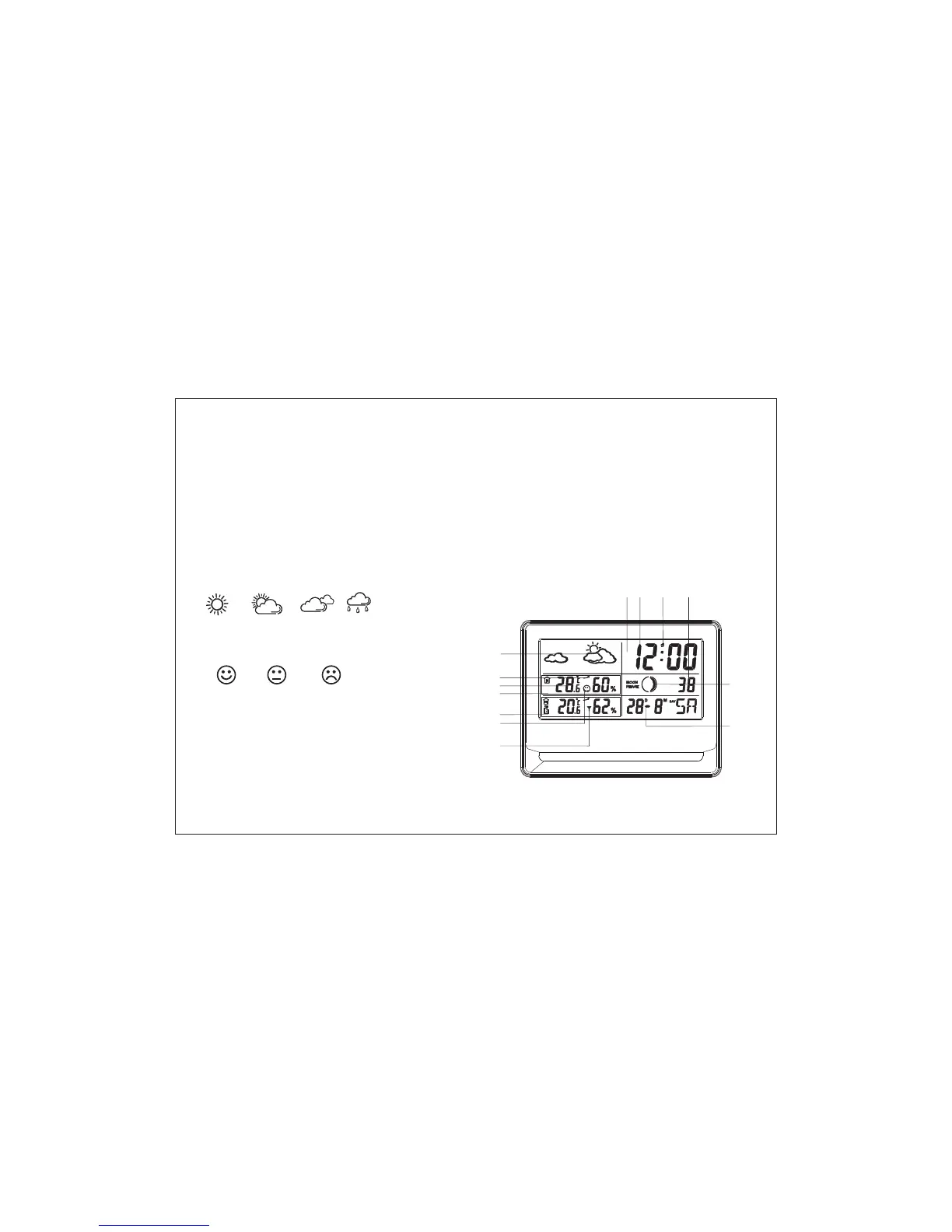
LOCATION OF INDICATORS ON SCREEN
1.Weather Forecast
2.Temperature & Humidity
3.Comfort Index
4.Receiving Channel
5.Temperature trend indication
6.Hour and Minute
7.Second
8.PM Indicator
9.Alarm
10.Moon Phase
11.Day-Month and Day of Week
1
2
3
4
5
6789
PM
10
11
Sunny Light Cloud
Cloud
Rainy
Comfortable Normal Uncomfortable
MAIN UNIT
PORTABLE SENSOR
5


 To Next Page