
 Need help?
Do you have a question about the CRATE AUDIO PA6FX and is the answer not in the manual?
Explanation of graphical symbols used in the manual and on the apparatus.
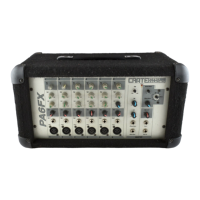
Input jack for connecting signals, supports 1/4" Hi-Z or XLR Lo-Z.
Control to adjust the signal level of each channel.
Adjusts low frequency output (30dB boost/cut at 80Hz).
Adjusts midrange frequency output (30dB boost/cut at 600Hz).
Adjusts high frequency output (30dB boost/cut at 10kHz).
Adjusts signal level sent to the monitor bus.
Adjusts signal level sent to internal DSP and Effects Send.
Master EQ for low frequencies (30dB boost/cut at 50Hz).
Master EQ for midrange frequencies (30dB boost/cut at 600Hz).
Master EQ for high frequencies (30dB boost/cut at 10kHz).
Indicator light showing when the mixer is turned on.
Control to select one of sixteen on-board digital effects.
Adjusts level of effected signal from internal DSP.
Adjusts level from Aux In and Effects Return jacks.
Adjusts signal level from tape input jacks.
Adjusts main mixed signal level to the power amplifier.
Adjusts signal level from channel Mon controls to Monitor Out.
Sends monitor signal to monitor amp and speakers.
Sends signal to external effects devices.
Returns external effects device output into the mixer.
Connects tape recorder for recording and playback.
Connects auxiliary sources like CD/tape players.
Heavy duty switch to turn the mixer ON or OFF.
Connects to a grounded power outlet meeting electrical codes.
Connects mixer output to speaker cabinets using heavy gauge cable.
Connects external signal processors like EQs or compressors.
Sends a pre-amplified, post-EQ signal to an external effects device.
Guidance on connecting Hi-Z (1/4") and Low-Z (XLR) microphones.
Setting Level control for guitars and basses (instrument level).
Setting Level control for keyboards and drum machines (line level).
Aux In sends signal before Master Level and Tone controls.
Details amplifier output wattage into different ohm loads.
Specifications for low, mid, and high frequency EQ adjustments.
Specifications for high-Z and low-Z input impedance and sensitivity.
Defines the maximum input signal levels for various inputs.
Specifications for line, aux, and tape output/input levels.
Details voltage, frequency, and power consumption.
Physical dimensions and weight for PA6FX and PA8FX models.
 Power Output
| output power rating | 150 watts RMS @ 5% THD, 4 ohm load, 120VAC, 220 watts RMS @ 5% THD, 2 ohm load, 120VAC |
|---|
Equalization| channel EQs low | ±15dB @ 80Hz |
|---|---|
| channel EQs mid | ±15dB @ 600Hz |
| channel EQs high | ±15dB @ 10kHz |
| master EQs low | ±15dB @ 50Hz |
| master EQs mid | ±15dB @ 600Hz |
| master EQs high | ±15dB @ 10kHz |
Inputs and Outputs| input impedance high Z | 10k ohm |
|---|---|
| input impedance low Z | 1k ohm |
| input sensitivity high Z | 20mV RMS |
| input sensitivity low Z | 2mV RMS |
| max. input signal high Z | 4V RMS (11.25V peak-to-peak) |
| max. input signal low Z | 40mV RMS (1.25V peak-to-peak) |
| max. input signal aux in/effects return | 10V RMS (30V peak-to-peak) |
| line out/line in levels | 1V RMS |
| aux in/tape out levels | 1V RMS |
| effects return/effects send levels | 1V RMS |
Power Requirements| power requirements 120VAC | 60 Hz, 160VA |
|---|---|
| power requirements 100/115VAC | 50/60Hz, 160VA |
| power requirements 230VAC | 50/60Hz, 160VA |
 Weight and Dimensions
| height | 10” |
|---|---|
| width | 18” |
| depth | 9.5” |
| weight | 29 lbs. |
Power Output| output power rating | 150 watts RMS @ 5% THD, 4 ohm load, 120VAC, 220 watts RMS @ 5% THD, 2 ohm load, 120VAC |
|---|
Equalization| channel EQs low | ±15dB @ 80Hz |
|---|---|
| channel EQs mid | ±15dB @ 600Hz |
| channel EQs high | ±15dB @ 10kHz |
| master EQs low | ±15dB @ 50Hz |
| master EQs mid | ±15dB @ 600Hz |
| master EQs high | ±15dB @ 10kHz |
Inputs and Outputs| input impedance high Z | 10k ohm |
|---|---|
| input impedance low Z | 1k ohm |
| input sensitivity high Z | 20mV RMS |
| input sensitivity low Z | 2mV RMS |
| max. input signal high Z | 4V RMS (11.25V peak-to-peak) |
| max. input signal low Z | 40mV RMS (1.25V peak-to-peak) |
| max. input signal aux in/effects return | 10V RMS (30V peak-to-peak) |
| line out/line in levels | 1V RMS |
| aux in/tape out levels | 1V RMS |
| effects return/effects send levels | 1V RMS |
Power Requirements| power requirements 120VAC | 60 Hz, 160VA |
|---|---|
| power requirements 100/115VAC | 50/60Hz, 160VA |
| power requirements 230VAC | 50/60Hz, 160VA |
Weight and Dimensions| height | 10” |
|---|---|
| width | 20.25” |
| depth | 9.5” |
| weight | 34 lbs. |

 To Next Page