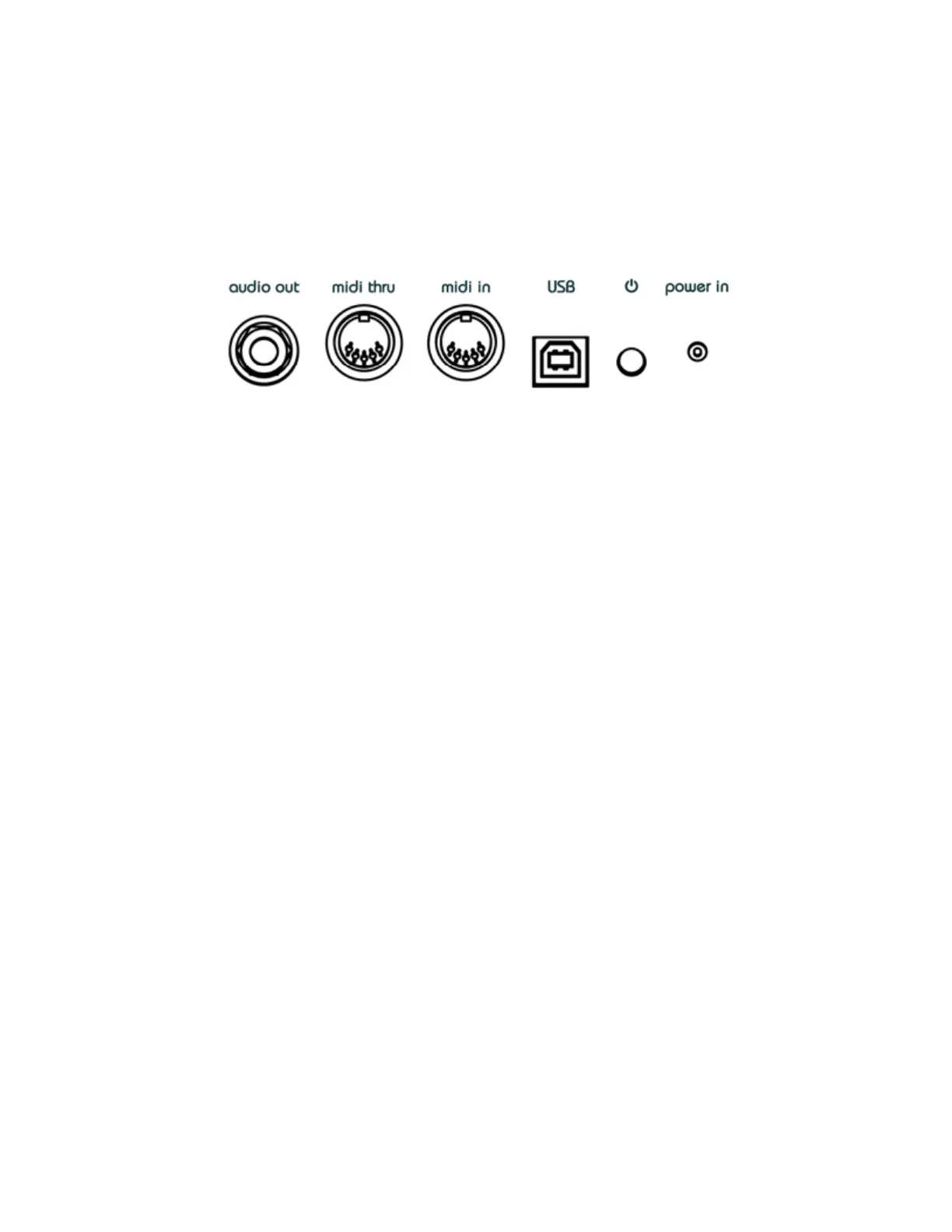
Rear I/O
“Audio out” output jack
This mono (ts) ¼” unbalanced jacks outputs the summed audio signals sent to “to out”
jacks on top of NifyCASE. A mono instrument cable should be used to connect
niftyCASE to a mixer or audio interface.
Midi thru
This DIN5 midi port will transmit any MIDI information received at the “midi in” port or via
MIDI-over-USB.
Midi in
Connect a MIDI keyboard or sequencer to this DIN5 port to take control of NiftyCASE.
NiftyCASE will also send midi information received out of the “midi thru” port so you can
daisy chain MIDI devices.
USB
The USB port is used to control NiftyCASE via MIDI-over-USB. Use a USB type B cable
to connect NIftyCASE to a computer.
It's not mandatory to connect NiftyCASE to a computer, it will operate “stand-alone”
NiftyTIP: NiftyCASE will also send MIDI received at this input over USB to a computer.
so can use NiftyCASE as a bi-directional USB-MIDI interface!


 To Next Page