8
ENGLISH
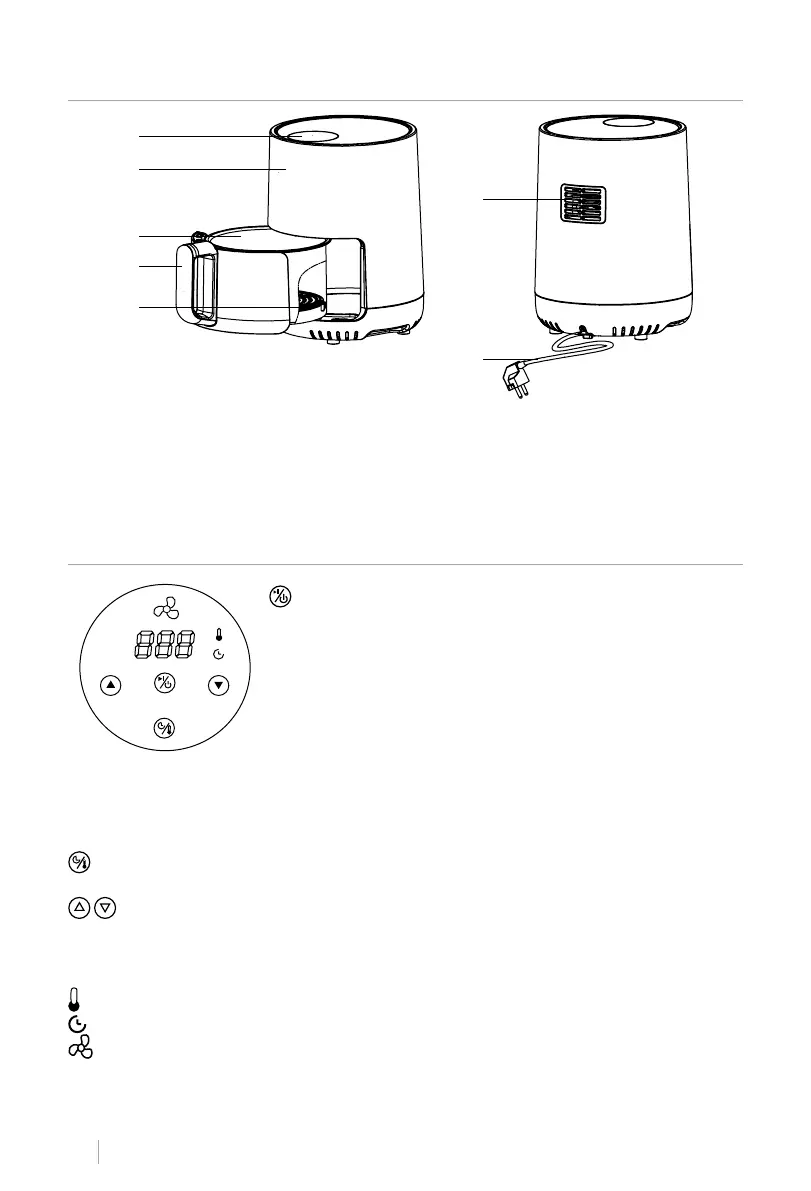
LIST OF PARTS
1. Control Panel
2. Main body
3. Basket
6
7
1
2
3
4
5
Power button
• Once the inner tray and basket are correctly placed in the air
fryer body, the power button will illuminate.
• Press and hold the power button for 2 seconds to default the
temperature to 180º and the cooking time to 15 minutes. Press
again to start the cooking process.
• Press and hold the power button for 2 seconds to stop the de-
CONTROL PANEL
4. Basket handle
5. Inner tray
6. Air vent
7. Power cord
vice during operation. All lights will turn off and the fan will stop.
Note: While the device is operating, you can use the button to pause and start operation. The
button light will ash while paused and the fan will turn off a few seconds later.
• Press the button again to continue cooking and the button light will remain on steadily.
Temperature/timer button
• Press this button to enter temperature and timer setting. Use the arrows to congure it.
Control buttons
• You can use the arrows to adjust the time and temperature.
• The temperature range is 80°C to 200°C.
• The time range is from 1 minute to 60 minutes.
Temperature indicator
Timer indicator
fan indicator



 To Next Page