10
ENGLISH
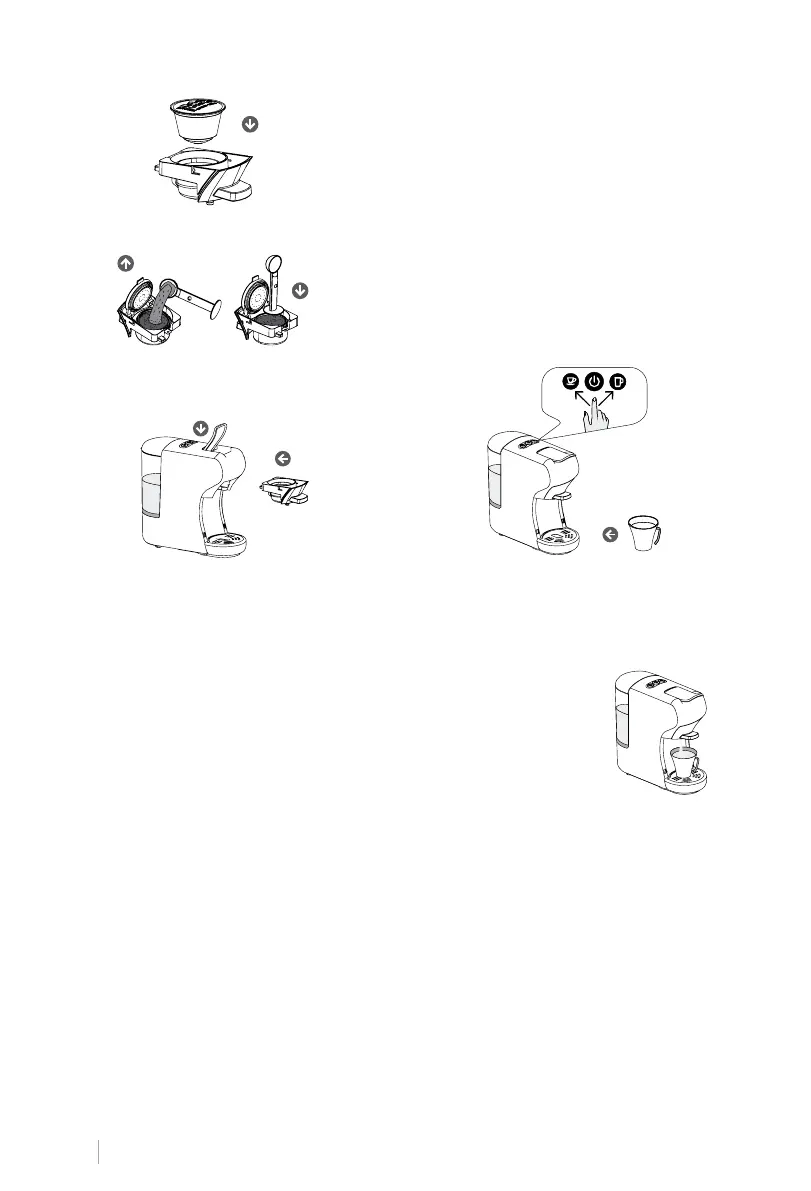
Ground Coffee: Lift the adapter’s lid and add the
ground coffee. Press down to compact the ground
coffee and lower the adapter’s lid.
4. Push the adapter with the capsule
in and close the lever downwards as
shown in the picture.
5. Place a cup under the dispenser. Press
the desired coffee button only once.
The button will flash and the machine
will begin preparation.
6. Once the brewing process is complete, the machine will
automatically stop when the predetermined brewing time
is reached. You can change the amount of coffee by adjust-
ing the default brewing time to suit your taste. Refer to the
“Coffee volume adjustment” section.
Predetermined brewing time:
• Capsules
16s for short espresso and 25s for long coffee.
• Ground Coffee
25s for short espresso and 47s for long coffee.
7. Lift the lever and remove the adapter to insert the new capsule you are going to use or
to change the adapter.
Attention:
When the desired coffee button is pressed, its LED may blink for a few seconds first, and
then start brewing coffee, which is quite normal.
Dolce Gusto capsules:
To ensure optimum performance and taste, use the
appropriate adapter according to the type of capsule:
For espresso, ristretto, long coffee or decaffeinated
coffee capsules, insert a capsule into the standard
adapter included with the coffee machine.
For coffee capsules with milk, cortado, cappuccino,
latte macchiato, chocolates or teas, use the specic
adapter for Dolce Gusto varieties, available on our
website.


 To Next Page