9
ENGLISH
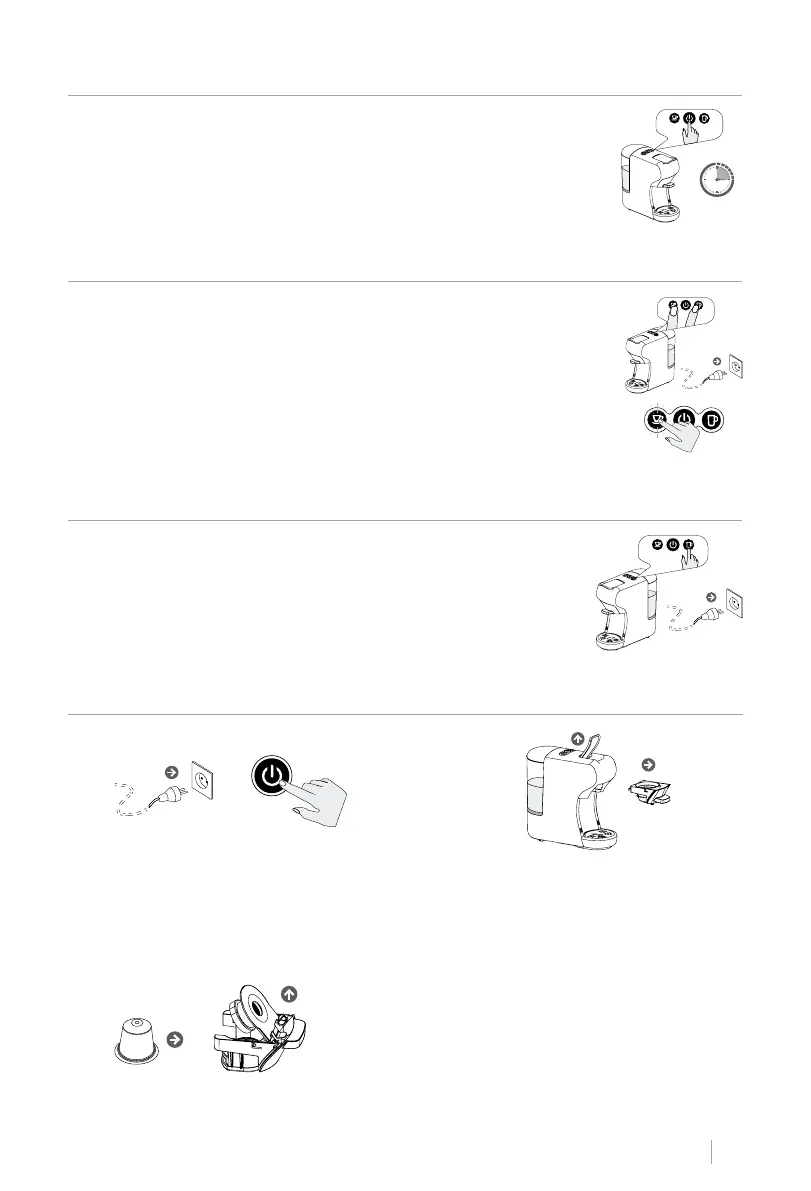
STANDBY MODE
STANDBY MODE SETTING
FACTORY DEFAULT SETTING
COFFEE PREPARATION
• This appliance is in Standby mode by default: In this mode, the ma-
chine and all indicator lights will turn off after 15 minutes of inac-
tivity.
• If the machine enters standby mode, press the start button to turn
it back on.
• Hold down the Small Cup and Large Cup buttons.
• Connect the machine to the power outlet. The LED on the start but-
ton will light up.
• To activate the Standby Mode, press the small cup button and the
LED light will turn on.
• Press again to deactivate Standby Mode and the LED light will
turn off.
• Press and hold the Large Cup button.
• Connect the machine to the power outlet.
• The LED on the button will turn on and blink twice, indicating that
the machine has returned to the factory default setting.
1. Connect the device to the mains sock-
et. Press the start button.
> 15
minutos
Nespresso capsules:
Lift the capsule adapter lid. Insert a capsule into
the adapter and lower the adapter lid.
2. Lift the top lever and pull it out to re-
move the adapter while the machine
warms up.
3. Follow the instructions below to use each type of adapter:


 To Next Page