9
ENGLISH
• POWER: When the product is on, press Power. The upper part of the display shows the
temperature. The heater is working at low power heating conditions as default.
• MODE: Press Mode to regulate low, or high temperature power.
• TEMPERATURE: Press temperature button, the temperature can be set from 5°C to
40°C. Internal temperature is displayed every time the appliance is started up. The temper-
ature can be set when the appliance is in stand-by or heating modes. When the room tem-
perature reaches the set level, the high temperature power stops and the low temperature
power remains active. When room temperature is 2 degrees over the set temperature, both
the high and lower temperature powers will stop operating. The machine will begin operat-
ing again only when temperature decreases 2 degrees with respect to the set temperature.
• TIME: The timer button can be set to start or stop the appliance at the desired time, with
a time interval between 1 hour and 24.
The touch screen buttons located on the product correspond to the remote control functions.
The Child lock function can be found on the remote control:
• CHILD LOCK: Press the child clock button for 3 seconds, the heater is locked and it
can’t be switched on. After pressing Child Lock button for 3 seconds again, the heater is
unlocked.
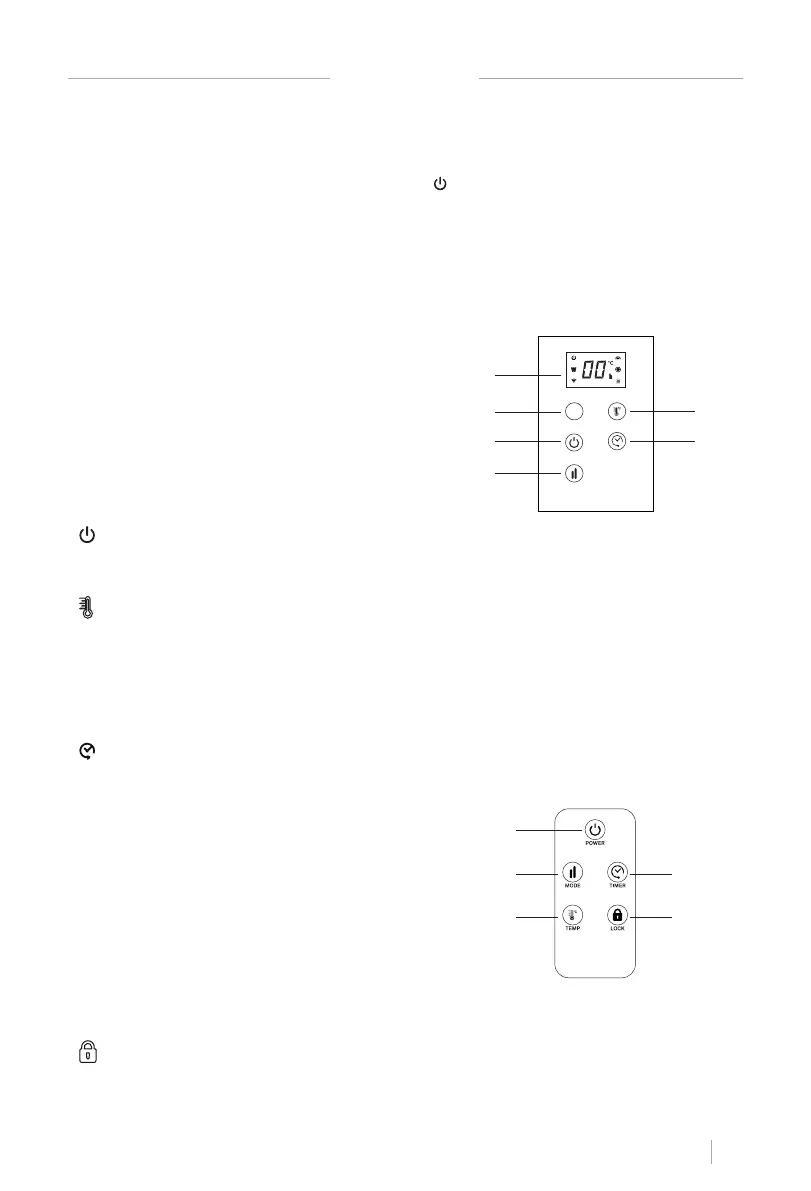
TOUCH PANEL
REMOTE CONTROL
HOW TO USE
• Place the heater on a at stable surface
• Plug into any 220-240V, 50Hz, AC source, then turn on the switch at side, you will hear a
beep sound.
• Turn on the heater by pressing the power button , the LED display will show room temper-
ature, then please use touch control or remote control to set power, temperature and time.
• If the appliance is not used for a long time, switch it off and plug the item out.
Attention: Do not cover the product. The convector should not be placed under a shower or
in a swimming pool.
• The appliance emits a beep upon each operation setting.
1. Display
2. PR sensor / Wi-Fi signal control
3. Power on / off
4. Mode
5. Temperature
6. Timer
1. Power button
2. Mode
3. Temperature
4. Timer
5. Lock
1
5
6
2
3
4
1
2 4
3 5


 To Next Page