8
ENGLISH
• Plug the device into the outlet and press the power switch located on the back of the heat-
er. After turning it on, a beep will sound and the indicator light will appear. will light up.
• Press the power button
to turn on the heater.
• Press the power button again
and the heater will turn off. The heater will blow cold air
for about 60 seconds with a countdown to discharge heat before it turns off.
Note: Unplug the product when not in use.
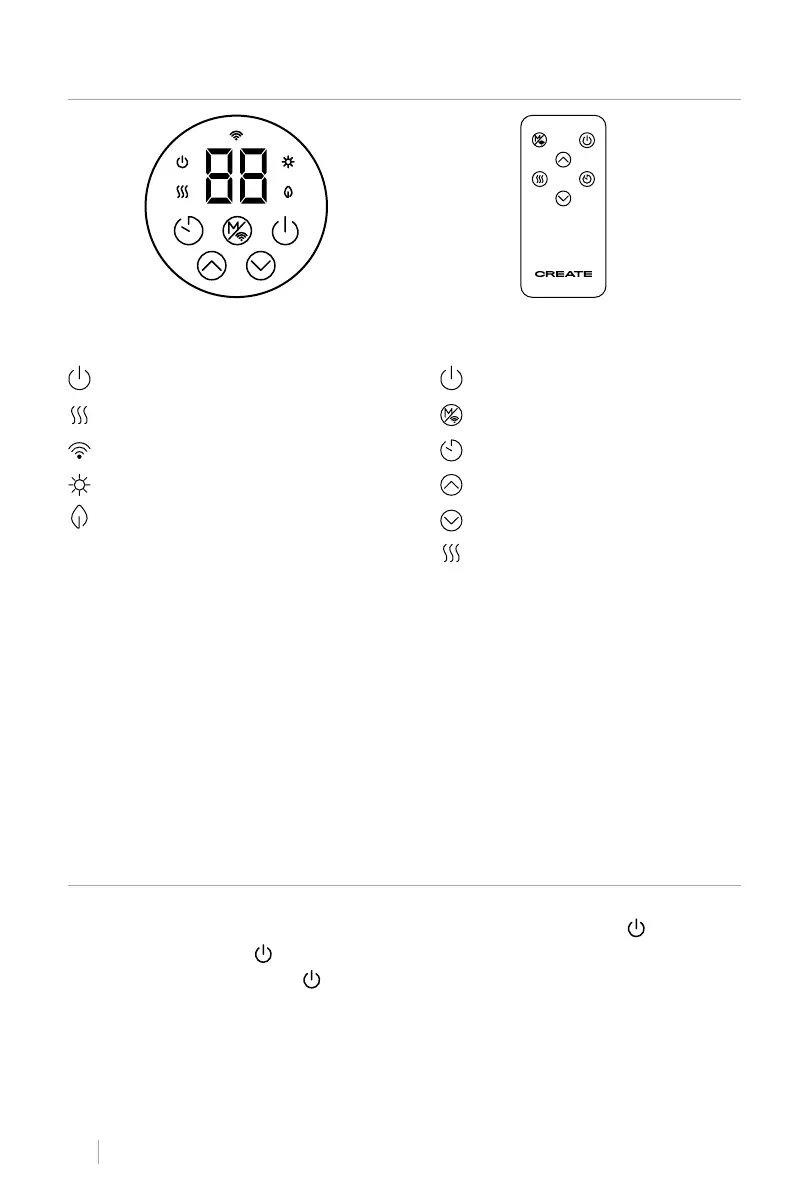
• Before using the remote control, remove the insulating paper from the remote control. All
buttons are the same as the buttons on the control panel and the functions are also the
same.
• The remote control uses a CR2025 battery; If the battery needs to be replaced, please
follow the steps below:
1. Open the battery cover at the bottom of the controller, press the battery cover buckle in-
ward and take it out, take out the old battery.
2. Identify the polarity of the battery and insert the new battery into the battery slot.
3. Push the battery cover to the bottom of the remote control.
• If you do not use it for a long time, remove the battery from the remote control.
Power button
BUTTONSLUMINOUS INDICATORS
Selection button Mode / Wi
Timer button
Increase button
Decrease button
Power button
Power indicator light
Power indicator light
Wi light indicator
Comfort mode light indicator
ECO mode light indicator
CONTROL PANEL AND REMOTE CONTROL
HOW TO USE


 To Next Page