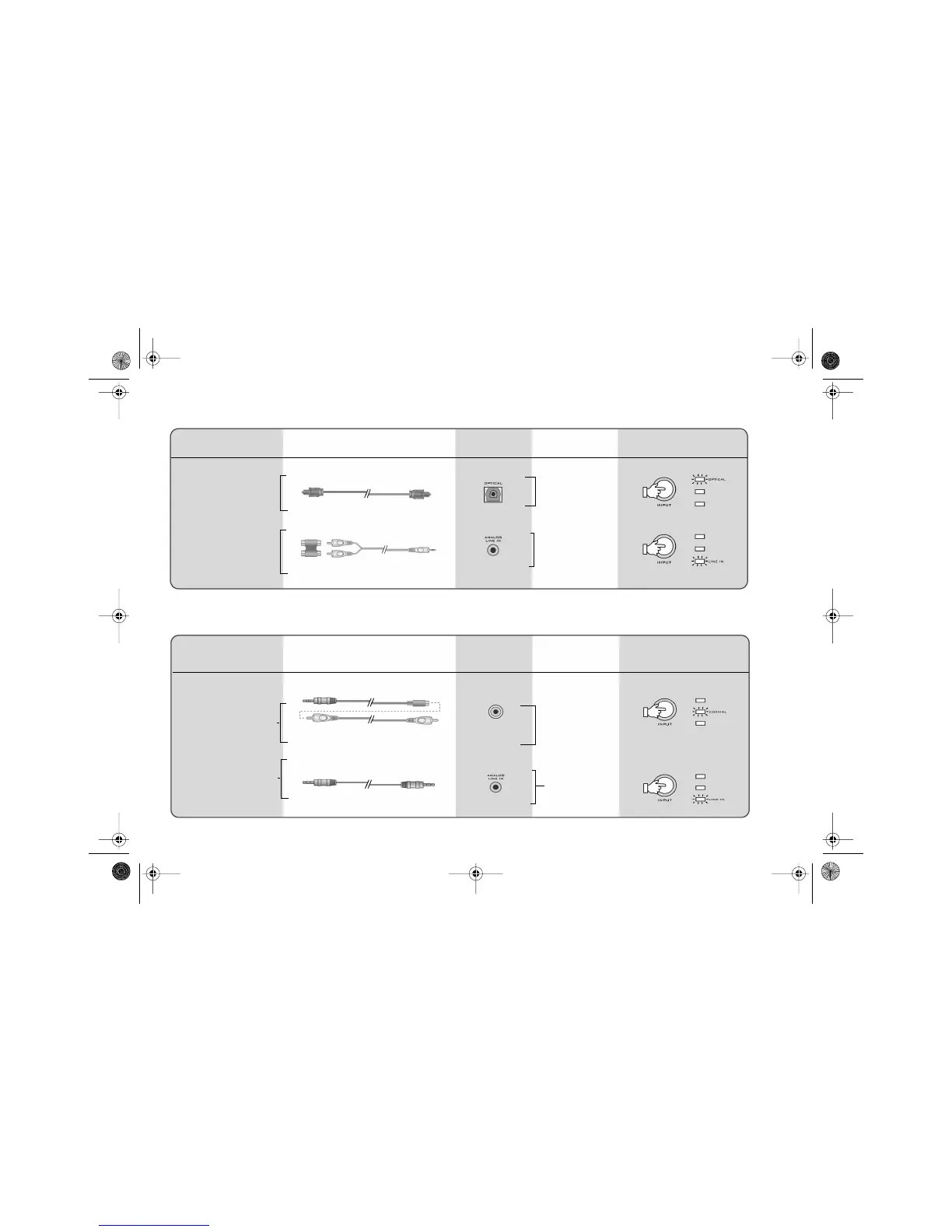
2-2 Connecting Devices and Selecting Input Sources
Game Console User’s Chart
From Device To Decoder
Sony Playstation ® 2
Optical
- Dolby Digital
- PCM
Analog
Devices
Decoder
Inputs
Signals
Decoder Input
Selection
Cables
Personal Computer User’s Chart
From Device To Decoder
Devices
Signals
Decoder Input
Selection
Cables
- Dolby Digital
- PCM
Analog Stereo
4 conductor Miniplug to RCA (female)
RCA-to-RCA (male)
(Both cables must be used together)
Stereo Line-in
Creative Sound
Blaster Live 5.1
or Audigy audio
cards* (Software
DVD)
2-channel audio
cards
Select Line-in
Select Optical
Dual Female-Female RCA Adapter
and Dual RCA to Stereo
Sony Playstation ®
Select Line-in
Select Coaxial
RCA
Decoder
Inputs
DTT3500-lic.book Page 2 Wednesday, July 24, 2002 3:11 PM



 To Next Page