4-4 Selecting Mode and Controlling Speaker Output
Controlling Speaker
Output
When playing back multichannel programs like Dolby Digital soundtracks, you may want to set the
speaker output level to suit your sitting position relative to the speakers. This is to obtain the desired
(balanced) output required for multichannel playback from all speakers.
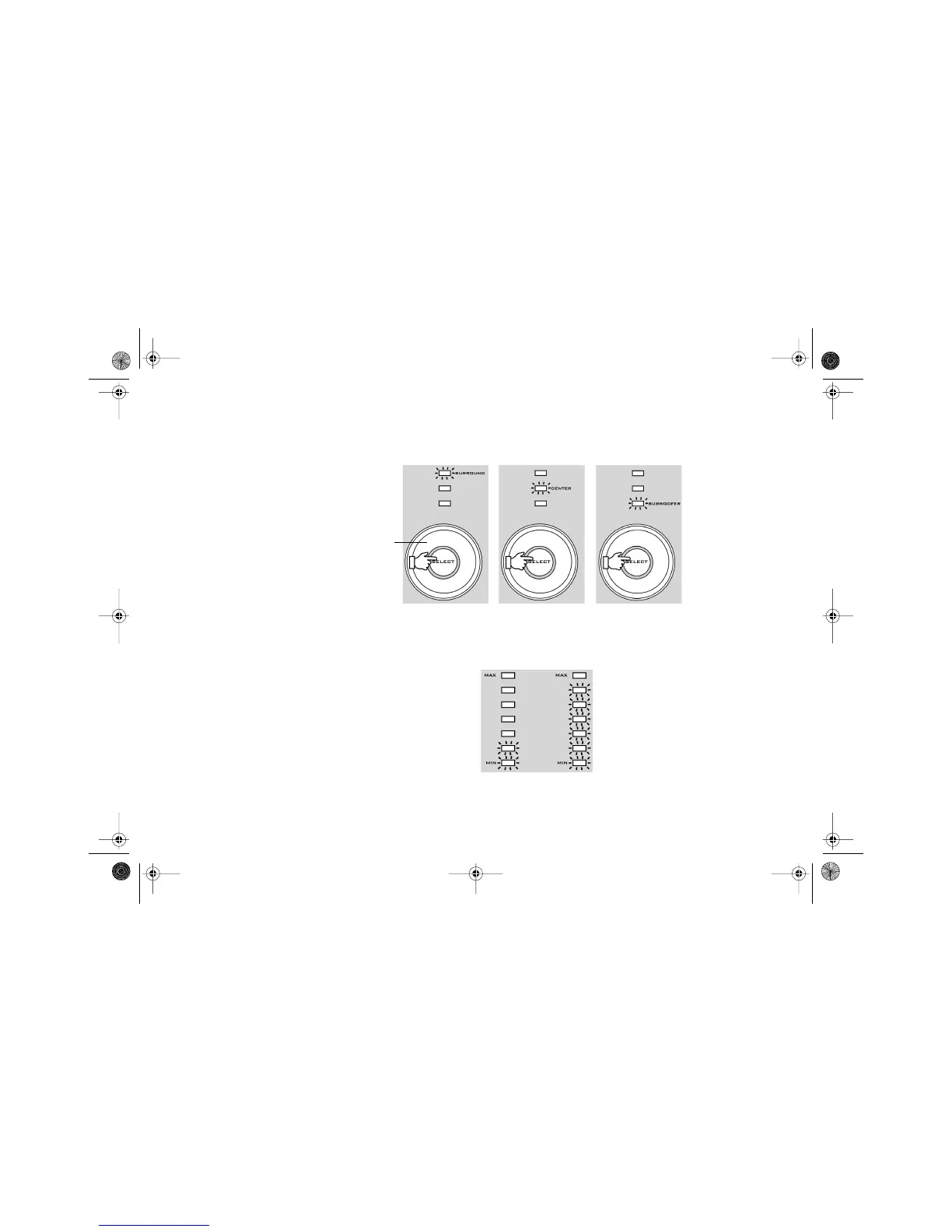
1. Press the SELECT button on the decoder until the LED of the channel you want lights up.
2. Turn the volume knob clockwise to increase the selected channel volume or
counterclockwise to decrease the selected channel volume.
The LED indicators on the front of the decoder (see Figure 4-2) indicate the volume selected.
The more lit indicators there are, the higher the volume.
If the volume setting in any of the three channel levels — surround, center or subwoofer —
remains unchanged for 2–3 seconds, the master volume control resumes.
Note: The volume is set relative to the front speakers.
Figure 4-1: Selecting the channel volume.
Vo l u m e
knob
Low
volume
High
volume
Figure 4-2: LED volume indicators.
DTT3500-lic.book Page 4 Wednesday, July 24, 2002 3:11 PM



 To Next Page