7
Usage Precautions
Disconnecting your player properly
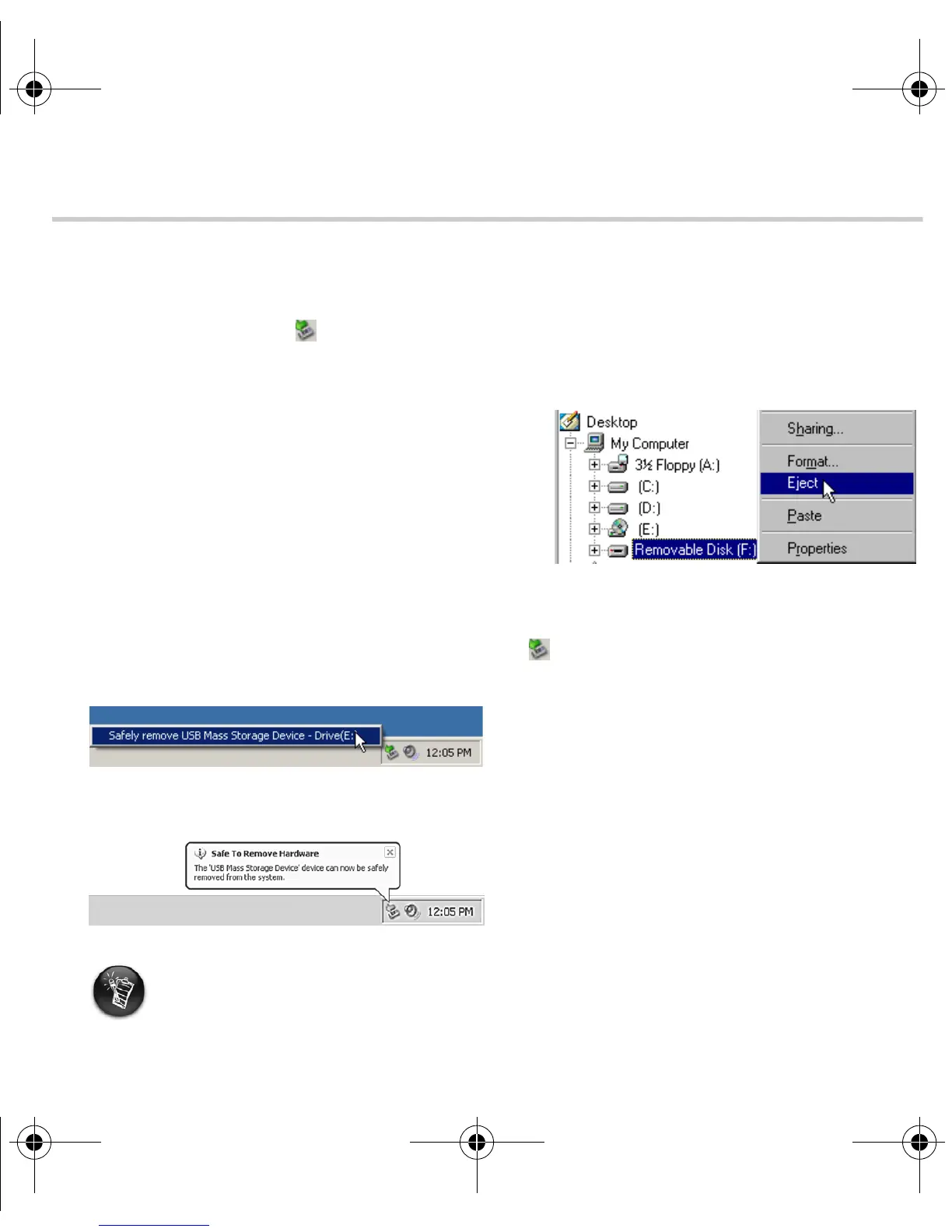
Before disconnecting your player from your computer, use the Windows Eject or Safely
Remove Hardware icon on the Taskbar to safely disconnect your player. If not, your player
may not be able to function normally. Follow these steps below to safely disconnect your player:
Windows 98 SE
1. Wait at least 10 seconds after all file transfers
are completed.
2. In Windows Explorer, right-click the
Removable Disk icon and click Eject.
3. Unplug your player after 10 seconds.
Windows 2000, Windows Me and
Windows XP
1. Left-click the Safely Remove Hardware icon on the Taskbar and click Safely
remove USB Mass Storage Device as shown.
2. Unplug your player when you are prompted to do so.
This prompt appears on the Taskbar in Windows XP. On other operating systems, a message
box appears on the desktop instead.
New_English_Omicron_13pg.fm Page 7 Tuesday, March 23, 2004 6:47 PM














 To Next Page