Available for Windows
®
, the fully customizable Sound Blaster
Connect software gives you complete control over your product.
You can also tweak the lighting effects of your BlasterX product
to create a neat gaming space.
Download at www.creative.com/support/blasterx-ae5.
SOUND BLASTER CONNECT FOR PC
SOUND BLASTERX AE-5 EXPERIENCE GUIDE
ENHANCING &
CUSTOMIZING
OVERVIEW
1
2
3
4
5
6
7
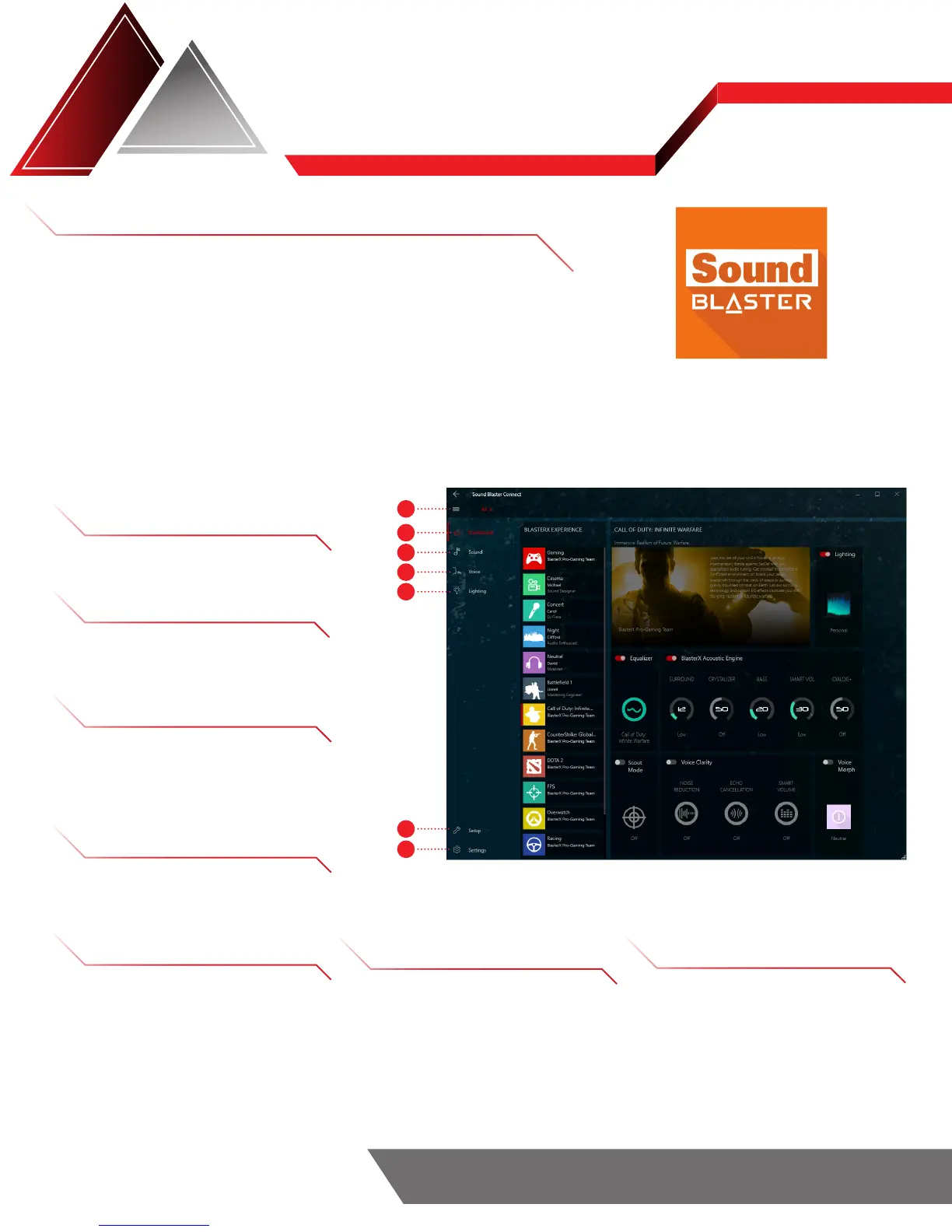
1 OPEN/COLLAPSE MENU
Expand or minimize the side menu
2 DASHBOARD
Quick overview of audio and
visual settings
3 SOUND
• Modify EQ setting
• Personalize audio settings
• Activate Scout Radar and Scout Mode
4 VOICE
• Improve voice clarity
• Have fun with voice morph
5 LIGHTING
• Choose or customize RGB
lighting presets to match your
mood and space
6 SETUP
• Select speaker configuration
and type
• Calibrate speakers
• Enable playback/recording mixing
7 SETTINGS
• Change language settings
• Modify SB Connect settings
• Check for software updates
• Restore default setting













 To Next Page