EasyManua.ls Logo

Creative Sound Blaster AE-9 - User Manual

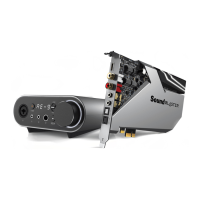
Creative Sound Blaster AE-9
9 pages
Print Icon
To Next Page IconTo Next Page
Loading...
使用产品前请阅读使用说明
Question and Answer IconNeed help?

Do you have a question about the Creative Sound Blaster AE-9 and is the answer not in the manual?

Summary

Product Overview and Components

Audio Control Module (ACM) Components

Identifies and describes the various ports and controls on the Audio Control Module.

Sound Card Components

Lists and details the connectors and features of the main sound card.

Power Supply Connection

PCI Express Power Connector Guide

Details the pinout and important notes for connecting the PCI Express power supply.

Installing the Sound Card

Sound Card Installation Procedure

Illustrates the physical installation process of the sound card into a computer.

Connecting Devices to Sound Card

Analog and Optical Device Connections

Diagrams for connecting analog speakers, AV receiver, and players to the sound card's outputs.

Connecting Devices to Audio Control Module

Microphone and Headphone Connections

Shows how to connect microphones and headphones to the ACM, including adapter use.

Audio Control Module Interface and Controls

+48 V Phantom Power and SBX Controls

Explains the function of the +48V button and the SBX button.

Volume and Headphone Impedance Settings

Describes the volume knob, display, and headphone impedance selector switch.

Software, Support, and Warranty Information

Software Download and Usage

Guides on downloading and using the Sound Blaster Command software.

Product Registration and Technical Support

Information on registering the product and accessing technical support services.

Warranty and Other Information

Details warranty information and availability of supplementary documentation.

Summary

Product Overview and Components

Audio Control Module (ACM) Components

Identifies and describes the various ports and controls on the Audio Control Module.

Sound Card Components

Lists and details the connectors and features of the main sound card.

Power Supply Connection

PCI Express Power Connector Guide

Details the pinout and important notes for connecting the PCI Express power supply.

Installing the Sound Card

Sound Card Installation Procedure

Illustrates the physical installation process of the sound card into a computer.

Connecting Devices to Sound Card

Analog and Optical Device Connections

Diagrams for connecting analog speakers, AV receiver, and players to the sound card's outputs.

Connecting Devices to Audio Control Module

Microphone and Headphone Connections

Shows how to connect microphones and headphones to the ACM, including adapter use.

Audio Control Module Interface and Controls

+48 V Phantom Power and SBX Controls

Explains the function of the +48V button and the SBX button.

Volume and Headphone Impedance Settings

Describes the volume knob, display, and headphone impedance selector switch.

Software, Support, and Warranty Information

Software Download and Usage

Guides on downloading and using the Sound Blaster Command software.

Product Registration and Technical Support

Information on registering the product and accessing technical support services.

Warranty and Other Information

Details warranty information and availability of supplementary documentation.

Creative Sound Blaster AE-9 Specifications

General IconGeneral
Audio ProcessorSound Core3D
Signal-to-Noise Ratio (SNR)129 dB
Headphone AmplifierYes, Xamp discrete headphone bi-amplifier
DACESS SABRE-class 9038
RGB LightingYes
Dynamic Range (DNR)129 dB
Op-amp swappingYes
Output Channels5.1
Software SuiteSound Blaster Command
Audio Resolution32-bit / 384 kHz
ConnectivityPCIe
Audio TechnologyCrystalVoice, Scout Mode
THD+N0.0001%
Playback Resolution32-bit / 384 kHz
I/O Ports (Rear)Optical Out
I/O Ports (Front)3.5mm microphone
Headphone AmpXamp discrete bi-amplifier
Total Harmonic Distortion + Noise (THD+N)0.0001%
External Audio Control ModuleYes

Related product manuals