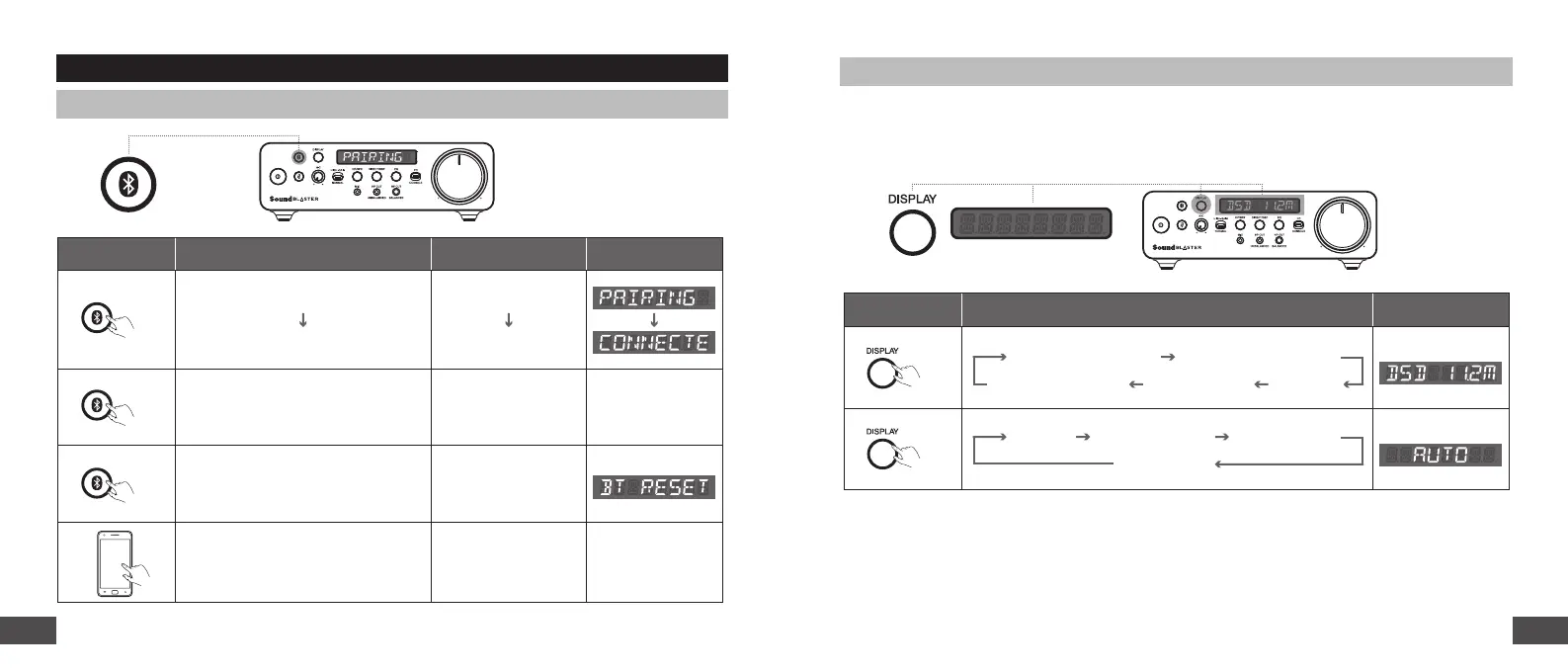
Bluetooth Connectivity
Button Action LED DisplayLED Indicator
2s
x1
5s
Enter Bluetooth Pairing Mode
Blinking Blue
Bluetooth Paired / Connected Solid Blue
O
Flashing Blue
N / A
N / A
N / A
Exit Bluetooth Pairing Mode
Trigger BLE connection via the
Creative app
Reset Bluetooth Settings
Example:
Example:
LED Display
The LED Display oers direct view of Sound Blaster X5’s status and information. Details displayed
include volume level, playback format, speaker / headphones output, DSP / direct mode, selected EQ,
Bluetooth status, and other device messages.
Button Action LED Display
2s
x1
O
Auto Bright (100%) Dark (50%)
Playback Volume
Audio Format DSP / Direct Mode
OutputMic-in Status
DISPLAY AND CONTROL INTERFACE
98


 To Next Page