5
Getting Started
1
1
Charge your headset
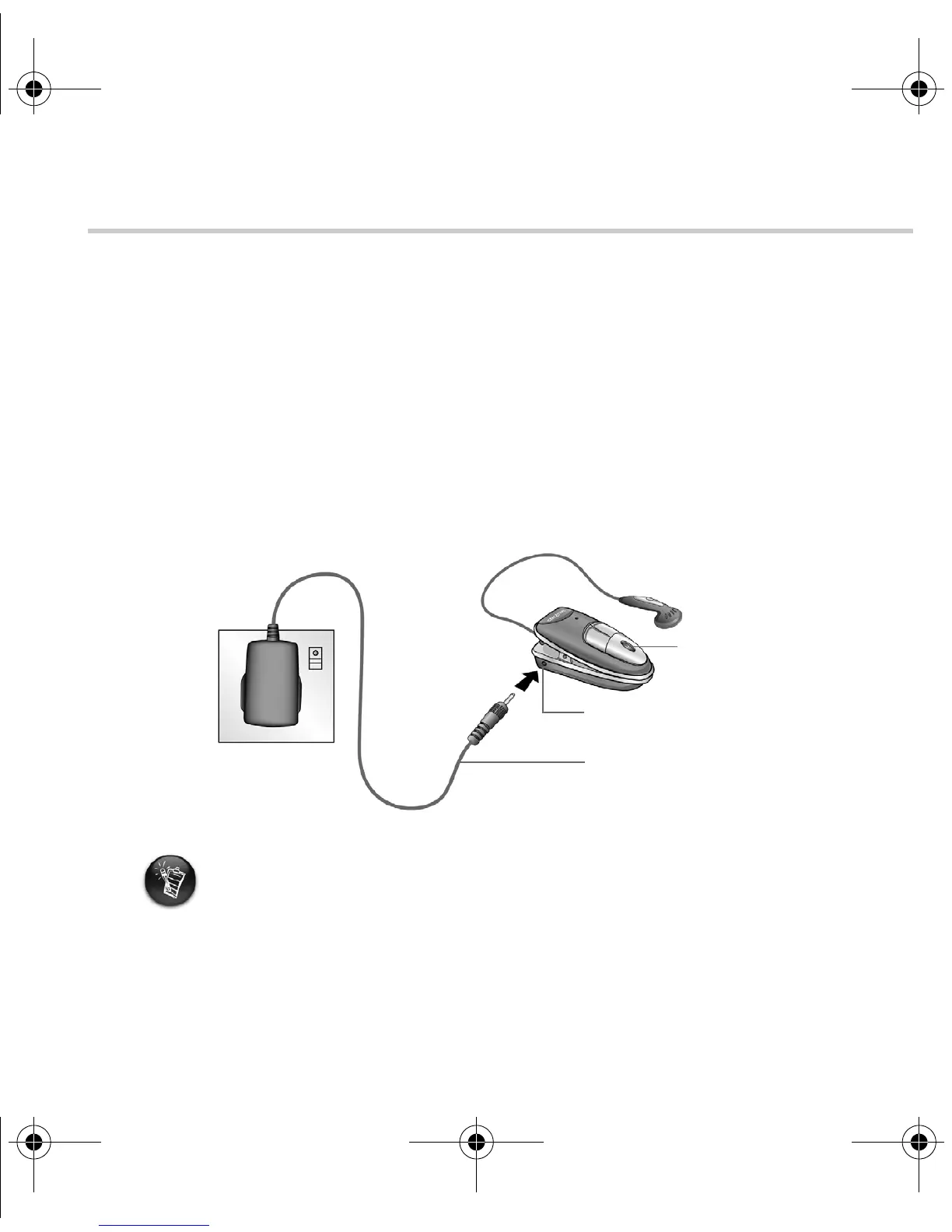
Your headset needs to be fully charged before you use it for the first time. To charge your
headset’s battery, connect your headset to the wall outlet as shown in Figure 2.
The Tri-Color LED indicates the battery status. It turns red when the battery is charging,
and green, when the battery finishes charging. Charging your battery fully for the first time
takes approximately three hours.
For more information on your Tri-color LED, see ”Reading your headset’s Tri-color LED”
on page 9.
• A fully charged battery should supply you with approximately up to four hours of talk
time and up to 120 hours of standby time. Talk time, however, may vary depending on
your mobile phone’s settings and usage.
• When the battery is almost depleted, the Tri-color LED blinks red once every four
seconds and your headset beeps once every minute. Recharge the battery at the
earliest opportunity.
• If you are charging your battery for the first time, or have not used your headset in a
while, the Tri-color LED may take slightly longer to turn red.
Figure 2
Wall outlet
Power adapter jack
Power adapter
Tri-color LED
Wireless Bluetooth headset.fm Page 5 Monday, August 23, 2004 6:40 PM











 To Next Page