About Broadcasting and Zone Control 10
About Broadcasting and Zone Control
These wireless features enable you to remotely control your X-Fi Wireless
Receiver from your transmitter, using the Broadcast and Zone control
buttons found on your transmitter remote control.
Broadcasting can be used on any number of paired receivers, and it enables
you to activate or deactivate all paired receivers simultaneously.
Zone control is limited to the first four manually paired receivers, and it
enables you to activate or deactivate each paired receiver individually.
To use Broadcasting, pair your transmitter and receiver automatically (see
“Setting Up Your X-Fi Wireless Receiver” on page 4 and “Setting Up Two or
More X-Fi Wireless Receivers” on page 9) or manually (see “Manual
Pairing” on page 11). To use Zone control, you must pair the receivers
manually.
For more information on using the broadcasting and zone control features,
see “Using Your Wireless Features” on page 17.
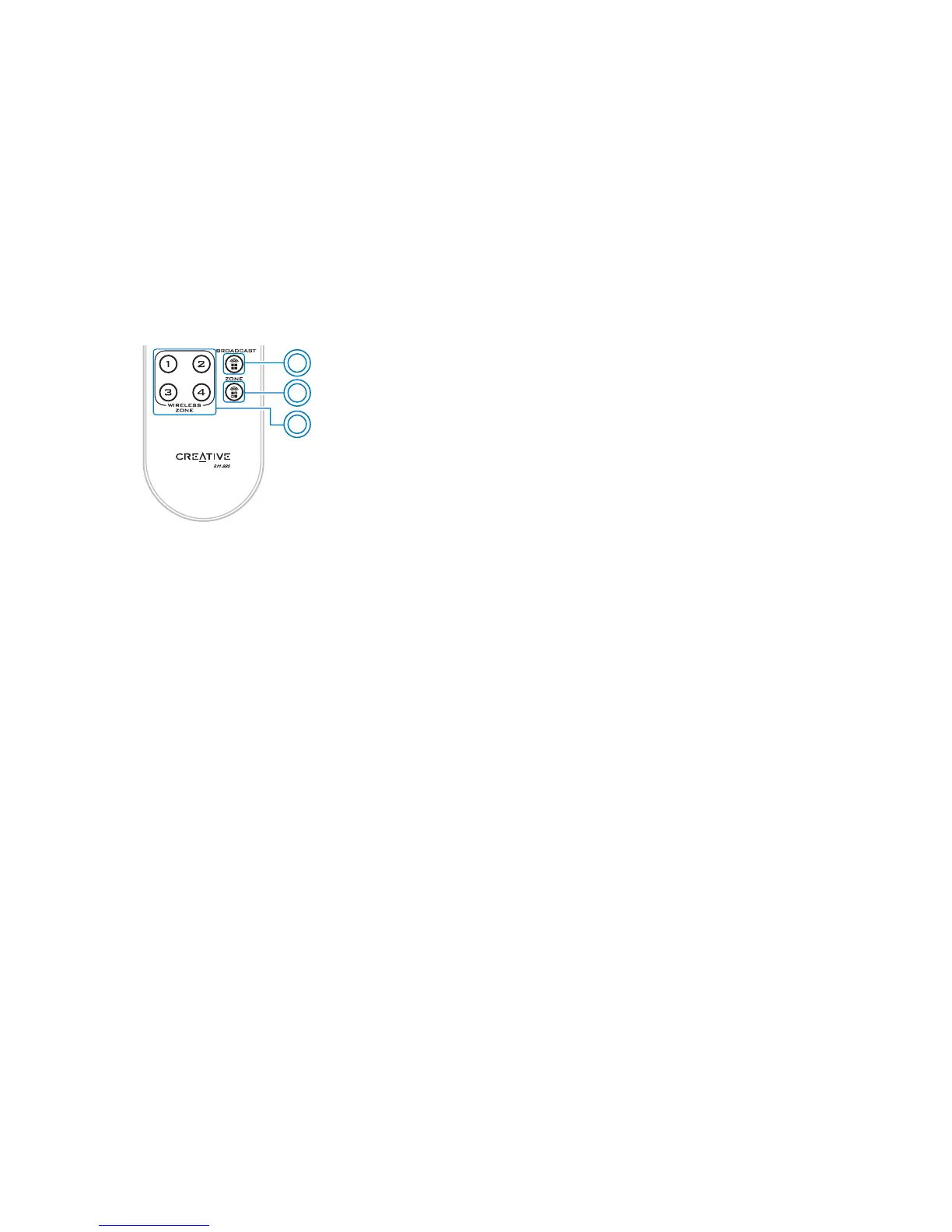
1 Activates or deactivates all receivers.
2 Reactivates manually paired receivers.
3 Activates or deactivates a manually
paired receiver (up to four).
1
2
3


 To Next Page