EasyManua.ls Logo

Creative Zen Stone plus - Player Controls and Charging; Device Layout Identification; Player Charging Procedure

Creative Zen Stone plus
8 pages
Print Icon
To Next Page IconTo Next Page
To Previous Page IconTo Previous Page
Loading...
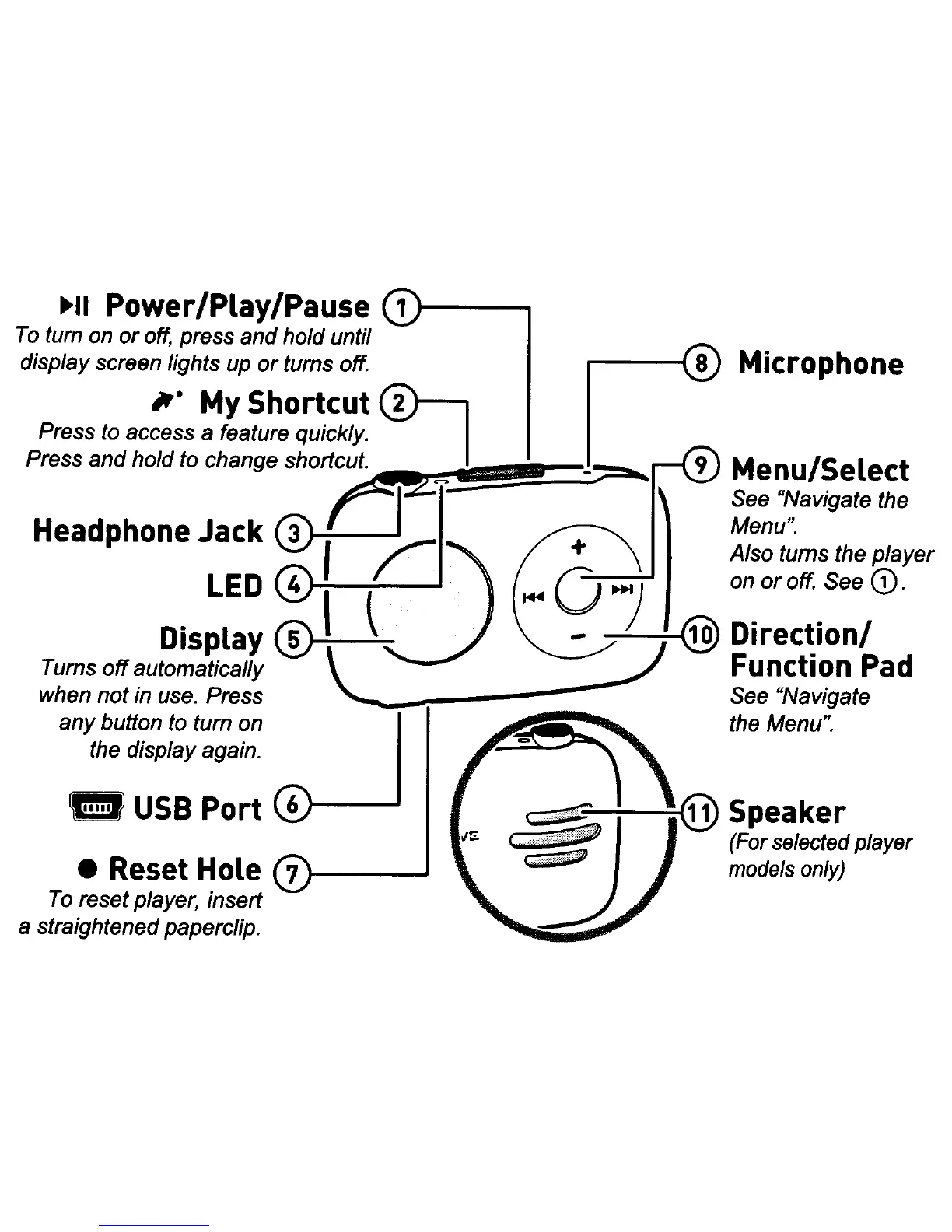
Microphone
Menu/Select
See "Navigate the
Menu".
Also turns the
player
on
or
off. See
CD.
~o~
Function
Pad
See "Navigate
the Menu".
C,:C::f::,::i:;:iif~:#:--I-~@
~~r~:/~:~
player
models
only)
1
11111
1
USB
Port
e Reset Hole
To
reset player, insert
a straightened paperclip.
~II
Power/Play/Pause
To
turn on
or
off, press and hold until
dispJa
y screen lights up
or
turns off.
It-
My Shortcut
Press to access a feature quickly.
Press
and
hold to change shortcut.
~
__
:
...
LED
4
..
Display
®'
t .
Turns
off
~utomatically
\ _
:-::
..,.",
when
not
In
use. Press
,~
~--_
..........
--
any
button to turn on
the display again.

Other manuals for Creative Zen Stone plus

Related product manuals