Step
1:
Charge
Your
Player Fully Before First
Use
Step
2:
Install Software
and
User's
Guide*
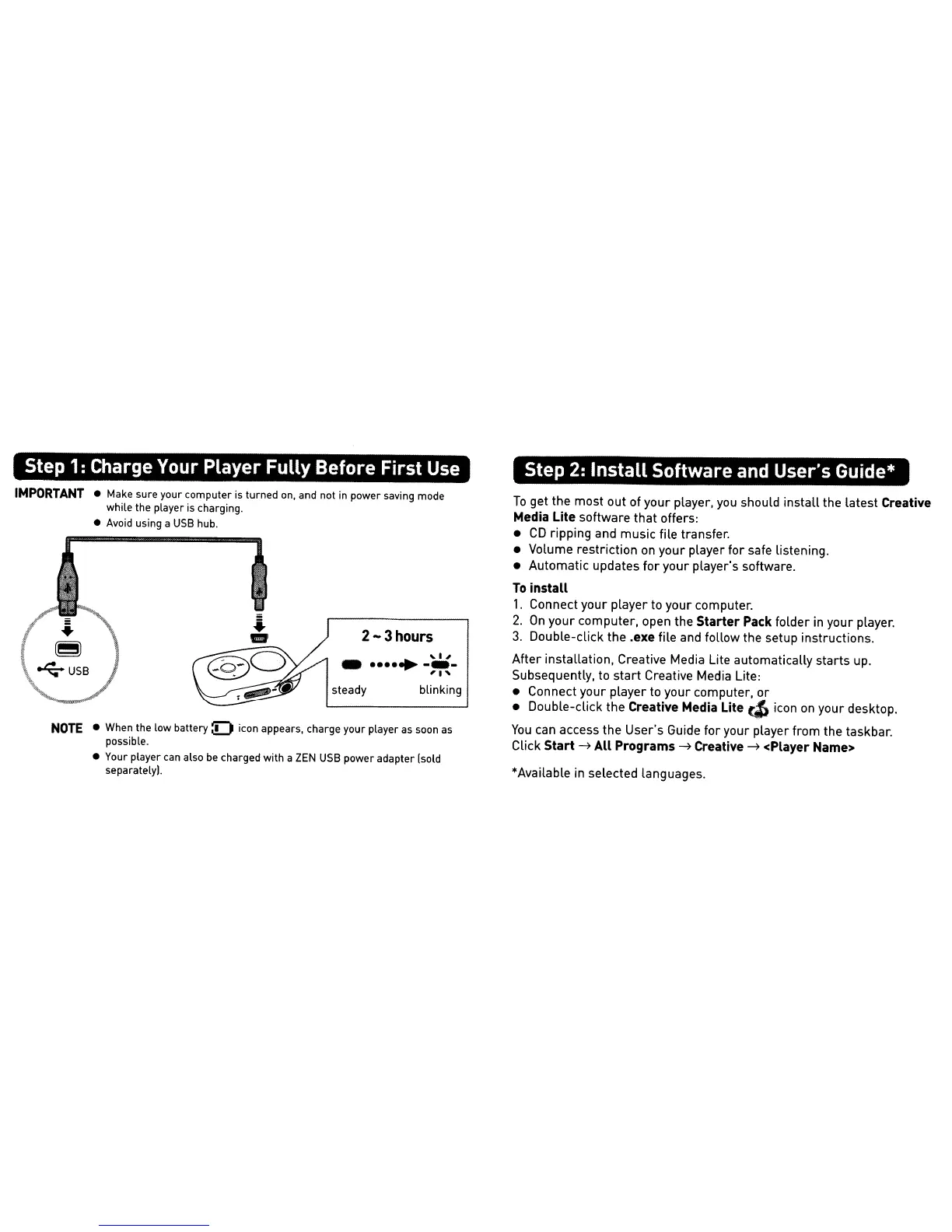
2-3hours
~I,
-....•
-.-
'1'
•
Make
sure your computer
is
turned
on,
and not
in
power saving mode
while the player
is
charging.
•
Avoid
using a
USB
hub.
To
get the most out of your player,
you
should install the latest
Creative
Media
Lite software that offers:
•
CD
ripping and music file transfer.
• Volume restriction
on
your player for safe listening.
• Automatic updates for your player's software.
To
install
1.
Connect your player to your computer.
2.
On
your computer, open the Starter
Pack
folder
in
your player.
3.
Double-click the .exe file and follow the setup instructions.
After installation, Creative Media Lite automatically starts
up.
Subsequently,
to
start Creative Media Lite:
• Connect your player to your computer,
or
• Double-click the
Creative
Media
Lite
cIJ
icon
on
your desktop.
You
can
access the User's Guide for your player from the taskbar.
Click
Start
~
All Programs
~
Creative
~
<Player
Name>
*Available
in
selected languages.
blinking
steady
•
When
the
low
battery:D
icon
appears, charge your player as soon as
possible.
•
Your
player can also
be
charged with a
ZEN
USB
power adapter [sold
separately!.
NOTE
IMPORTANT











 To Next Page