1.5
Enjoy audio from Stereo
Bluetooth
devices
Enjoyyourfavouritemusicfromother
Bluetooth
devices by following these steps to connect them.
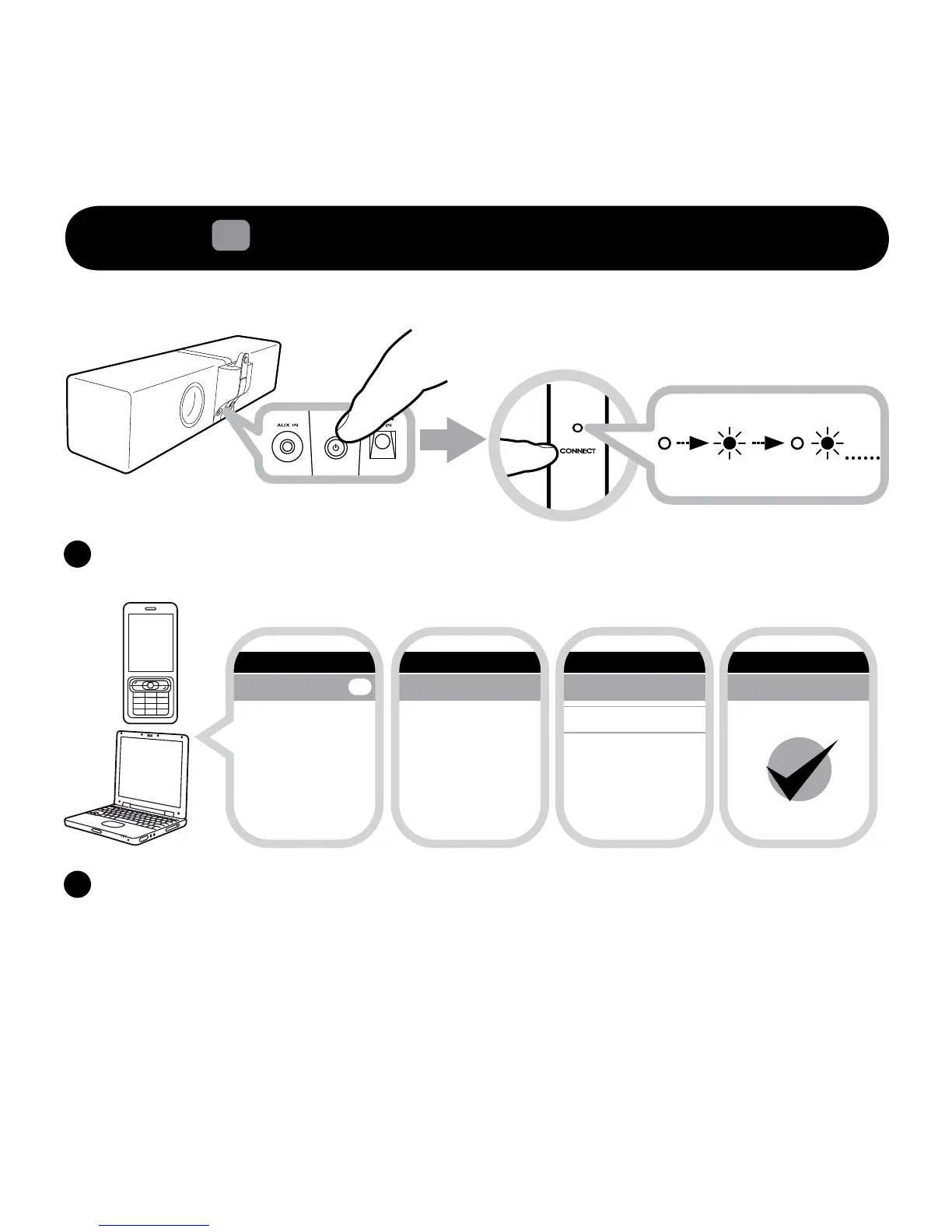
EnsurethespeakerispoweredON.Pressandholdthe“CONNECTTouchpad/Buttonfor
5seconds.ReleasewhentheCONNECTLEDblinksonce.
i) Turnonthe
Bluetooth
feature on your device
ii)SearchforZiiSoundD5x
#
iii)PairandconnecttoZiiSoundD5x
#
,ifpromptedforpasscode,enter0000.
iv)Pairingsuccessful,readytostreammusic
Note:Theabovearegenericstepstopaira
Bluetooth
device,formorespecicinstructionon
Bluetooth
connectivityforyourdevice,
pleaseconsultyourmanufacturer’smanual.
#Whenpairinga
Bluetooth
devicetoaLinkedspeakersystemin1.1,2.1or3.1conguration,theLinkedspeakersystemwillappear
as“ZiiSoundD5xSystem”





 To Next Page