1.6
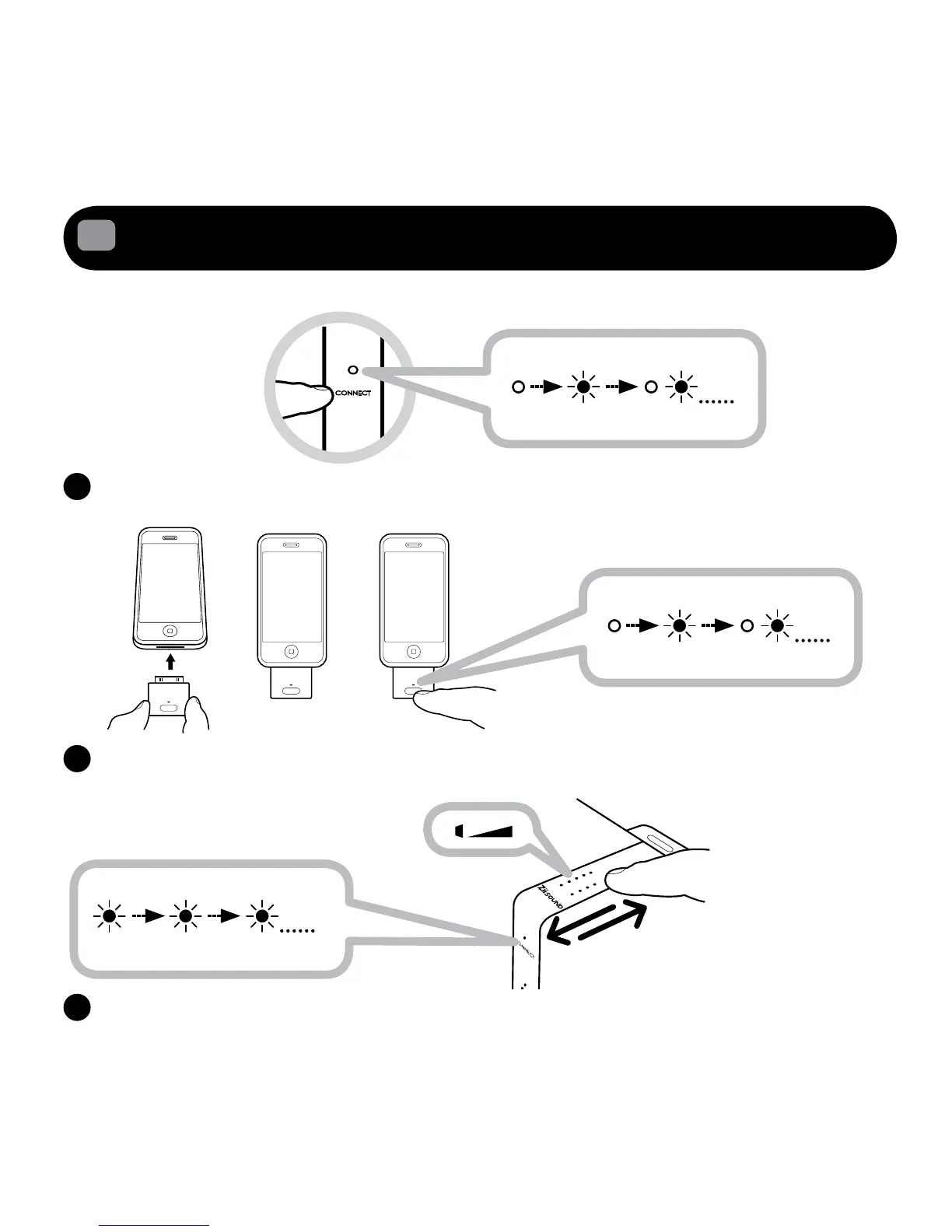
Re-pairing with your iPhone/iPod via the Wireless Transmitter BT-D5
Followthesestepsifthereisaneedtore-pairyouriPhone/iPodviaBT-D5totheZiiSoundD5x.
EnsurethespeakerispoweredON.Pressandholdthe“CONNECTTouchpad/Buttonfor
5seconds.ReleasewhentheCONNECTLEDblinksonce.
InsertBT-D5intoyouriPhone/iPod.WaitfortheTransmitterLEDtostartblinking.NowPressand
holdthe“PAIRINGButton”for3SecondsandreleasewhenthetransmitterLEDisrapidlyblinking.
Connected
Steady Lit
C
Waitforautomaticconnectionprocesstocomplete.CONNECTLEDshouldbesteadylit.Readyto
stream music.





 To Next Page