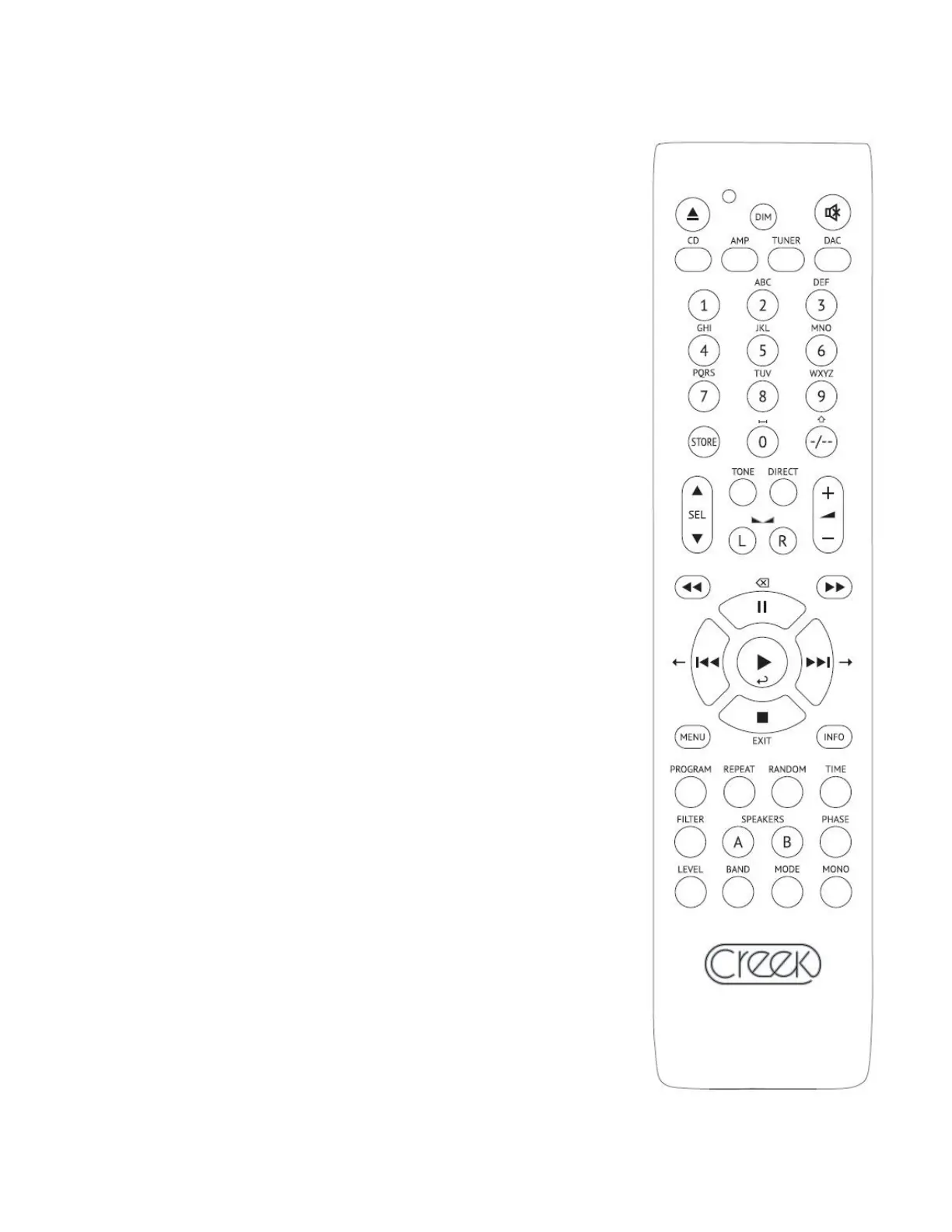
리모콘 REMOTE CONTROL
본 앰프의 리모콘은 앰프는 물론 CDP 및 튜너도 함께 구동할 수
있습니다. 참고로 이 리모컨은 Creek 의 Evolution50 & 100 시리즈
제품에만 사용할 수 있으며, 전원 스위치는 리모컨으로 끄고 켤 수
없습니다. 작동법은 간단하여 긴 설명이 필요치 않습니다.
The EVOLUTION 50A’s new remote control handset allows the user to
operate the amp and CD/DAC/Pre and tuner functions. It should be noted
that the EVO remote handset will only operate Creek’s EVOLUTION 50
and 100 ranges of products and is not able to switch the mains power.
The operation of the remote is designed to be intuitive, so we do not
intend to describe its functions in great detail here, have a play!
펌웨어 및 하드웨어 설정
FIRMWARE AND HARDWARE CONFIGURATION
본 앰프의 하드웨어 및 펌웨어 상태를 알 수 있습니다. 먼저 앰프를
끄십시오. 전면의 INFO 버튼을 누른 상태에서 전원스위치를 켜십시오.
전면 표시창에 About this unit 이 나타나면 INFO 버튼을 놓으십시오.
펌웨어 버전과 포노모듈 혹인 AMBI Tuner 의 장착 유무가 표시될
것입니다. 이 정보는 업그레이드 혹은 아프터 서비스 시에 필요합니다.
It is possible to check the hardware and firmware status of your 50A on
the display. Turn off the 50A and then, whilst holding down the INFO key,
power up the EVOLUTION 50A. Once the screen has changed to “About
this unit”, release the INFO key. The firmware version will be displayed
along with the presence/absence of a Sequel phono card and AMBIT
tuner card. This information will be required in the event of an upgrade or
service to the product.
무선주파수 간섭 RADIO INTERFERENCE
본 앰프는 정상적인 가정환경에서 작동하도록 설계되어 있습니다.
그러나 만약 본 앰프를 휴대폰과 같은 무선기기 근처에 두면 그
성능에 악영향을 받을 수 있습니다. 그런 경우 앰프 혹은 무선기기
위치를 바꾸면 정상화될 것입니다.
The EVOLUTION 50A is designed to work properly in normal domestic
operating conditions. However, its performance could be affected if sited
near to a radio transmitter such as a mobile phone etc. Relocating the
50A or the radio transmitter will normalize the situation. Page: 8
⑬




 To Next Page