EasyManua.ls Logo

Crenova MS8233D - User Manual

Crenova MS8233D
12 pages
Print Icon
To Next Page IconTo Next Page
Loading...
Contents
1. Introduction ………………………………………………. 1
2. Safety note ……………………………………………..… 1
3. Explanation of Controls and Indicators …………………... 2
3-1. Product illustration ………………………………………. 2
3-2. Functional button …………………………………………. 3
3-3. LCD display symbol ………………………….……………3
4. Specification ………………………………………………. 4
4-1. General Specification ……………………………………... 4
4-2. Electrical Specification …………………………………. 5
5. Measurement operation ………………………………….. 8
5-1 DC voltage & AC voltage measurement ………………... 8
5-2. Resistance measurement …………………………….….. 9
5-3. Diode & Continuity check ………………………..…..… 9
5-4. Frequency Measurement [ Only for MS8233D ] …….…… 9
5-5. DC/AC µA or mA measurement ………………….……. 10
5-6. DC/AC 10A measurement …………………………..…. 10
6. Maintenance ……………………………………………….10
6-1. Replacing the battery …………………………...………. 10
6-2. Replacing the fuse ………………………………………. 11
6-3. Cleaning and Decontamination …………………………. 11
7. Warranty ………………………………………………. 11
Question and Answer IconNeed help?

Do you have a question about the Crenova MS8233D and is the answer not in the manual?

Summary

Introduction to MS8233 D Digital Multi Meter

Safety Precautions and Warnings

Controls and Indicators Overview

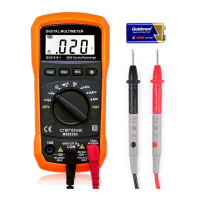
Product Illustration and Ports

Visual diagram identifying the physical parts and input/output terminals of the multimeter.

Functional Buttons Explanation

Details the purpose and operation of each button on the multimeter's interface.

LCD Display Symbols Guide

Explains the meaning of various icons and indicators shown on the multimeter's LCD screen.

Technical Specifications

General Specifications

Outlines overall features like auto-ranging, overload protection, data hold, and battery status.

Electrical Measurement Specifications

Details performance parameters for DC/AC voltage, resistance, current, and frequency measurements.

Measurement Operations Guide

DC & AC Voltage Measurement

Instructions for measuring DC and AC voltages, including terminal connections and range selection.

Resistance Measurement

Steps for measuring resistance values, including lead placement and range settings.

Diode and Continuity Check

Procedure for testing diodes and checking circuit continuity with the multimeter.

Frequency Measurement

How to measure the frequency of a signal using the multimeter's Hz function.

DC;AC Current Measurement (μA;mA)

Steps for measuring small DC and AC currents in microamperes and milliamperes.

DC;AC High Current Measurement (10 A)

Procedure for safely measuring high DC and AC currents up to 10A.

Maintenance and Care

Replacing the Battery

Instructions for safely replacing the multimeter's battery.

Fuse Replacement Procedure

Steps for replacing a blown fuse in the multimeter.

Cleaning and Decontamination

Guidelines for cleaning the multimeter's exterior safely and effectively.

Product Warranty Information

Crenova MS8233D Specifications

General IconGeneral
BrandCrenova
ModelMS8233D
CategoryMultimeter
LanguageEnglish