EasyManua.ls Logo

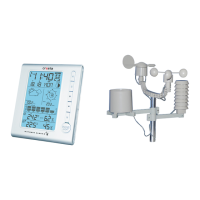
Cresta DTX500 - User Manual

Cresta DTX500
49 pages
Go to English
Print Icon
To Next Page IconTo Next Page
Loading...
CRESTA
CRESTA
CRESTA
CRESTA
PROFESSIONAL
PROFESSIONAL
PROFESSIONAL
PROFESSIONALWEATHERSTATION
W EATHERSTATION
WEATHERSTATION
WEATHERSTATIONDTX500
D TX500
DTX500
DTX500
GEBRUIKSAANWIJZING
GEBRUIKSAANWIJZING
GEBRUIKSAANWIJZING
GEBRUIKSAANWIJZING
MANUAL
M ANUAL
MANUAL
MANUALD
D
D
D
INSTRUCTION
I NSTRUCTION
INSTRUCTION
INSTRUCTION
BEDIENUNGSANLEITUNG
BEDIENUNGSANLEITUNG
BEDIENUNGSANLEITUNG
BEDIENUNGSANLEITUNG
USER
USER
USER
USERMANUAL
M ANUAL
MANUAL
MANUAL
Question and Answer IconNeed help?

Do you have a question about the Cresta DTX500 and is the answer not in the manual?

Summary

Installation and Mounting

Installing the Batteries

Steps to insert batteries into the main unit and close the battery cover.

Outdoor sensor connection

Connecting cables from wind and rain sensors to the thermo-hygro sensor.

Mounting the main unit

Guidance on placing or wall-mounting the main unit for optimal radio signal reception.

Mounting the outdoor sensor onto the stainless steel mast

Instructions for mounting wind speed, wind direction, and rain sensors onto brackets.

LCD Overview and Operation

Initial Operation

Guide to initial setup including RF signal reception and automatic time synchronization.

Manual Time Setup

Guide to manually setting time, date, time zones, and display preferences.

Cresta DTX500 Specifications

General IconGeneral
BrandCresta
ModelDTX500
CategoryWeather Station
LanguageEnglish

Related product manuals