7
CRICKET Installation and Setup Instructions
Once you have safely and completely removed your vehicle from its shipping crate, you are ready to perform the
basic installation and set-up procedures prior to the initial operation of your new CRICKET RX5.
*You may dispose of the protective barrier.
1. Unpack the CRICKET Vehicle
1.1. Remove all packing material including the rear step plate and the front seat from the CRIKCET. Set
these items aside until needed.
2. Install the Steering Shaft
2.1. Make sure the steering wheel in the correct orientation for driving straight and the front wheels are
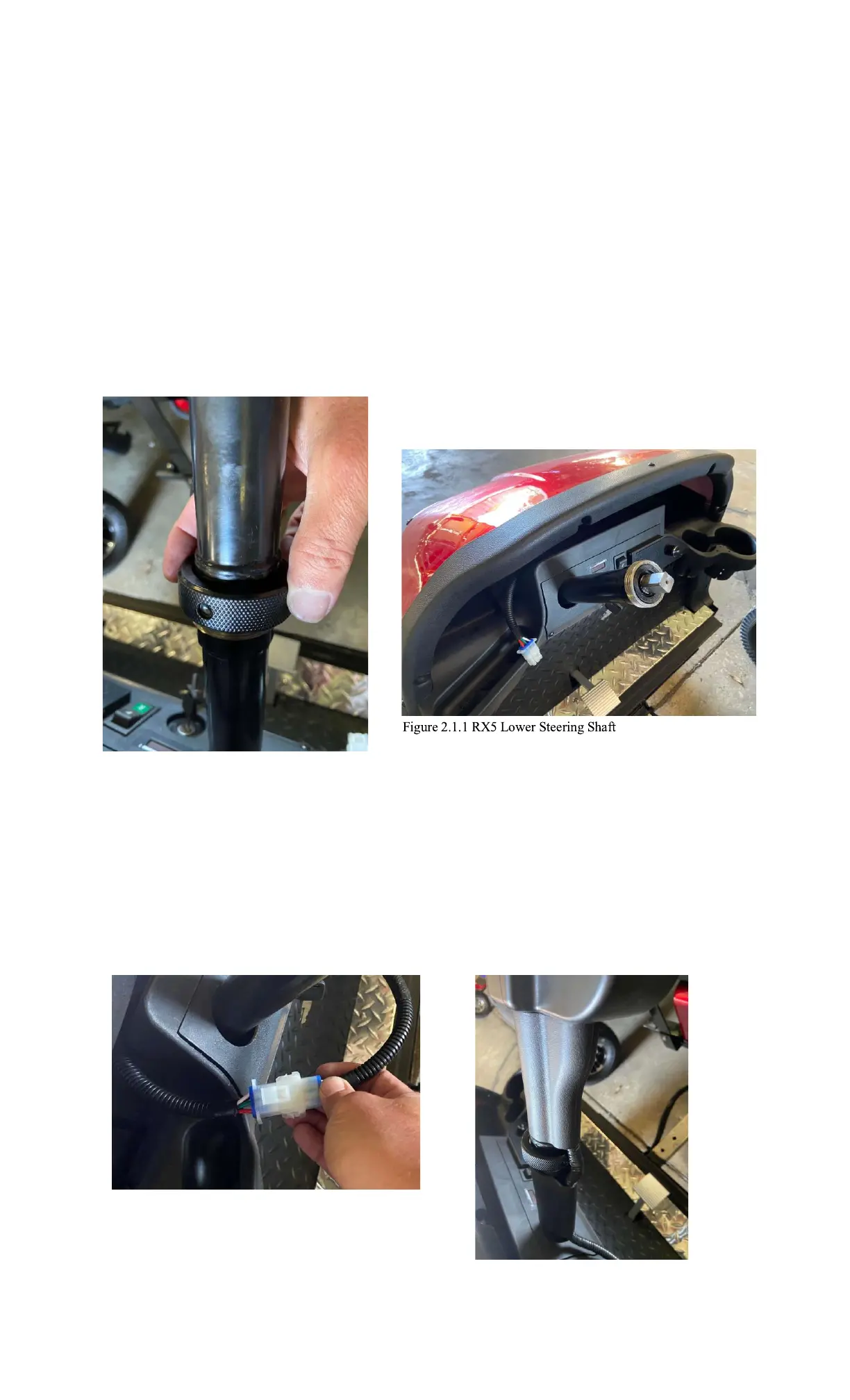
pointing straight. Line up the square pin (Fig. 2.1.1) on the lower shaft with the upper shaft and slide the
two shafts together. Then tighten the large nut on the upper shaft until tight. (Fig. 2.1.2)
Figure 2.1.2 RX5 Steering Shaft Nut
2.2. Connect the wiring harness to the open connector located inside the front dash on the drivers’ side of the
dash.
(Fig. 2.2.1)
2.3. Install wiring harness clips on the steering shaft. (Fig 2.2.2)
Figure 2.2.1 RX5 Wiring Harness Connector Figure 2.2.2 RX5 Wiring
Harness Clips



 To Next Page