6 7
PARTS AND FEATURES PARTS AND FEATURES (continued)
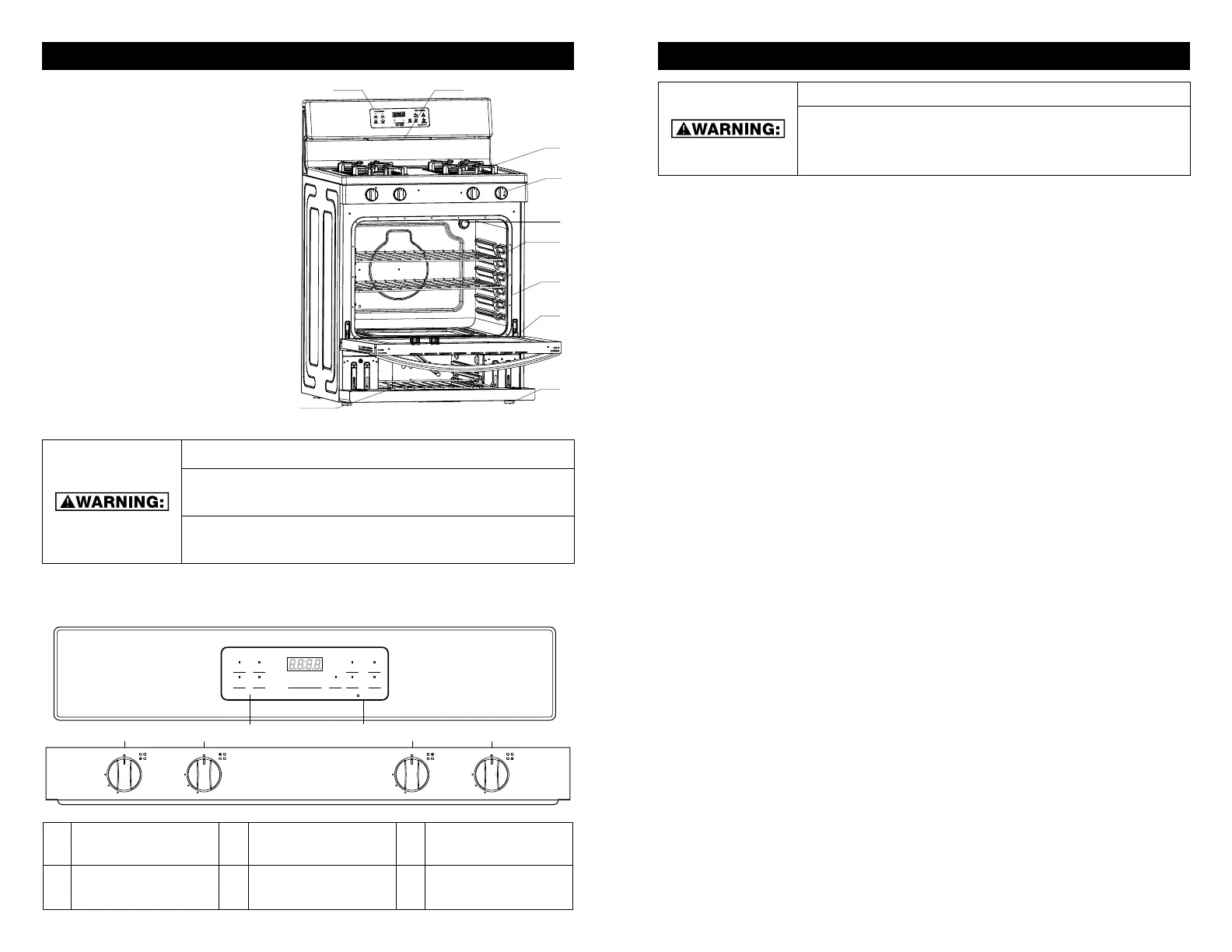
RANGE PARTS DIAGRAM:
A. Control Panel
B. Oven Vent
C. Grates
D. Control Knobs
E. Oven Light
F. Oven Racks
G. Gasket
H. Oven Door Handle
I. Broil
J. Adjustable Feet x 4
BURN HAZARD
BURNER GRATES AND SURFACE AREAS MAY STILL BE HOT
AFTER USE.
CHOKING HAZARD. SMALL PARTS. NOT FOR CHILDREN
UNDER 3 YEARS OLD.
KEEP FLAMMABLE MATERIALS AWAY FROM THE BURNERS. DO NOT STORE MATERIALS
SUCH AS PAPER TOWELS, HAND TOWELS, OR OTHER COMBUSTIBLE MATERIALS NEAR
BURNERS. FAILURE TO DO SO MAY RESULT IN FIRE OR BODILY INJURY.
TO START THE BURNER:
1. Push in and turn knob counterclockwise to the “IGNITE” position and hold.
2. All surface burners will click. However, only the burner with the control knob turned to
“IGNITE” will produce a flame.
3. Turn knob to adjust flame level between HI and LO.
4. If a burner does not start a flame, turn knob to the off position and repeat step 1.
NOTES:
• Electric igniters automatically light the surface burners when control knobs are turned
to “IGNITE”.
• Before turning a burner on, place filled cookware on the grate.
• Do not operate a burner using empty cookware or without cookware on the grate.
• The flame should be adjusted so it does not extend beyond the edge of the pan.
• CAUTION: NEVER LEAVE THE IGNITED BURNERS UNATTENDED WHILE COOKING.
FOOD MAY IGNITE CAUSING A FIRE IN PAN OR SURROUNDING AREAS.
BAKE/BROIL CYCLE:
When the range is set to the “Bake” or “Broil” setting, you will hear a few clicking noises as
the burners ignite in the oven. This is the normal operation of the range.
• Gas valves may make a “popping” sound when opening or closing
• Igniters will “click” several times until a flame is sensed
• A “poof” sound is heard when a Bake or Broil burner ignites; odors and smoke are
normal when the oven’s controls are accessed through its control panel.
POWER FAILURE:
In case of prolonged power failure, the surface burners can be lit manually. To light manually,
hold a lit match near a burner and the turn knob counterclockwise to “IGNITE.” After burner
lights, turn knob to desired setting.
• The right front burner is designed to give maximum power when fully on. It can be used
to rapidly bring liquid to a boil and to cook large quantities of food.
• The right rear burner allows for more precise simmering and low temperature cooking.
CONTROL PANEL DIAGRAM
+ -
Automatic Oven
Cook Options
Bake Start
Broil
Hi/Lo
Cancel
Off
Lock Controls
Hold 3 Seconds
Oven Settings
Timer
On/off
Set
Clock
Oven
Light
Cook
Time
Delay
Time
Time of Day
OFF
IGNITE
Hi
Lo
OFF
IGNITE
Hi
Lo
OFF
IGNITE
Hi
Lo
OFF
IGNITE
Hi
Lo
A B C D E F
A FRONT LEFT
BURNER
C COOK OPTION E REAR RIGHT
BURNER
B REAR LEFT
BURNER
D OVEN SETTINGS F FRONT RIGHT
BURNER
FIRE HAZARD
• Do not let the burner flame extend beyond the edge of the pan.
• Turn off all controls when not cooking.
• Failure to follow these instructions can result in death or fire.
• When range is in use, the entire cooktop area may become hot.
D
C
F
E
H
G
J
I
BA


 To Next Page