12
OPERATION INSTRUCTIONS
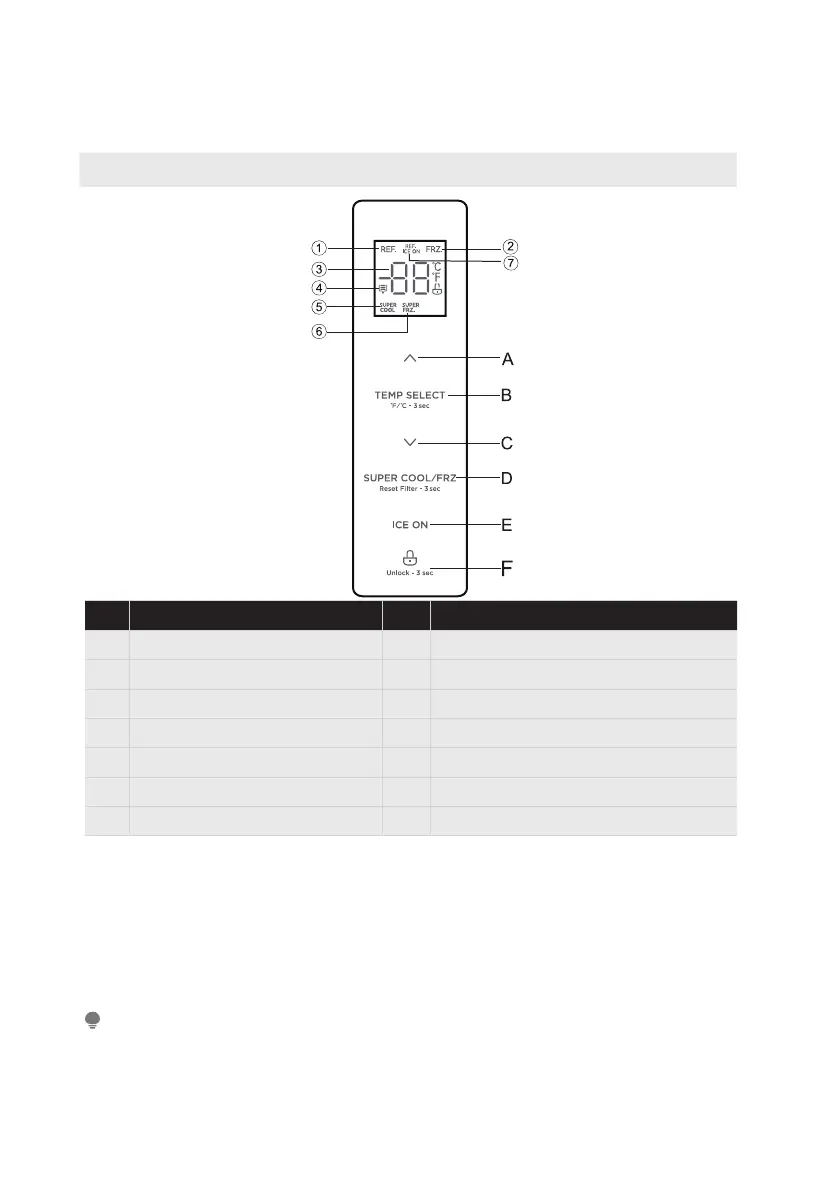
Control panal
Display Button
1
Refrigerating icon
A
Temperature up button
2
Freezer icon
B
Temperature zone selection button
3
Temperature display icon
C
Temperature down button
4
Filter replacement reminder icon
D
Super cool/Super freeze button
5
Super cool icon
E
Ice maker button
6
Super freeze icon
F
Lock/Unlock button
7
Refrigerating ice on icon
Display
• When electrify the refrigerator, the display screen will totally display for 3
seconds, meanwhile the starting up bell rings ,then the display screen enters
the normal display of operation.(if power-on for rst time, the default set
temperature of the refrigerator room and the freezer room is 39
℉
/ 0
℉
).
• It will display the set temperature of both refrigerator and freezer rooms when
there is no fault
.
ATTENTION
The actual control panel may differ from model to model.



 To Next Page