14
5. Settings Functions
To access <Settings> functions, press the <Settings> icon on control panel. There are (7)
congurable settings functions. Press the <Settings> icon repeatedly (per chart below) to scroll
through settings function options. Use chart and information below for instructions on accessing &
conguring specic settings functions.
Setting Time Clock
· Touch <Settings> icon once to access the clock setting function. The default time of 12:00 will
be displayed. At this time, to set current time, enter the correct current time by touching the
corresponding numbers on control panel. The time displayed will change from right to left on
control panel. Touch the <Start> icon to save the newly set time and exit. The <Cancel> icon can
be touched at any time to cancel the set time process.”
Setting Temperature Unit
· Touch <Settings> icon twice to access the temperature unit setting function. The control panel
should display the default temperature unit of “F” for Fahrenheit. Press <Start> to save default of
Fahrenheit. To change setting to Celsius, touch “1” when temperature default unit displays. The
display should change to “C” Celsius.”
Setting Sound Interface
· The sound settings function determines if the control panel emits sound when interfacing with icons
on the control panel. To access the sound setting function, touch <Settings> icon three times to
access the sounds settings function. The current sound setting is displayed in the middle of the
screen. “ON” indicates that the sound is enabled, “OFF” indicates that the sound is disabled.
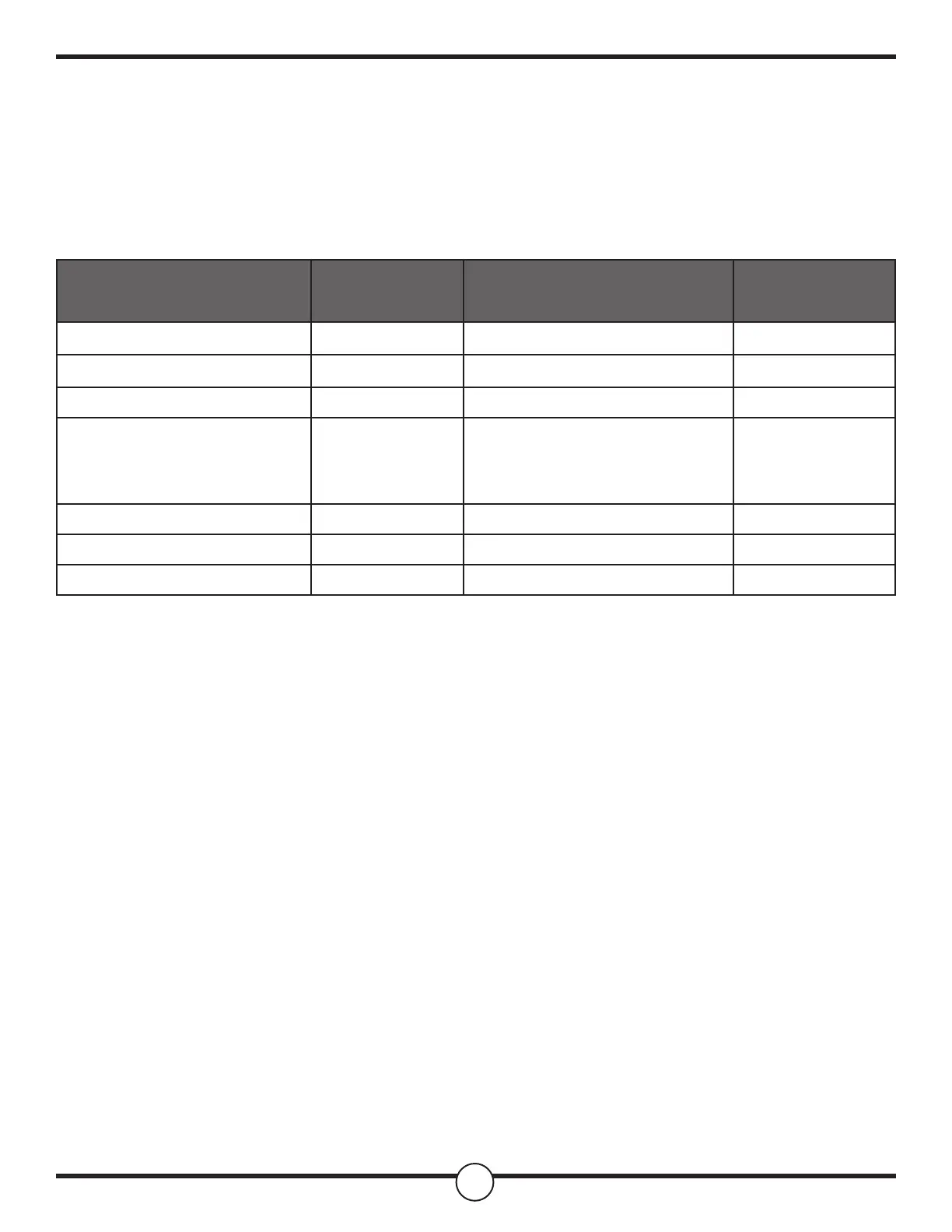
Parameter that can be set
Touch Settings
Repeatedly
Congurable Settings Default
Clock Touch 1x Set Clock 12:00 PM
Temp Unit Touch 2x Press 1: Degree F/C F
Sound Touch 3x Press 1: On/O On
Calibration Touch 4x
Press 1: to change mode then
Press 3: to increase
Press 6: decrease
00°
(-30°F - 30°F)
Demo Mode Touch 5x Press 1: On/O O
12/24H Touch 6x Press 1: 12 H / 24 H 12 H
Sabbath Touch 7x Press 1: On/O O


 To Next Page
 Loading...