26
To Set Convection Bake:
1. Press Convection BAKE once. "Set Temp or Press START" and 325°F (162°C) will be displayed.
2. Press START If you wish to convection bake at 325°F (162°C).
OR
Enter the desired temperature by pressing the number keypad, and then press START. The
temperature can be set from 170°F (77°C) to 500°F (260°C).
Note: To change the set temperature press CANCEL. Press the number keypad to enter the
desired temperature, and then press START.
Note: After selecting an Oven Mode and Temperature, you have the option to set a Cook Time and
Start Time before pressing START. See "Cook Time" and "Start Time".
3. The oven will begin preheating once Start is pressed. A tone will sound when the oven is at the set
temperature.
Note: There are two preheat modes for Convection Bake. Use Rapid Preheating when using
multiple racks. It is possible to switch between "Rapid Preheating" and "Preheating" by pressing
START during preheating.
4. Place the food in the oven and close the oven door when preheat is completed.
5. Press CANCEL when nished, and then remove food from the oven.
Note: If you used Cook Time or Start Time to set a cook time, the oven will turn o automatically.
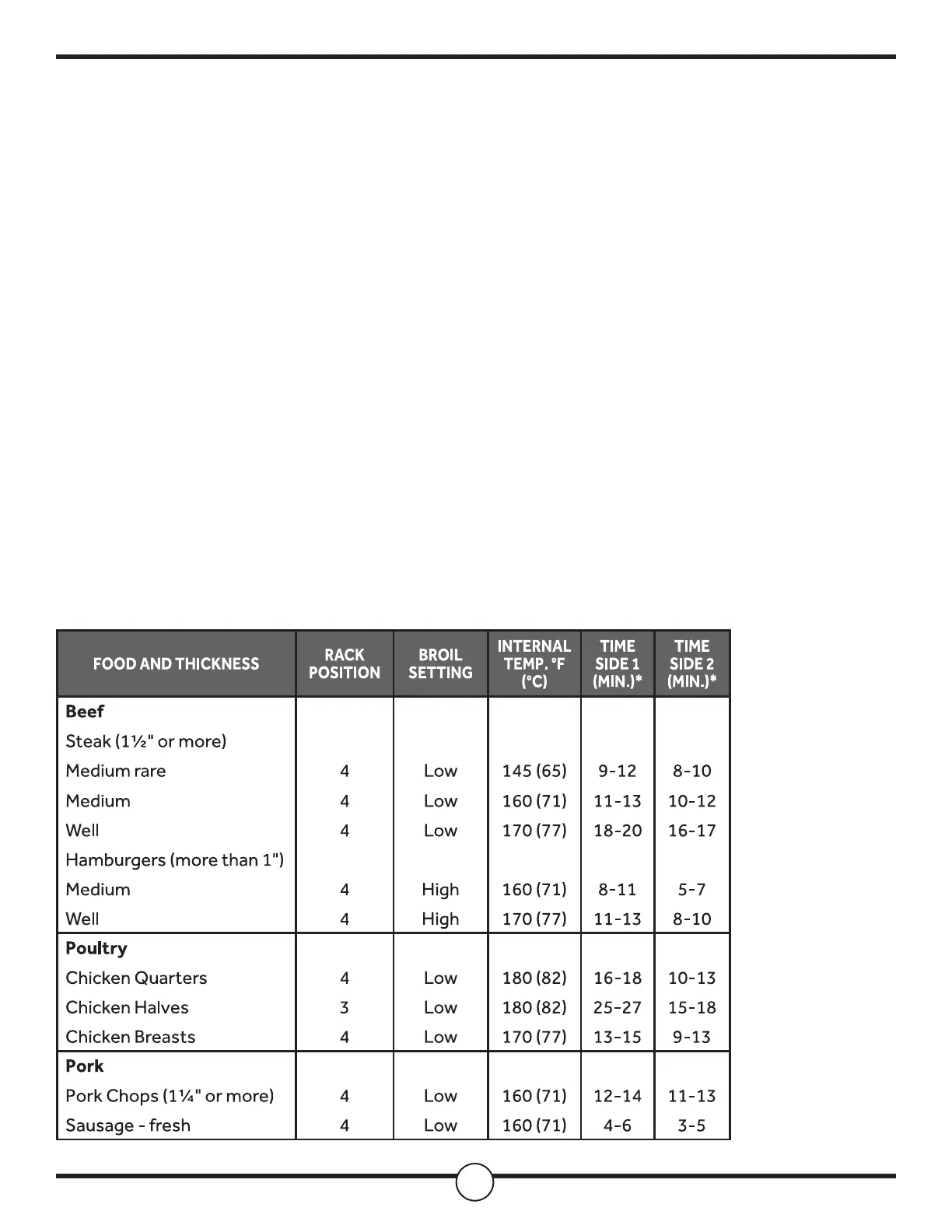
Convection Broil


 To Next Page
 Loading...