9
Control Panel
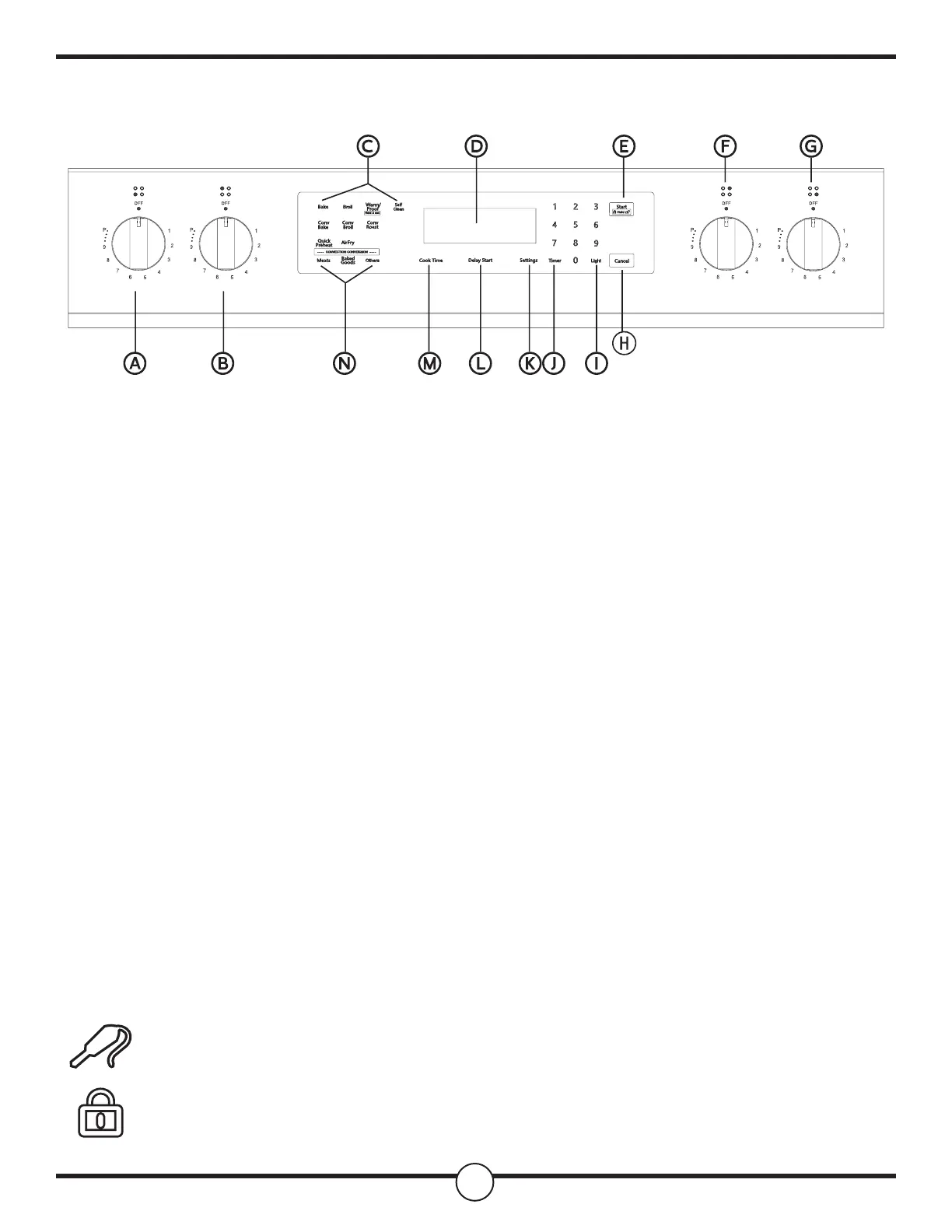
1. Key and Icon Denitions
a. Start: Start button, start operation, or start Settings to take eect.
b. Cancel: Cancel button to cancel the current operation.
c. Cook Time: Bake time button, used to set the bake time.
d. Delay Start: The appointment time button is used to set the start time.
e. Settings: Select system settings. Press repeatedly to display dierent settings.
f. Timer: Timer symbol - this symbol is displayed on the LED after the timer function is set.
g. Self Clean: Self-cleaning button to start the self-cleaning mode.
Probe Symbol - this symbol appears on the display screen when the system detects a
meat thermometer probe (optional accessory)
Child Lock Symbol - the same as locking all keys, the child lock is set, this symbol will
appear on the display.
Front Left Burner
Rear Left Burner
Oven Modes
Display
Start/Control Lock
(Hold 3 Seconds)
Rear Right Burner
Front Right Burner Cancel
Cancel
Light
Timer
Setting
Delay Start
Cook Time
Convection Conversion
a
b
c
d
e
f
g
h
i
j
k
l
m
n


 To Next Page