Need help?
Do you have a question about the Criterion CMH16G1W and is the answer not in the manual?
Provides essential safety guidelines for operating the microwave oven.
Details precautions to prevent excessive microwave energy exposure.
Covers placement, air flow, and ensuring proper setup for safe operation.
Explains the importance and method of grounding the microwave for electrical safety.
Illustrates and labels the main parts of the microwave oven.
Details the purpose and operation of each button on the control panel.
Instructions for correctly placing and using the glass turntable and roller ring.
Step-by-step guide to setting the microwave's 12 or 24-hour clock.
How to cook food using manual time settings and power levels.
Details on how to operate the oven's internal and external lights.
Instructions for using the vent fan as a range hood.
How to turn the turntable rotation on or off for different cooking needs.
Explains how to stop, clear settings, or cancel operations.
Using pre-programmed settings for common foods based on type and weight.
How to use automatic defrost settings for various food types and weights.
Steps for defrosting food not listed in Compu Defrost chart using manual settings.
Quickly add cooking time or start cooking at full power.
Continuous cooking at full power by holding the start button.
Instructions for reheating food based on weight.
How to set a timer for cooking or other purposes.
Provides on-screen hints for features like Compu Defrost, Clock, and Child Lock.
Lists microwave-safe utensils for heating and cooking.
Details utensils with limited use, such as foil and certain plastics.
Lists utensils that should not be used due to safety or damage risks.
Tips for stirring food to ensure even heating and distribution.
Guidance on placing food for optimal microwave energy absorption.
Using foil strips to prevent overcooking specific parts of food.
Importance of turning food midway through cooking for even results.
Explanation of how food continues to cook after microwave stops.
Techniques for adding moisture to food for better cooking.
Instructions for cleaning the outside surfaces of the microwave.
How to clean the microwave door and its seals.
Careful cleaning instructions for the touch control panel.
Methods for cleaning the microwave's interior surfaces.
How to clean the waveguide cover without damaging it.
A method to remove lingering cooking odors from the oven.
Instructions for cleaning the removable turntable and its support.
Procedure for cleaning the grease filters monthly.
Steps for safely replacing the oven's interior light bulb.
Guide for changing the charcoal filter every 6-12 months.
Instructions for accessing and replacing the oven light cover.
Common issues and checks to perform before requesting service.
Details on power, dimensions, capacity, and weight of the microwave.
Details of the manufacturer's limited warranty coverage and exclusions.
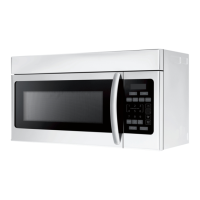
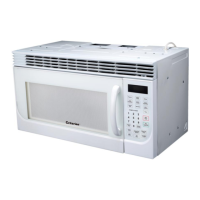
This document describes the Criterion 1.6 Cu.Ft. Over the Range Microwave, model CMH16G1W, providing a comprehensive guide to its operation, features, and maintenance.
The microwave's primary function is to heat, cook, and defrost food using microwave energy. It is designed for household use and offers various cooking modes to simplify meal preparation. The control panel features a display screen that shows cooking time, lock indicators, timers, defrost signs, and help information.
For general cooking, the microwave offers a "Time Cooking" function, allowing users to set a specific cooking duration up to 99 minutes and 99 seconds. There are six power levels available, ranging from 100% (High) to 0% (Zero), enabling precise control over the cooking process. The power level can be adjusted by pressing the "POWER LEVEL" pad and then entering the desired cooking time using the number pads. During cooking, the power level can be checked by pressing the "POWER LEVEL" pad.
The microwave also includes "Quick Cook Settings" for common food items, eliminating the need to manually program time and power. For "Popcorn" and "Fish/Seafood," users can repeatedly press the corresponding food icon pad to select the desired weight. For "Beverage," the amount can be selected using number pads 1-6. For "Baked Potato," "Fresh Vegetables," "Frozen Entrees," "Frozen Vegetables," "Ground Meat," and "Pizza," users can enter the weight using the number pads. Some "Compu Cook" programs, such as "Frozen Entrees" and "Ground Meat," will pause during cooking to remind the user to turn the food over for better results. For "Beverage," the display shows the number of cups rather than weight.
A "Compu Defrost" feature is available for automatically defrosting various foods based on their weight or number of servings. The display guides the user to select the food type (e.g., ground meat, steak chops or pork, chicken pieces or poultry, fish or seafood, roast, soup) and enter the corresponding weight or number of cups. During some defrosting programs, the oven will pause and beep to prompt the user to check the food's doneness and turn it over. After the final stage, small icy sections may remain, and it is recommended to let the food stand to continue thawing. Small, smooth strips of aluminum foil can be used to cover edges and thinner sections of food to prevent over-defrosting.
For foods not listed in the "Compu Defrost" chart or exceeding the maximum recommended weight, a "Manual Defrost" option is available, utilizing 20% microwave power. Users should periodically stop the oven to remove or separate defrosted portions and continue defrosting in 1-minute increments until fully thawed. Food should be placed on a microwave-safe dish, not a plastic container, during manual defrosting.
Convenient features include "Minute Plus/Express," which allows for quick cooking at 100% power by simply touching the pad. This feature can also extend manual cooking time by one minute per touch, up to 99 minutes and 59 seconds. The "Touch On" feature enables continuous cooking at 100% power by holding down the "START/TOUCH ON" pad, ideal for tasks like melting cheese. The oven stops immediately when the finger is removed.
A "Reheat" function uses 100% microwave power to reheat food based on the entered weight, with a range of 1 oz. to 2 lb. 5 oz. The "Kitchen Timer" allows users to set a timer up to 99 minutes and 99 seconds, which can be used independently of cooking functions.
The microwave also integrates additional functionalities such as "Light Control" for the external light, offering high, low, and off modes. The "Vent Fan Control" acts as a range hood, filtering smoke, odors, and grease. It has high, low, and off settings and automatically activates when heat rises from range surface units or burners to prevent excessive temperature rise. The "Turntable On/Off" button allows users to disable the turntable for larger dishes that may not rotate freely.
The "STOP/CLEAR" pad serves multiple purposes: clearing previous settings, canceling the timer, temporarily stopping the oven during cooking, setting the "CHILD LOCK," and canceling a program during cooking (by touching twice). The "START/TOUCH ON" pad initiates cooking and can also be used for quick full-power starts.
The "Custom Help" feature provides interactive guidance for various functions. It offers hints for "Compu Defrost" weight ranges, steps for setting the "Clock," instructions for activating and deactivating the "Child Lock" (which prevents unsupervised operation), and toggling "Sound On/Off" for audible signals.
Regarding cooking techniques, the manual emphasizes stirring foods like casseroles and vegetables to distribute heat evenly, especially from the outside to the center. Arranging evenly shaped foods with thicker parts towards the outside of the turntable ensures more even cooking. Delicate areas, such as asparagus tips, should be placed towards the center to prevent overcooking. Shielding with narrow strips of aluminum foil can prevent overcooking exposed areas like poultry wing tips or corners of baking dishes, but excessive foil should be avoided. Turning foods over midway through cooking is crucial for large items like roasts to ensure all parts are exposed to microwave energy. "Standing time" after cooking is important for foods to complete cooking internally, particularly for cakes, whole vegetables, and roasts. Liquids should be shaken or stirred after cooking. Adding a small amount of water to dry food can aid in cooking, as microwave energy is attracted to water molecules.
Maintenance instructions cover cleaning and care for different parts of the microwave. The exterior, made of precoated steel and plastic, should be cleaned with mild soap and water, then rinsed and dried with a soft cloth, avoiding abrasive cleaners. The door window should be wiped with a damp cloth, and metal parts should be cleaned frequently. The touch control panel requires gentle cleaning with a slightly dampened cloth, with the oven door open, and no chemical cleaners or scrubbing. The interior surfaces are easy to clean with a soft cloth and warm water, or baking soda/mild soap for heavier soil, again avoiding abrasive cleaners. The waveguide cover, located on the ceiling, is made of mica and should be kept clean by wiping food spatters with a damp cloth to prevent overheating or fire. The manual explicitly states, "DO NOT REMOVE THE WAVEGUIDE COVER."
For odor removal, a mixture of water, grated lemon peel and juice, and whole cloves can be boiled in the oven, then allowed to cool before wiping the interior. The turntable and its support are removable and dishwasher-safe for easy cleaning. Grease filters should be cleaned monthly by soaking them in hot water and detergent, scrubbing with a brush, rinsing, and drying. Ammonia or alkali should not be used as they can damage the filter material.
Instructions for replacing light bulbs are also provided, requiring disconnection of power, removal of a screw to access the light cover, and using a bulb no larger than 30 watts. The charcoal filter, used for non-vented installations, should be changed every 6 to 12 months. This involves removing a louver mounting screw, pushing down on tabs, pulling the louver away, changing the filter, and reassembling.
 General
| Type | Countertop |
|---|---|
| Capacity | 1.6 cu. ft. |
| Power Output | 1000 Watts |
| Turntable | Yes |
| Turntable Diameter | 12.4 inches |
| Color | White |
| Preset Programs | Yes |
| Child Lock | Yes |
| Defrost Function | Yes |
| Timer | Yes |
| Cooking Levels | 10 |
| Door Handle | Push Button |

 To Next Page