EasyManua.ls Logo

Crosley CR32D - User Manual

Crosley CR32D
7 pages
Print Icon
To Next Page IconTo Next Page
Loading...
CR32D
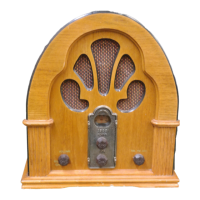
Cathedral
Instruction Manual
Questions, problems, missing parts?
Before returning to the store, call Customer Service
8 a.m. 6 p.m., EST, Monday Friday
1-888-CROSLEY
www.crosleyradio.com
Question and Answer IconNeed help?

Do you have a question about the Crosley CR32D and is the answer not in the manual?

Summary

Safety Instructions

Product Description

Operation

Initial Setup

Steps for setting up the unit on a flat surface and connecting the power adapter and antenna.

Radio Operation

Instructions for turning on the unit, selecting radio bands, tuning stations, and adjusting volume.

Bluetooth Operation

Guide to pairing your audio device with the unit via Bluetooth for streaming music.

CD Playback

CD Playback Operation

Instructions for playing CDs, including opening the tray, starting playback, pausing, and stopping.

Programmed Playback

How to program tracks for custom playback sequences on the CD player.

Troubleshooting

Summary

Safety Instructions

Product Description

Operation

Initial Setup

Steps for setting up the unit on a flat surface and connecting the power adapter and antenna.

Radio Operation

Instructions for turning on the unit, selecting radio bands, tuning stations, and adjusting volume.

Bluetooth Operation

Guide to pairing your audio device with the unit via Bluetooth for streaming music.

CD Playback

CD Playback Operation

Instructions for playing CDs, including opening the tray, starting playback, pausing, and stopping.

Programmed Playback

How to program tracks for custom playback sequences on the CD player.

Troubleshooting

Overview

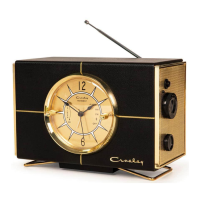
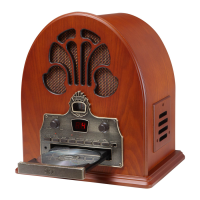
The Crosley CR32D Cathedral is a vintage-style radio with modern functionalities, offering AM/FM radio, CD playback, and Bluetooth connectivity. Its design evokes classic cathedral radios, featuring a wooden cabinet and an illuminated tuner dial.

Function Description:

The CR32D serves as a multi-source audio player. It allows users to tune into AM and FM radio stations, play audio CDs, and stream music wirelessly via Bluetooth from compatible devices. The unit incorporates an On-Off Switch/Volume Knob for power control and volume adjustment, a Tuning Knob for radio station selection, and a Function Switch to select between CD, Radio, and Bluetooth modes.

For radio operation, the device includes an AM/FM Button to switch between bands. The Tuner Dial visually indicates the selected frequency. An FM wire antenna is provided for improved FM reception, while the AM antenna is built internally.

CD playback is managed through a dedicated CD Drawer, along with Play/Pause, Stop, Forward Skip, Backward Skip, and Open/Close buttons. A Play/Pause Indicator illuminates during playback and flashes when paused. The unit also supports programmed CD playback, allowing users to create a custom sequence of up to 20 tracks using the Program Button and Program Indicator. The LED display shows track numbers and programming status.

Bluetooth functionality enables wireless audio streaming. When in Bluetooth mode, the Tuner Dial light changes to blue, indicating readiness for pairing. Users can connect their audio devices by searching for "Crosley CR32".

For personal listening, a Headphone Jack is included. The device also features a Speaker for integrated audio output.
Important Technical Specifications:

  • Frequency Range:
    • AM: 520 - 1710 KHz
    • FM: 87.5 - 108.5 MHz
  • Power Consumption: 14W
  • Power Source: AC-DC adapter 12V 1A
  • Speaker: 3" 8Ω 3Wx2
  • Bluetooth Version: 4.2

Usage Features:

  • Easy Setup: Place on a flat, stable surface, connect the AC adapter, and untie the FM antenna.
  • Intuitive Controls: Clearly labeled buttons and knobs for power, volume, tuning, function selection, and CD control.
  • Radio Tuning: Manual tuning with a dedicated knob and visual tuner dial. AM/FM band selection.
  • CD Playback: Supports standard audio CDs. Features include play, pause, stop, skip forward/backward, and fast forward/backward search.
  • Programmed CD Playback: Allows programming up to 20 tracks in a desired sequence.
  • Bluetooth Streaming: Seamless wireless connection to Bluetooth-enabled audio devices for music playback. The Tuner Dial light changes color to indicate Bluetooth mode.
  • Headphone Output: For private listening.
  • Energy Saving (ERP Standard): Some models comply with ERP energy-saving standards, automatically cutting off power if there is no audio input for 20 minutes. To resume playing, the unit needs to be turned off and on again.

Maintenance Features:

  • Antenna Management: The FM wire antenna can be moved for optimal reception. The AM antenna is internal, and rotating the unit may improve AM reception.
  • Troubleshooting Guide: The manual provides solutions for common issues such as no power (check power adapter, outlet), no sound (check Function Knob position, volume level), and CD playback problems (check function mode, CD condition, placement, and file type compatibility).
  • Service Information: Users are advised not to attempt self-service and to refer all servicing to qualified personnel to avoid hazards and voiding warranty.
  • Safety Instructions: Comprehensive safety guidelines are provided, including warnings about water proximity, power source requirements, polarized plug safety, power cord protection, avoiding overload, preventing object insertion into openings, liquid spills, and proper handling of the unit.
  • Packaging Retention: Users are encouraged to retain original packaging materials for exchange or return purposes.
  • Customer Support: A toll-free customer service number and website are provided for questions, problems, or missing parts.

Crosley CR32D Specifications

General IconGeneral
BrandCrosley
ModelCR32D
CategoryRadio
LanguageEnglish

Related product manuals