
 Need help?
Do you have a question about the Crosley Cruiser Premier CR8005G and is the answer not in the manual?
Steps for placing the unit and connecting the power adapter.
How to connect the unit to a stereo system using RCA jacks.
Connecting an audio device to play music through the unit's speakers.
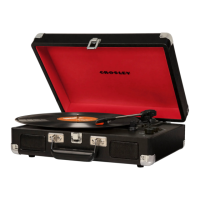
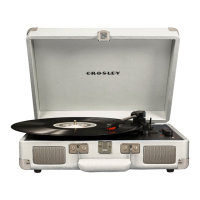
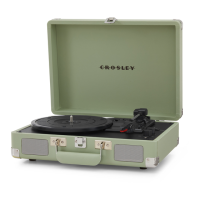
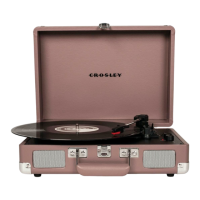
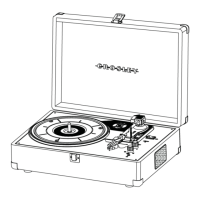
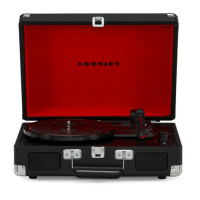
The Crosley CR8005G Cruiser Premier is a portable turntable designed for playing vinyl records and offering various audio connectivity options. Its compact, suitcase-style design makes it easy to transport and set up in different locations.
The primary function of the Cruiser Premier is to play vinyl records at multiple speeds: 33 1/3, 45, and 78 RPM. It features a built-in speaker system, allowing for immediate audio playback without the need for external components. The turntable also includes an Aux In Jack, enabling users to connect external audio devices like smartphones or MP3 players and play music through the turntable's speakers. Additionally, it is equipped with RCA Jacks for connecting to an external stereo system or powered speakers, offering enhanced audio output. A headphone jack is also provided for private listening.
A notable feature of this model is its Bluetooth output capability. This allows the turntable to transmit audio wirelessly to other Bluetooth-enabled devices, such as Bluetooth headphones or speakers, providing flexibility in how the audio is enjoyed. Conversely, it also supports Bluetooth input, meaning you can stream music from your Bluetooth-enabled audio device to the turntable's built-in speakers.
The turntable incorporates a tonearm with a lift lever for gentle placement and removal of the stylus on records, helping to protect both the record and the stylus. An auto-stop switch is included, which, when activated, automatically stops the platter from spinning once a record has finished playing. The pitch control knob allows for fine-tuning the playback speed, enabling users to increase or decrease the speed by approximately 10%.
To begin using the turntable, it should be placed on a flat and stable surface, free from vibrations. After connecting the AC adaptor to the power jack, the unit can be turned on by rotating the On/Off Volume Knob. The tonearm's tie-wrap and stylus protector must be removed before playing a record. The speed switch should be set to match the record's RPM (33 1/3, 45, or 78). For 45 RPM records, the included 45 RPM adapter should be placed on the turntable spindle.
To play a record, the tonearm's hold-down clip needs to be released. The tonearm lift lever is then used to raise the tonearm, allowing it to be gently moved over the desired starting point on the record. Lowering the tonearm lever will slowly descend the tonearm onto the record, initiating playback. Once the record finishes, the tonearm can be raised again with the lever and returned to its rest, after which the hold-down clip should be re-engaged to secure the tonearm when not in use.
For external audio connections, the RCA Jacks provide analog line-level signals suitable for powered speakers or a stereo system's input. The red plug connects to the right channel, and the white plug to the left. It's important to note that these jacks are not designed for passive speakers, which would result in very low volume. The Aux In Jack allows for a direct wired connection from an audio device using a 3.5mm auxiliary cable. When an auxiliary cable is plugged in, it automatically overrides the turntable function.
The Bluetooth input feature is activated by setting the function switch to Bluetooth mode. The unit will emit an activation sound, and then users can search for "Crosley CR8005G" on their audio device and pair with it. A confirmation sound indicates successful pairing, after which music can be streamed from the device to the turntable. For Bluetooth output, the turntable's function switch is set to the middle position. The external Bluetooth receiving device (e.g., headphones, speakers) should be put into pairing mode, and the turntable will automatically connect to it. A confirmation sound will signal a successful connection. If pairing fails, it's advisable to ensure the external audio device is not already paired or connected to another Bluetooth device.
The auto-stop switch can be toggled ON or OFF. If the turntable stops playing prematurely with auto-stop ON, setting it to OFF may resolve the issue. The pitch control knob allows for minor adjustments to the playback speed; turning it clockwise increases speed, while counter-clockwise decreases it.
Proper maintenance is crucial for the longevity and optimal performance of the Cruiser Premier. Users should avoid touching the stylus tip with their fingers and prevent it from bumping against the turntable mat or the record's edge, as this can cause damage. The stylus should be cleaned regularly using a soft brush, moving it from back to front only.
Records themselves should be cleaned to remove dust or grease, using a dedicated record cleaning brush and solution. The turntable lid and cabinet can be cleaned with a slightly damped microfiber cloth. It is important to avoid using cleansers that contain alcohol, benzene, or other harsh chemicals, as these can damage the paint and finish of the turntable.
The stylus (needle) is a consumable part and will need replacement over time. To remove the old needle, gently pull down its front edge, then pull it forward and out. Installing a new needle involves positioning it with the tip facing down, aligning its back with the cartridge, and inserting its front end at a downward angle. It should then be gently lifted upward until it snaps into place. Crosley offers a range of cleaning accessories, and users can consult their retailer or the Crosley website for more information on these products.
The device also incorporates an ERP energy-saving standard. If there is no audio input for 20 minutes, the unit will automatically power off to conserve energy. To resume playing, the power must be turned off and then on again. This feature helps in reducing power consumption when the device is not actively in use.
 General
| Type | Portable Turntable |
|---|---|
| Drive Type | Belt Drive |
| Speakers | Built-in stereo speakers |
| Bluetooth | Yes |
| RCA Output | Yes |
| Headphone Jack | Yes |
| Mechanism | Manual |
| Platter | Plastic |
| Auxiliary Input | Yes |
| USB Recording | No |
| Speeds | 33 1/3, 45 RPM |
| Material | Wood |
| Cartridge | Ceramic |
| Stylus | Diamond |
| Finish | Various finishes available |



 To Next Page