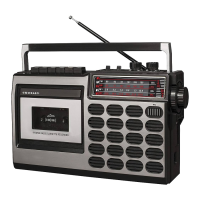
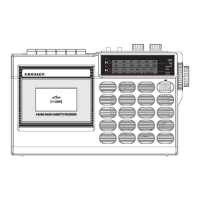
The Crosley CT201A is a versatile cassette player designed for a range of audio functions, including playback, recording, and radio reception, with additional features for modern connectivity like Bluetooth, USB, and SD card support. It's a portable unit, capable of operating on both AC power and batteries, making it suitable for various environments.
Function Description:
The primary function of the CT201A is to play cassette tapes. Users can insert prerecorded cassettes into the cassette tray and initiate playback using the dedicated play button. The device also supports fast forward and rewind functions, allowing for quick navigation through tape content. To stop playback or eject a cassette, a stop/eject button is provided.
Beyond playback, the CT201A offers extensive recording capabilities. It can record audio from multiple sources onto a cassette tape. These sources include:
- Microphone to Tape: Users can record sounds through the built-in microphone directly onto a cassette tape.
- Radio to Tape: Radio broadcasts (both FM and AM) can be recorded onto a cassette tape.
- USB/SD to Tape: Audio files from a USB device or SD memory card can be recorded onto a cassette tape.
- Bluetooth to Tape: Audio streamed via Bluetooth from an external device can be recorded onto a cassette tape.
- AUX to Tape: Audio from an external device connected via the Aux In jack can be recorded onto a cassette tape.
For all tape recording functions, a record button initiates the process, and a pause button allows for temporary interruption. To prevent accidental overwriting of existing recordings, users are advised to break off the cassette tab from side A or B.
The device also functions as a radio receiver, supporting both FM (87.5-108 MHz) and AM (520-1710 KHz) bands. A tuning knob allows users to select desired radio stations. For optimal FM reception, a telescopic antenna is included and can be adjusted.
Modern connectivity is a key feature of the CT201A. It includes a Bluetooth 5.0 module, enabling wireless audio streaming from compatible devices. Once paired, users can play music from their smartphone or other Bluetooth-enabled devices through the unit's speakers.
The CT201A also supports USB and SD card playback and recording. Users can insert a USB device into the USB port or an SD memory card into the SD card slot to play audio files. Navigation through tracks is facilitated by forward and backward skip buttons, with press-and-hold functionality for fast searching. Playback can be paused or resumed using a dedicated play/pause button.
Furthermore, the device allows for recording from various sources directly to a USB device or SD memory card. These recording functions include:
- Radio to USB/SD: Current radio programs can be recorded onto a USB device or SD memory card.
- Cassette to USB/SD: The audio from a playing cassette can be recorded onto a USB device or SD memory card.
- Microphone to USB/SD: Sounds captured by the microphone can be recorded onto a USB device or SD memory card.
- Bluetooth to USB/SD: Bluetooth audio playback can be recorded onto a USB device or SD memory card.
- AUX to USB/SD: Audio from an external device connected via the Aux In jack can be recorded onto a USB device or SD memory card.
For USB/SD recording, a long press of the Record/Repeat button initiates the process, indicated by a quickly flashing red light. A stop record button is used to end the recording. It's important to note that USB/SD recording will capture any background noise.
The unit features a sound switch for selecting between mono and stereo output, as well as a bass boost option. Volume, bass, and treble can be adjusted using dedicated knobs. A level display provides visual feedback on audio levels.
Important Technical Specifications:
- Power: AC 120V / 60Hz
- Battery Supply: 6 x "D" (UM-1) 1.5V batteries (not included)
- Power Output: 14 W
- Power Consumption: 30 W
- Speakers: 2 x 5-inch speakers
- Frequency Range (AM): 520 - 1710 KHz
- Frequency Range (FM): 87.5 - 108 MHz
- Bluetooth Version: 5.0
- USB/SD Card Support: Up to 32 GB (or smaller) USB or SD memory card
- Connectivity: Headphone Jack, Aux Jack, USB Port, SD Card Slot
Usage Features:
- Portability: The option for both AC power and battery operation (6 x D-cell batteries) makes the unit highly portable.
- Multi-source Playback: Supports cassette tapes, FM/AM radio, Bluetooth streaming, and USB/SD card playback.
- Multi-source Recording: Records from microphone, radio, USB/SD, Bluetooth, and AUX to cassette tapes, and from radio, cassette, microphone, Bluetooth, and AUX to USB/SD.
- User-Friendly Controls: Clearly labeled buttons and knobs for functions like play, record, fast forward, rewind, pause, stop/eject, volume, bass, treble, and tuning.
- Level Display: A visual meter helps monitor audio input levels during recording and playback.
- Telescopic Antenna: Improves FM radio reception.
- Headphone Jack: Allows for private listening.
- Auxiliary Input: Enables connection of external audio devices.
- Auto Stop: A feature for cassette playback, likely to prevent tape damage at the end of a side.
- Power LED and Stereo LED: Provide visual indicators for power status and stereo reception.
- ERP Energy Saving Standard: Some models may comply with this standard, leading to automatic power cut-off after 20 minutes of no audio input. To resume, the unit needs to be turned off and on again.
Maintenance Features:
- General Care: The manual advises placing the unit on a flat, stable, and vibration-free surface.
- Power Cord Protection: Users are instructed to protect the power cord from being walked on or pinched.
- Ventilation: Slots and openings in the cabinet are provided for ventilation and should not be blocked or covered to prevent overheating.
- Cassette Care: Remove cassettes from the holder when not in use.
- Safety Instructions: Emphasizes not attempting to service the product oneself and referring all servicing to qualified personnel. It also warns against pushing objects into openings or spilling liquids on the product.
- Polarized Plug: Instructions are provided for ensuring proper insertion of the polarized plug into a power outlet.
- Lightning Storm/Long Periods of Disuse: Unplug the product during these times.
- Disconnect Device: The mains plug/appliance coupler serves as a disconnect device and should remain readily operable.

 Need help?
 General

 To Next Page