Need help?
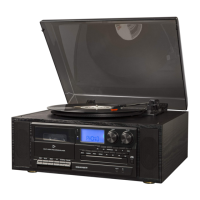
Do you have a question about the Crosley Eclipse CR7014A and is the answer not in the manual?
Essential steps to set up the unit, including placement and power connection.
Instructions for activating and replacing the battery in the remote control.
Outputs analog line-level signals for connection to audio systems or powered speakers.
Outputs amplified speaker-level signals for connection to passive speakers.
Details the automatic platter stopping feature at the end of a record and troubleshooting.
Step-by-step guide for safely removing and installing the turntable needle.
Guide to programming playback order and selecting specific tracks on a CD.
Records audio from the radio directly onto a cassette tape.
Records audio from USB or SD devices onto a cassette tape.
Records audio from a CD onto a cassette tape.
Records audio from a record player onto a cassette tape.
Records audio from a Bluetooth-paired device onto a cassette tape.
Records audio from an auxiliary input device onto a cassette tape.
Procedure to erase individual audio files or tracks from USB/SD storage.
Procedure to erase entire folders of audio files from USB/SD storage.
Procedure to erase all audio files and tracks from USB/SD storage.
Records audio from the radio to USB/SD media.
Records audio from a cassette tape to USB/SD media.
Records audio from a turntable to USB/SD media.
Records audio from a CD to USB/SD media.
Records audio from an auxiliary device to USB/SD media.
Records audio from a Bluetooth device to USB/SD media.
 General
| Brand | Crosley |
|---|---|
| Model | Eclipse CR7014A |
| Type | Home Theater System |
| Audio Output | Stereo |
| Input Voltage | 120V |
| Frequency Response | 20Hz - 20kHz |
| Connectivity | Bluetooth, RCA |
| Features | Built-in Bluetooth |
| Speeds | 33 1/3, 45 RPM |
| Power Output | 2 x 15W |
| Speaker Configuration | 2 x Full Range Speakers |

 To Next Page