42
EN
GETTING STARTED
Installing the sim card
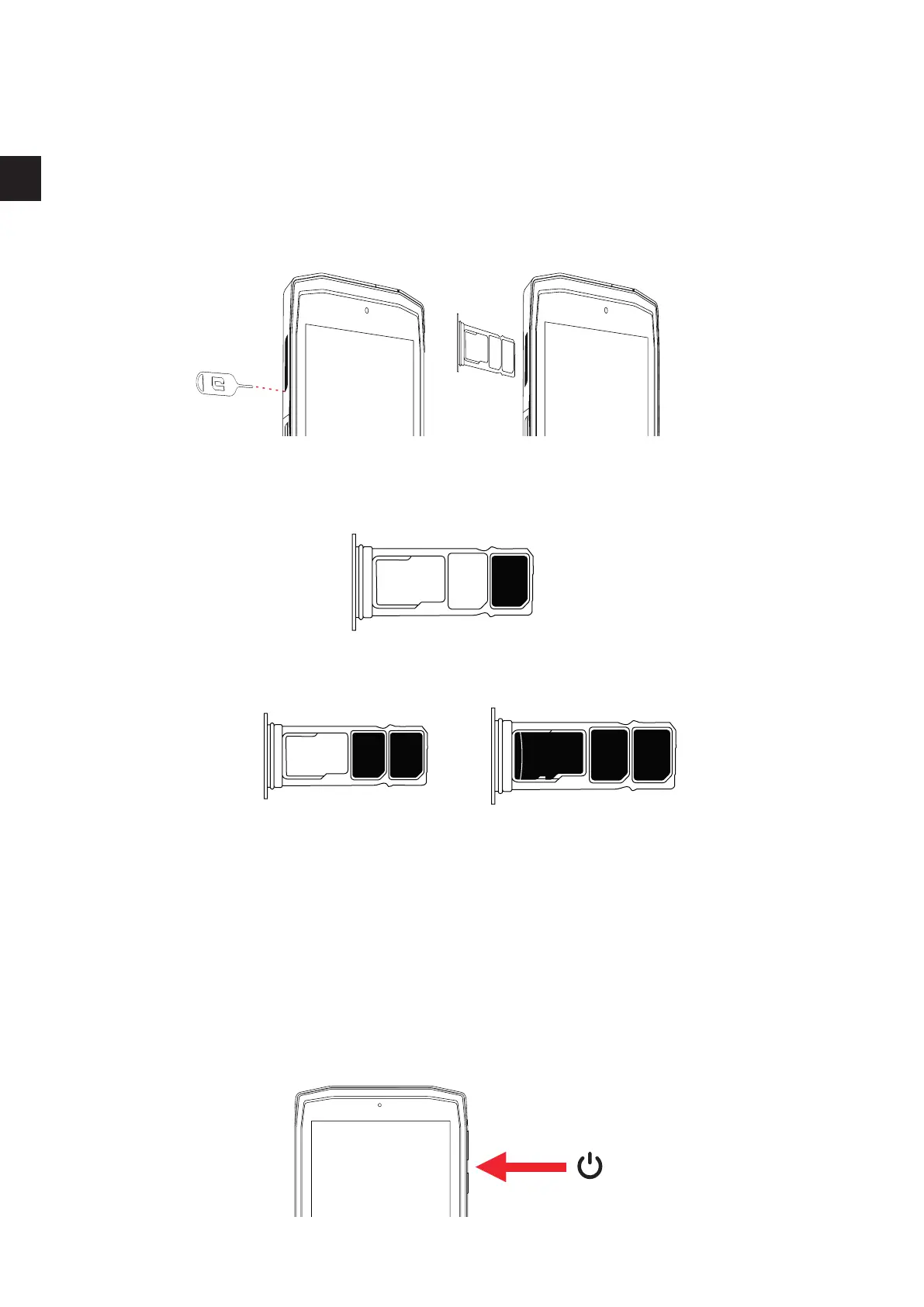
1. Check that your device is turned o
If not, turn the power o by pressing the On/O button
2. Open the SIM tray using the SIM eject tool provided
a. Take the tool provided
b. Insert it into the hole, as shown below, to eject the SIM tray from its housing.
3. Pull out the tray completely with the metal side facing upwards
4. Insert the SIM cards
a. Insert the SIM card, face down, in the smallest compartment
b. If you wish, insert a second SIM card (or an SD card up to 512GB), face down, in the
biggest compartment.
5. Insert the tray back in the tablet
a. Check that the cards are properly aligned.
b. Check that the tray is properly aligned with the slot in the tablet when you insert it.
c. Insert the tray and push it in, as indicated below.
Please note:To ensure that your tablet is watertight, make sure that the tray is
completely inserted and locked.
SWITCHING THE TABLET ON AND OFF
sim 1
sim 1sim 2
micro sd
sim 1sim 2


 To Next Page