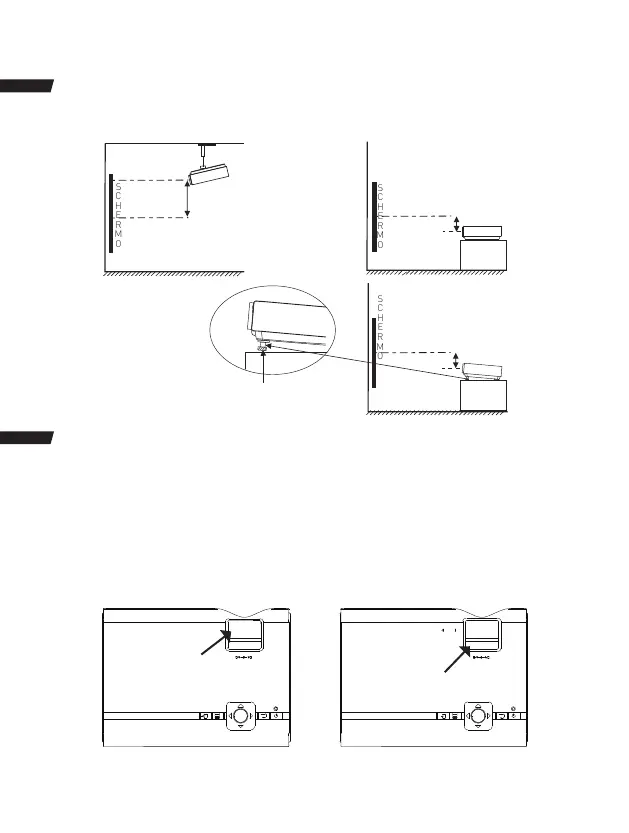
Regolare la Posizione Verticale
Seguire le immagini per regolare la posizione verticale.
SCHERMO
PROIETTORE
DIMENSIONE
VERTICALE
SCHERMO
PROIETTORE
DIMENSIONE
VERTICALE
SCHERMO
PROIETTORE
DIMENSIONE
VERTICALE
Regolare questa manopola (Manopola del regolamento
di angolo) per mettere l’angolo di visualizzazione più alto.
Regolare il Fuoco e la Chiave di Volta
Follow below picture to adjust the focus and trapezoidal screen.
1. Adjust the focus by turning the knob while observing the image pixels near the center of the
screen. Optimal focus is obtained when the pixels are clearly visible. Depending on the projected
screen size, the focus near the screen edges may be less sharp than the screen center.
2. Keystone image is created when the projector beam is projected to the screen in an angle.
Keystone correction will restore the distorted image to a rectangular or square shape.
Manopola di Regolamento
Angolo
KEYSTONE
①
OK
Malopola di Regolamento
Trapezoidale
KEYSTONE
FOCUS
②
OK
71


 To Next Page