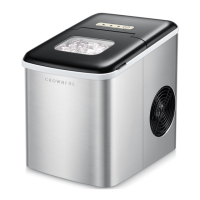
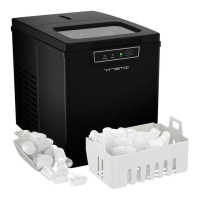
This document is a user manual for the CROWNFUL Smart Ice Maker, model IM2200BA-UL. It provides comprehensive information on the device's operation, maintenance, and smart features.
Function Description
The CROWNFUL Smart Ice Maker is designed to produce ice cubes for household and kitchen needs. It features smart connectivity, allowing users to control and monitor the ice maker remotely via the CROWNFUL mobile app. The device offers two ice cube sizes (small and large) and includes a self-cleaning program. It is equipped with indicators for various statuses such as "Ice Full," "Add Water," "Ice Making," and "Clean" mode, as well as Wi-Fi connectivity status.
Important Technical Specifications
- Model: IM2200BA-UL
- Water Reservoir Capacity: 2.8L / 94.6oz
- Production in 24H: 33lbs
- Power Source: 120V/60Hz
- Rated Current: 1.8A
- Rated Power: 130W
- Refrigerant: R600a / 27.5g (0.0605LBS)
- Design Pressure: Upper limit: 290Psig / Lower limit: 138Psig
- Foaming Agent: C5H10
- Net Weight: 11KG
- Housing: SUS430+ABS
- Unit Size (WDH): 9.69 * 15.75 * 16.93 inches
- Appliance Climate: ST/SN/N/T
- Class: I
- Connectivity: Bluetooth® and Wi-Fi® (2.4G network only)
Usage Features
The ice maker is designed for ease of use with both a physical control panel and a smart app.
Control Panel:
- Large Ice / Small Ice Buttons: Selects the desired ice cube size. Indicators light up green when selected.
- Clean Button: Initiates the self-cleaning program. Indicator lights up green when running.
- ON/OFF Button: Starts or stops the appliance.
- SELECT Button: Used to select ice size and cleaning mode, and for Wi-Fi pairing.
- Wi-Fi Indicator: Solid green when connected to the network, blinks green when waiting to pair with the app.
- Add Water Indicator: Lights up red when the water reservoir is low.
- Ice Full Indicator: Lights up red when the ice basket is full.
Smart App Control (CROWNFUL App):
- Remote Control: All functions can be controlled remotely.
- Status Check: Monitor ice full status, water level, and ice making process.
- Schedule Setting: Customize ice making schedules, including ice size, start/end times, and specific days.
- Third-Party Voice Control: Compatible with Amazon Alexa and Google Assistant™ for voice commands.
- Pairing: The app guides users through connecting the ice maker via Bluetooth® and Wi-Fi®. Troubleshooting steps are provided for connection issues.
First-Time Use:
- Unpack and check all accessories.
- Ensure the ice maker is level and on a stable surface, with at least 6 inches (15cm) clearance on all sides for ventilation.
- Allow the unit to rest for 2 hours after transportation before powering on.
- Fill the water reservoir with room temperature or lower potable water, not exceeding the "MAX" water level mark.
- Clean the appliance before first use following the "CLEANING AND MAINTENANCE" instructions.
Ice Making Process:
- Ensure the drain plug is closed.
- Plug the ice maker into a grounded 120V/60Hz outlet.
- Connect to the CROWNFUL App.
- Open the top lid, remove the ice basket, fill the water reservoir, replace the ice basket, and close the lid.
- Select ice size (small or large) using the "SELECT" key.
- Press the "ON/OFF" key to start ice making.
- The ice-making cycle takes 7-15 minutes.
- The ice maker automatically stops when the ice basket is full (Ice Full indicator lights up red) or when water is low (Add Water indicator lights up red).
- Ice should be used promptly or transferred to a freezer as the ice maker is not a freezer.
Maintenance Features
Regular cleaning is recommended to ensure optimal performance and ice taste.
- Weekly Cleaning:
- Stop the ice-making cycle and unplug the unit.
- Drain any residual water from the ice tray by gently pushing it back.
- Move the appliance forward (60mm from the table) and open the drain plug to empty excess water.
- Close the drain plug, fill the water reservoir with clean water, press "SELECT" until the "Clean" indicator flashes, then press "ON/OFF" to run the self-cleaning program for 6 minutes.
- After cleaning, open the drain plug and empty the water.
- Remove the ice basket.
- Clean the interior with a soft cloth soaked in warm water and vinegar, then rinse with clean water and drain.
- Wash the ice basket and ice scoop with soap and warm water, then rinse and dry.
- Clean the exterior with a soft damp cloth and mild dishwashing soap if needed.
- Storage: If not used for a long time, empty the water reservoir and dry the unit thoroughly before storage.
- Important Cleaning Notes: Do not use organic solvents, boiled water, detergents, strong acids, or strong alkalis for cleaning.
Safety Instructions
The manual emphasizes several safety precautions:
- Always use a grounded 120V/60Hz outlet.
- Avoid extension cords unless necessary and ensure they meet specifications.
- Do not operate with damaged cords or plugs.
- Do not immerse the product in water.
- Unplug before cleaning or when not in use.
- Do not use microbiologically unsafe water.
- Do not clean with flammable fluids.
- Do not overturn the ice maker; if overturned, let it stand for two hours before powering on.
- Do not place flammable or explosive articles in the ice maker.
- Ensure proper ventilation (6-inch clearance on all sides).
- Do not damage the refrigerant circuit.
- Do not store explosive substances in the appliance.
- Keep ventilation openings clear.
- Supervise children when the appliance is in use.
Warranty and Support
- Warranty: 1-year warranty from the date of purchase, covering defects in materials or workmanship.
- Customer Support: Contact support@crownful.com or visit www.crownful.com for product questions, concerns, or warranty claims.

 Need help?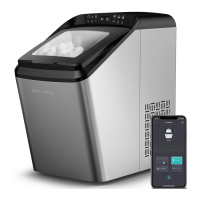

 To Next Page
 General