EasyManua.ls Logo

Crumar Spirit - Sound Creation Techniques

Crumar Spirit
31 pages
Print Icon
To Next Page IconTo Next Page
To Previous Page IconTo Previous Page
Loading...
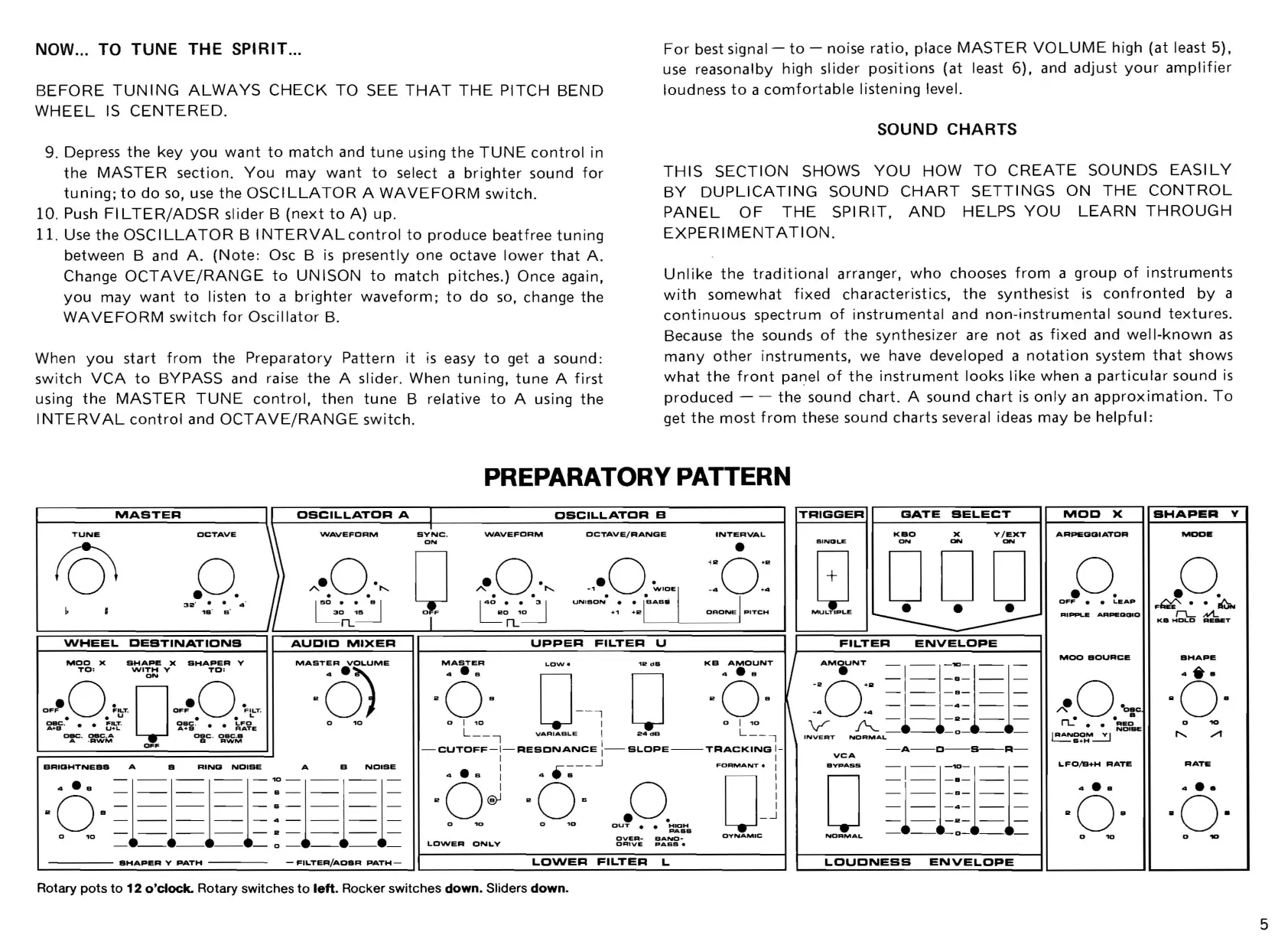
NOW ... TO TUNE THE SPIRIT ...
BEFORE
TUNING
ALWAYS
CHECK
TO
SEE
THAT
THE
PITCH
BEND
WHEEL
IS
CENTERED.
9. Depress
the
key
you
want
to
match
and
tune
using
the
TUNE
control
in
the
MASTER
section.
You
may
want
to
select a
brighter
sound
for
tuning;
to
do
so,
use
the
OSCILLATOR
A
WAVEFORM
switch.
10
. Push
FILTER/ADSR
slider B
(next
to
A)
up.
11. Use
the
OSCILLATOR
B
INTERVALcontrol
to
produce
beatfree
tuning
between
Band
A.
(Note:
Osc B
is
presently
one
octave
lower
that
A.
Change
OCTAVE/RANGE
to
UNISON
to
match
pitches.) Once again,
you
may
want
to
I isten
to
a
brighter
waveform;
to
do
so,
change
the
WAVEFORM
switch
for
Oscillator
B.
When
you
start
from
the
Preparatory
Pattern
it
is
easy
to
get a sound:
switch
VCA
to
BYPASS
and raise
the
A slider. When
tuning,
tune
A
first
using
the
MASTER
TUNE
control,
then
tune
B relative
to
A using
the
I
NTERVAL
control
and
OCTAVE/RANGE
switch
.
For
best
signal-
to
- noise
ratio,
place
MASTER
VOLUME
high
(at
least 5).
use
reasonalby high slider
positions
(at
least
6).
and
adjust
your
amplifier
loudness
to
a
comfortable
listening
level.
SOUND CHARTS
THIS
SECTION
SHOWS
YOU
HOW
TO
CREATE
SOUNDS
EASILY
BY
DUPLICATING
SOUND
CHART
SETTINGS
ON
THE
CONTROL
PANEL
OF
THE
SPI
RIT,
AND
HELPS
YOU
LEARN
THROUGH
EXPERIMENTATION.
Unlike
the
traditional
arranger,
who
chooses
from
a
group
of
instruments
with
somewhat
fixed
characteristics,
the
synthesist
is
confronted
by
a
continuous
spectrum
of
instrumental
and
non-instrumental
sound
textures.
Because
the
sounds
of
the
synthesizer are
not
as
fixed
and
well-known
as
many
other
instruments,
we have developed a
notation
system
that
shows
what
the
front
panel
of
the
instrument
looks
like
when a
particular
sound
is
produced
- -
the
sound
chart.
A sound
chart
is
only
an
approximation.
To
get
the
most
from
these sound charts several ideas
may
be
helpful:
PREPARATORY
PATTERN
~
________
~_A
__
S_T_E_R
________
~I~_o==S=C~I=L=L=~~T~O~R~A~_~r
____________
~O~S=C~IL~L~~~T~O~R~B~
__________
~
\'
TRIGGER
~----------------~
GATE
SELECT
TUNE
OCTAVE
'NAVE
FORM
SYNC
.
VtlAVEFDRM
ON
OCTAVE/RANGE
INTERVAL
KBO
X
ON
v /
eXT
ON
-
_0.
}
"-.0:,,
[)
"-.0.·,,
.,-0.
~'OE'
I
:: 0
1
~:
I
50
_,.
._
B I I
40
_.
._
3 I
UN,aON·..
l
-sAa"
~~
,
~~,;=~~~~3~2~
'
='B~
'
=B~
'
=4~!J~==~
~
~3~~
~
~~==~OhiF====~~~~~0nL~'
~
~~======.='==
·
~~'
I
~~~~O~R~O_~=P'T=C=H=d
1;1
000
WHEEL
DESTINATIONS
AUDID
~IXER
UPPER
FILTER
U
FILTER
ENVELOPE
MOD
X
SHAPE
X
BHAPER
V
TO
:
WITH
V
TO:
ON
-0· 0 -0·
O~F
F"-T
.
OFF
FILT.
u
••
L
~
.
~,!-~
.
i'ffi
'
~~~E
a.c
.
oac
.A
oec
.
Olle
.•
A ·
AWM
a
RWM
.,...
a
'0
BRI[JHTNEBa
A 8
RING
NOIBE
A
B
NOISE
..
0
4
-B
a 1
111
:
111
-
--
--
--
-4-
---
---
010
________
R
______
_
-
--
--
--
-0-
--
---
IIHAPI!R
V
PATH
FILTER/ADBR
PATH
MASTER
4 - B
O
LOW.
o'~d"
KB
..
A.O~NT
I
AM"UNT
-1
-1-"'-1-1-
II
0 B -
-i
~
0 B
::
0
~~
1
~~~
o
l
~O_1
VARIABLE
I
24aa
0
L:_,
I~T
"!;;;;-AL-
_
-0-
__
-CUTOFF-I
-
RESDNANCE
I
I-SLOPE--TRACKING
1-
-A-D-B--R-
1 1
~A
· 6 j ·
6-·-"
.0.
'·0-"]
'OVPASS
I
1~11
·
~
·
~
-'
..
,-
1
ovER-
BA~~B
O'l'NAMIC
NORMAL
- -
-0-
- -
OICttVE
PABB.
LO\NER
ONLY
LOWER
FILTER
L
LOUDNESS
ENVELOPE
Rotary pots
to
12
o'clock.
Rotary switches
to
left.
Rocker switches down. Sliders down.
~OD
X
ARPEOCIIATOR
RIPPLE
AAPlEOOlO
MOO
BDURCI!
LFO/B+H
RATI!
a ....
BHAPEA
Y
MOO.
SHAPe.
...
-
"0-
o
10
RATE
..
-.
"0-
o
10
5

Related product manuals