EasyManua.ls Logo

Crumar Spirit - Sound Sources

Crumar Spirit
31 pages
Print Icon
To Next Page IconTo Next Page
To Previous Page IconTo Previous Page
Loading...
6
1.
Start
from
the
Preparatory
Pattern.
This
assures
that
controls
that
do
not
playa
part
in
the
sound
will
not
interfere.
2. Set
up
the
sound
chart
accurately
.
3.
Change
the
MASTER
CUTOFF
control
to
alter
tone
color.
4.
Adjust
ENVELOPE
settings, especially
"A"
and
"D."
5. When
simulating
orchestral
instruments
, place
the
synthesized sound in
context
by
playing
in
the
appropriate
pitch
range, and select musical
lines
that
could
be
played
on
that
instrument
.
6.
Don't
forget
you
are
playing
a
soloistic
instrument;
such
instruments
are
played expressively. Use
the
PITCH
BEND
wheel and
the
MOD
X wheel
to
do
what
solo
instruments
do
best: bend
pitch
and
vary
vibrato.
The
following
sound charts
illustrate
some
of
the
Spirit's
sound
world.
Play
with
them
in
any
orde
r.
Try
them
by
the
book
first,
and
then
experiment
.
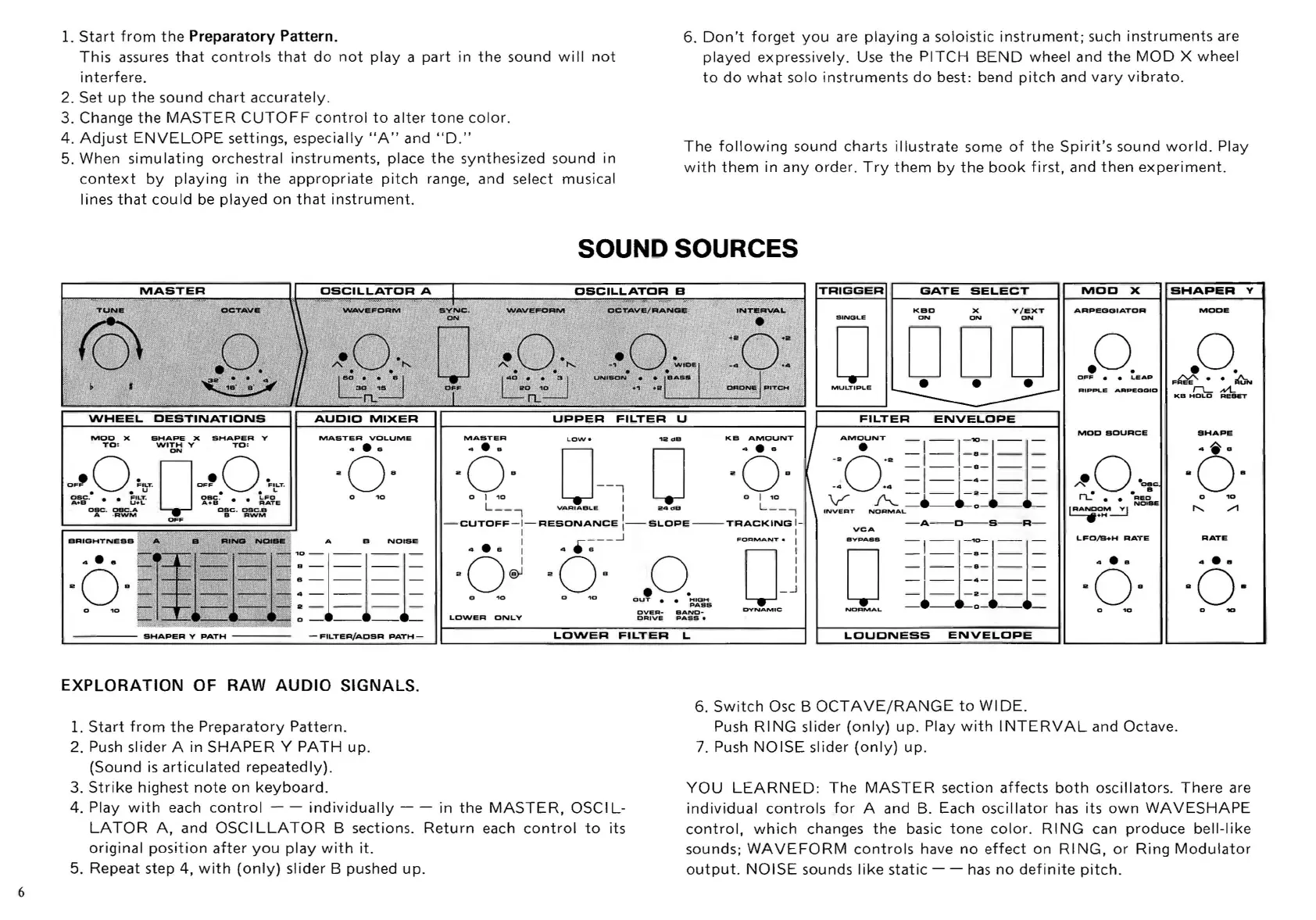
SOUND SOURCES
MOD
X
SHAPE
X
SHAPER
V
TO:
WITH
Y
TO:
ON
OF'
0
~'CT
.
0
OF'
0
"'CT
.
u
••
L
Dac
.
FILT.
asc
.
LFO
A+a
U+L
A+a
RATE
cae
.
oeC
.A -
CBC
.
OSC.a
A .
AW'M
a
AWM
OFF
BRIGHTNESS
A B
NOISE
a------
4------
a-
~
---
:=1=1=1=
_
......
__
.......
0 -
--
--
-
-
FtL.TER/ADSR
PATH-
EXPLORATION
OF RAW
AUDIO
SIGNALS.
1.
Start
from
the
Preparatory
Pattern.
2. Push slider A in
SHAPER
Y
PATH
up.
(Sound
is
articulated
repeatedly).
3.
Strike
highest
note
on
keyboard.
MASTER
KB
AMOUNT
-6·
0--'
1 0
aOs
0 1
10
o j .,o
L
__
-,
VARIABLE
I
24
d B L
__
,
TRIGGER
SINGLE
GATE
SELECT
r---------~
KBD
x
ON
V/EXT
ON
o D
DD
MULTIPLE
-A-
~
-O-S-R-
-CUTOFF
-1-
RESONANCE
:-
SL.OPE
--
TRACKING
1-
..
· a i 4
.~--~
FOoAMANT.
i
"O~~s
= I
=f-:=l=l=
aO~
aOs
0 j
=1_=:===
.
_1-
-2-
__
0.,0
OUT
;;:'::"°aMs
-e-
0-
__
OVEA
-
BAND-
DYNAMIC
NORMAL
LOWER
ONLY
DAIVE
"Asa.
6.
Switch
Osc B
OCTAVE/RANGE
to
WIDE.
MOO
X
SHAPER
Y
I-----------i
ARPEOGIATOR
. 0.
OFF
LIEAP
MOD
SOURCE
LFD/B+H
RATE
4
...
aOB
MODE
.0
.
F",·
~
rL
Nt.
KB
HOLD
Re..,.
SHAPE
-6-
o
RATE
Push
RING
slider
(only)
up.
Play
with
INTERVAL
and Octave.
7. Push
NOISE
slider
(only)
up
.
4. Play
with
each
control
- -
individually
- -
in
the
MASTER,
OSCI
L-
LATOR
A,
and OSCI
LLATOR
B sections.
Return
each
control
to
its
original
position
after
you
play
with
it.
YOU
LEARNED
:
The
MASTER
section
affects
both
oscillators.
There
are
individual
controls
for
A and B. Each
oscillator
has
its
own
WAVESHAPE
control,
which
changes
the
basic
tone
color
.
RING
can
produce
bell-like
sounds;
WAVEFORM
controls
have
no
effect
on RI
NG,
or
Ring
Modulator
output.
NOISE
sounds
like
static
- -
has
no
definite
pitch.
5. Repeat step 4,
with
(only)
slider B pushed
up.

Related product manuals