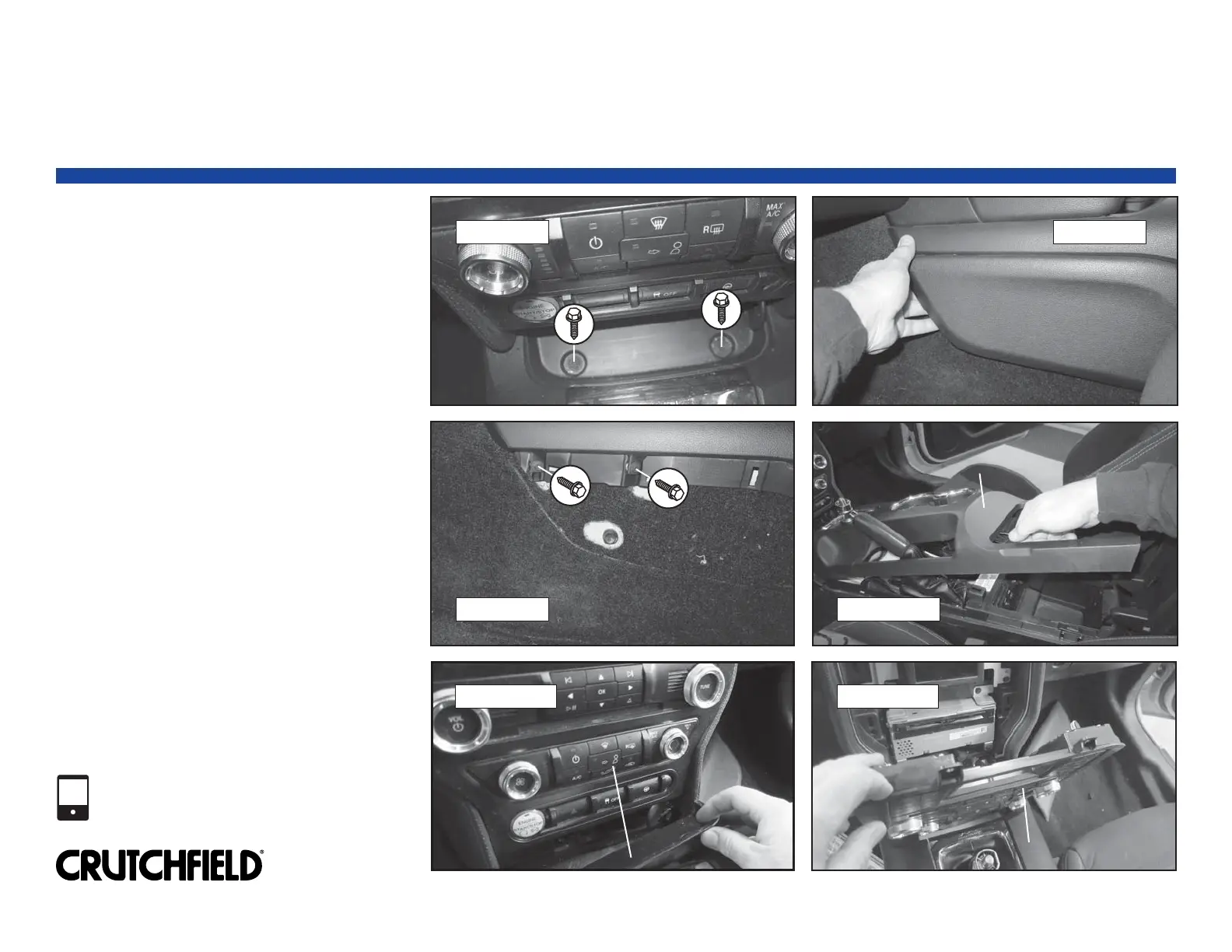
8. Remove two (2) 7mm screws exposed by
removal of rubber mat (Figure 7).
9. Pry off console lower side panel to
release six (6) clips. Remove two (2)
exposed 7mm screws (Figures 8 & 9).
10. Repeat step 9 for the other side of the
console.
11. Open center console storage compartment
lid. Pry up top of center console trim to
release clips and pull back enough to
access console pocket tray and receiver
climate control panel (Figure 10).
12. Remove console pocket tray (Figure 11).
13. Pry out receiver/climate control panel to
release four (4) clips. Disconnect wiring
harnesses and remove control panel
(Figure 12).
Continued on the next page.
019 0021
Factory Radio Removal (continued)
Copyright 2018 Crutchfield Corporation
1-800-955-9094
TECHNICAL SUPPORT
3
FIGURE 7 FIGURE 8
FIGURE 9
FIGURE 10
FIGURE 11 FIGURE 12
Console Lower Side Panel
Console Pocket Tray
Center Console Trim
Receiver/Climate Control Panel
Receiver/Climate Control Panel


 To Next Page