2
1. Before proceeding, eject disc(s) from factory
unit if present.
2. Set parking brake and disconnect negative
battery cable to prevent any electrical short.
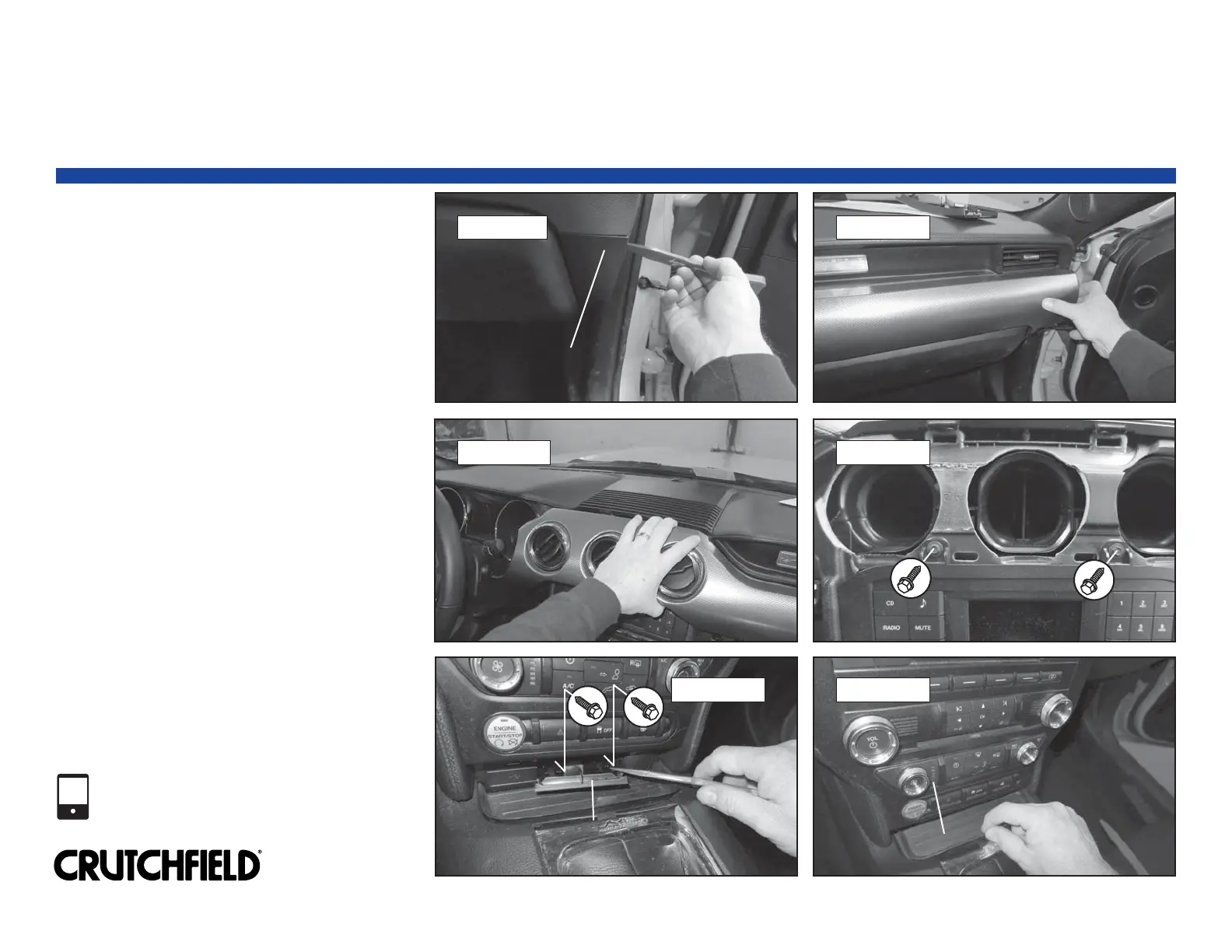
3. Pry off glove box right trimpanel to release
three (3) clips and remove trimpanel (Figure 1).
4. Pry out all edges of center vent panel to
release thirteen (13) clips and remove vent
panel (Figures 2 & 3).
5. Remove two (2) 7mm screws exposed by
removal of center vent panel (Figure 4).
6. Pry off lower receiver/climate trimpanel and
remove two (2) exposed 7mm screws
(Figure 5).
7. Remove rubber mat in forward console tray
(Figure 6).
Continued on the next page.
019 0021
Factory Radio Removal
Copyright 2018 Crutchfield Corporation
FIGURE 6
1-800-955-9094
TECHNICAL SUPPORT
FIGURE 1 FIGURE 2
FIGURE 3 FIGURE 4
FIGURE 5
Glove Box Right Trimpanel
Glove Box Right Trimpanel
Center Vent Panel
Lower Receiver/Climate Trimpanel
Lower Receiver/Climate Trimpanel
Rubber Mat



 To Next Page